Type text, add images, blackout confidential details, add comments, highlights and more.

02. Sign it in a few clicks
Draw your signature, type it, upload its image, or use your mobile device as a signature pad.

03. Share your form with others
Send brhc patient portal via email, link, or fax. You can also download it, export it or print it out.

How to use or fill out mybothwellhealth.brhc.org templates self-signup Create an account: Welcome To Your Patient Portal
Ease of Setup
DocHub User Ratings on G2
Ease of Use
DocHub User Ratings on G2
Click ‘Get Form’ to open it in the editor.
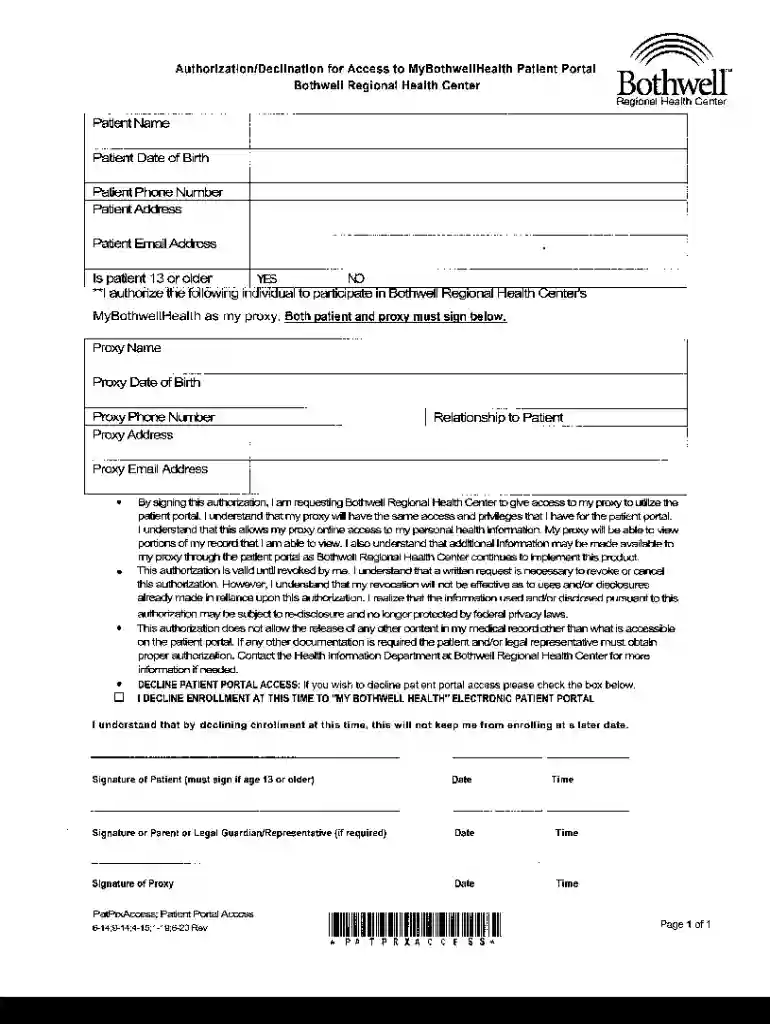
Begin by entering your personal information in the designated fields, including your name, date of birth, phone number, address, and email address.
Indicate whether you are 13 years or older by selecting 'YES' or 'NO'.
If you wish to authorize a proxy to access your patient portal, fill in their details such as name, date of birth, phone number, address, and email address.
Provide your relationship to the proxy in the specified field.
Review the authorization statement carefully before signing. Ensure that both you and your proxy sign and date the form where indicated.
If you choose to decline access to the patient portal, check the box provided for declining enrollment.
Start using our platform today for free and take control of your health information!
Fill out mybothwellhealth.brhc.orgtemplatesselfsignupCreate an account: Welcome To Your Patient Portal online It's free
See more mybothwellhealth.brhc.orgtemplatesselfsignupCreate an account: Welcome To Your Patient Portal versions
We've got more versions of the mybothwellhealth.brhc.orgtemplatesselfsignupCreate an account: Welcome To Your Patient Portal form. Select the right mybothwellhealth.brhc.orgtemplatesselfsignupCreate an account: Welcome To Your Patient Portal version from the list and start editing it straight away!
The staff will request your email address, and may have you complete a consent form. Within 30 minutes, you will receive an invitation with a link to enroll. Just click on the link and follow the instructions to complete your enrollment. Some facilities are providing onsite account creation during your stay.
How to register for the Tebra patient portal?
Activate Patient Portal After the practice invites the patient to the Patient Portal, the patient receives an email invitation to activate their account. In the email invitation, the patient clicks Get Started. The Patient Portal create account page opens. The patient creates a Password and enters their Date of Birth.
Can family members access my Bothwell portal?
Toggle between family members by clicking on your name in the upper right hand of the portal and selecting your family members account. To obtain access/set up portal accounts for your spouse, children, or other loved ones, complete the Proxy Request form that can be found on the link below.
How do I login to the NextGen patient portal?
The username and password method is the default login method. Enter your username. Enter your password. Select Log In.
brhc patient portal login
Bothwell pay my billBlue Ridge health patient portal loginGVMH patient portal loginWMMC patient portalMu patient portalFitzgibbon Patient PortalMedical West patient portalWestern Patient Portal
Security and compliance
At DocHub, your data security is our priority. We follow HIPAA, SOC2, GDPR, and other standards, so you can work on your documents with confidence.
Cookie consent notice
This site uses cookies to enhance site navigation and personalize your experience.
By using this site you agree to our use of cookies as described in our Privacy Notice.
You can modify your selections by visiting our Cookie and Advertising Notice.