Type text, add images, blackout confidential details, add comments, highlights and more.

02. Sign it in a few clicks
Draw your signature, type it, upload its image, or use your mobile device as a signature pad.

03. Share your form with others
Send form 106i via email, link, or fax. You can also download it, export it or print it out.

How to use or fill out form 106i i with our platform
Ease of Setup
DocHub User Ratings on G2
Ease of Use
DocHub User Ratings on G2
Click ‘Get Form’ to open it in the editor.
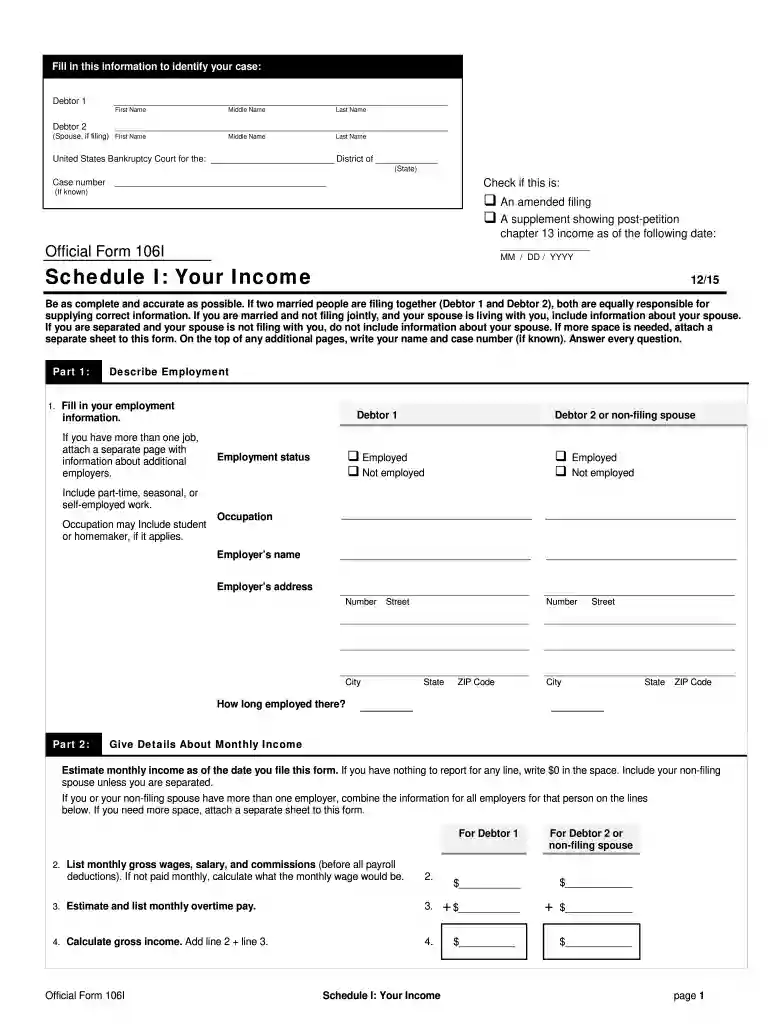
Begin by filling in your personal information under 'Debtor 1' and 'Debtor 2' sections. Ensure you include first, middle, and last names accurately.
Indicate the district of the United States Bankruptcy Court and your case number if known. Check the appropriate box if this is an amended filing or a supplement.
In Part 1, describe your employment status. Select whether you are employed or not, and provide details about your employer including name and address.
For monthly income, estimate your gross wages and any overtime pay. If applicable, combine information for multiple employers.
List all payroll deductions such as taxes, retirement contributions, and insurance. Calculate total deductions to find your take-home pay.
Finally, add any other regular income sources and calculate your total monthly income. Make sure to include contributions from others if applicable.
Start using our platform today for free to streamline your form completion process!
Not a regular taxpayer: Only taxpayers under the composition scheme are required to file GSTR-9A. Regular taxpayers, casual taxable persons, non-resident taxable persons, and those paying tax under the regular GST scheme are not eligible.
How to file form 9A of income tax Act?
How to file Form 9A? Form 9A shall be furnished electronically either under a digital signature or electronic verification code through the e-filing portal. What is the time limit to submit Form 9A? Form 9A shall be furnished on or before the due date for furnishing of return of income of the relevant assessment year.
What is the summary of your assets and liabilities and certain statistical information?
The Summary of Your Assets and Liabilities and Certain Statistical Information (Official Form 106Sum) gives a bottom line overview of your financial situation. It summarizes totals from your schedules, including the value of your property, total debts, income, and expenses.
How to file GSTR 9A?
Step-by-step guide to filing GSTR-9A Step 1: Login and navigate to GSTR-9A. Step 2: Answer the questionnaire. Step 3: Enter details in various tiles for the financial year. Step 4: Preview draft GSTR-9A. Step 5: Compute liabilities and late fees. Step 6: Preview draft GSTR-9A. Step 7: Proceed to file GSTR-9A.
What is the 9A form?
Who needs to file Form GSTR-9A? All taxpayers registered under the composition scheme under GST, for any period during the financial year, need to file Form GSTR-9A. This will include a taxpayer - who have opted for composition scheme since registration and have never opted out subsequently; and.
106i
Chapter 13 forms pdfOfficial Form 106IForm 106JChapter 11 vs Chapter 13Chapter 7 vs Chapter 133 types of bankruptciesHow to file Chapter 7 with no moneyOfficial Form 106E/F
Related links
Schedule I: Your Income
Estimate monthly income as of the date you file this form. If you have nothing to report for any line, write $0 in the space. Include your non-filing spouse
Federal Regulations require registrants to submit a detailed report of any theft or loss of Controlled Substances to the Drug. Enforcement Administration.
Cookie consent notice
This site uses cookies to enhance site navigation and personalize your experience.
By using this site you agree to our use of cookies as described in our Privacy Notice.
You can modify your selections by visiting our Cookie and Advertising Notice.