Ca address business 2026

Get Form
ca address business Preview on Page 1

Here's how it works

01. Edit your form online
Type text, add images, blackout confidential details, add comments, highlights and more.

02. Sign it in a few clicks
Draw your signature, type it, upload its image, or use your mobile device as a signature pad.

03. Share your form with others
Send it via email, link, or fax. You can also download it, export it or print it out.

How to use or fill out ca address business with our platform

Form edit decoration
9.5
Ease of Setup
DocHub User Ratings on G2
9.0
Ease of Use
DocHub User Ratings on G2
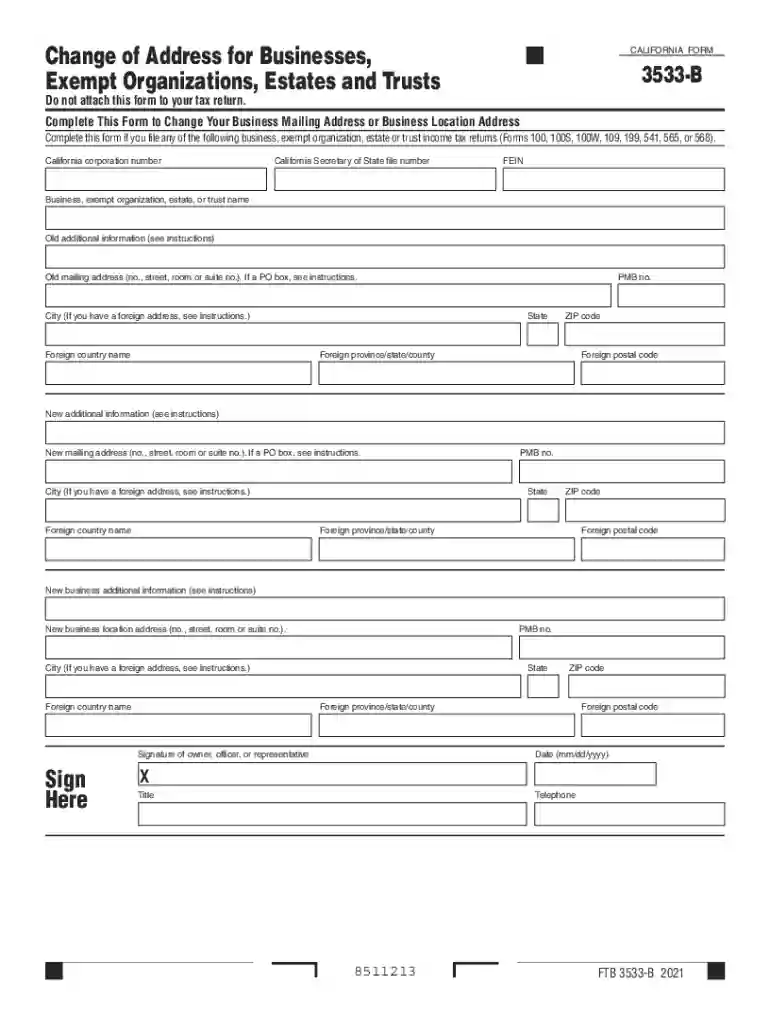
  1. Click ‘Get Form’ to open the Change of Address for Businesses form in the editor.
  2. Begin by entering your California corporation number and Secretary of State file number at the top of the form. This information is crucial for identifying your business.
  3. Next, provide your FEIN (Federal Employer Identification Number) along with the name of your business, exempt organization, estate, or trust.
  4. Fill in the old mailing address details, including street number, city, state, and ZIP code. If applicable, include any additional information such as PMB numbers.
  5. Now move on to the new mailing address section. Enter the new address details following the same format as before.
  6. Complete the new business location address if it differs from your mailing address. Ensure all fields are filled accurately.
  7. Finally, sign and date the form at the bottom. Include your title and telephone number for verification purposes.

Start using our platform today to streamline your document editing and make filling out forms easier than ever!

See more ca address business versions

We've got more versions of the ca address business form. Select the right ca address business version from the list and start editing it straight away!
Versions Form popularity Fillable & printable
2022 4.2 Satisfied (32 Votes)
2021 4.8 Satisfied (264 Votes)
2020 4.4 Satisfied (173 Votes)
2019 4.2 Satisfied (92 Votes)
2018 4.3 Satisfied (90 Votes)
2017 4.3 Satisfied (121 Votes)
2016 4.4 Satisfied (53 Votes)
be ready to get more

Complete this form in 5 minutes or less

Get form

Got questions?

We have answers to the most popular questions from our customers. If you can't find an answer to your question, please contact us.
Contact us

With DocHub, you can rapidly approve your ca address business or any other paperwork on iOS, even without installing extra programs. You can access your DocHub account from any web-connected browser and fill out and sign your form in any way you like with just a few clicks.

With DocHub, there are several convenient ways to edit your ca address business online. You can drag and drop the form and modify it straight at the DocHub site or use our browser extension to fill out your form immediately. Additionally, you can modify your PDF on your smartphone, as DocHub is compatible with all the available mobile platforms.

Yes, you can use a virtual address for your LLC in most states and take advantage of the various benefits it offers, such as registering a business entity and receiving mail and packages. Make certain that you check and follow your states regulations.
Yes, you can use a virtual address for your LLC in most states and take advantage of the various benefits it offers, such as registering a business entity and receiving mail and packages.
Types of Business Addresses You Can Use Using a Post Office (P.O.) Box for Your Business Address. Using a USPS Street Address for Your Business Address. Using a Virtual Office for Your Business Address. Using Coworking Space for Your Business Address. A USPS Street Address. A Virtual Office. Coworking Space.

Security and compliance

At DocHub, your data security is our priority. We follow HIPAA, SOC2, GDPR, and other standards, so you can work on your documents with confidence.

Learn more
ccpa2
pci-dss
gdpr-compliance
hipaa
soc-compliance

People also ask

Go to the a career business advisor in the area where you live. They would advise you the best address to use for business. Advisor will recommend a suitable and appropriate business address for your new business. You could hire a PO box in your local post office. It is not expensive, affordable.
Address. Provide the street address of the LLCs designated office in California. Registered agent. LLCs must list the name and address of a registered agent (agent for service of process) with a physical address (no post office boxes) in California.
Yes, you can use a virtual address to file LLC in California. The virtual address is an address that will enable you to establish a business without needing to rent or own physical office space or incur postal expenses associated with mailing address costs.

Related links