Sut 3 2026

Get Form
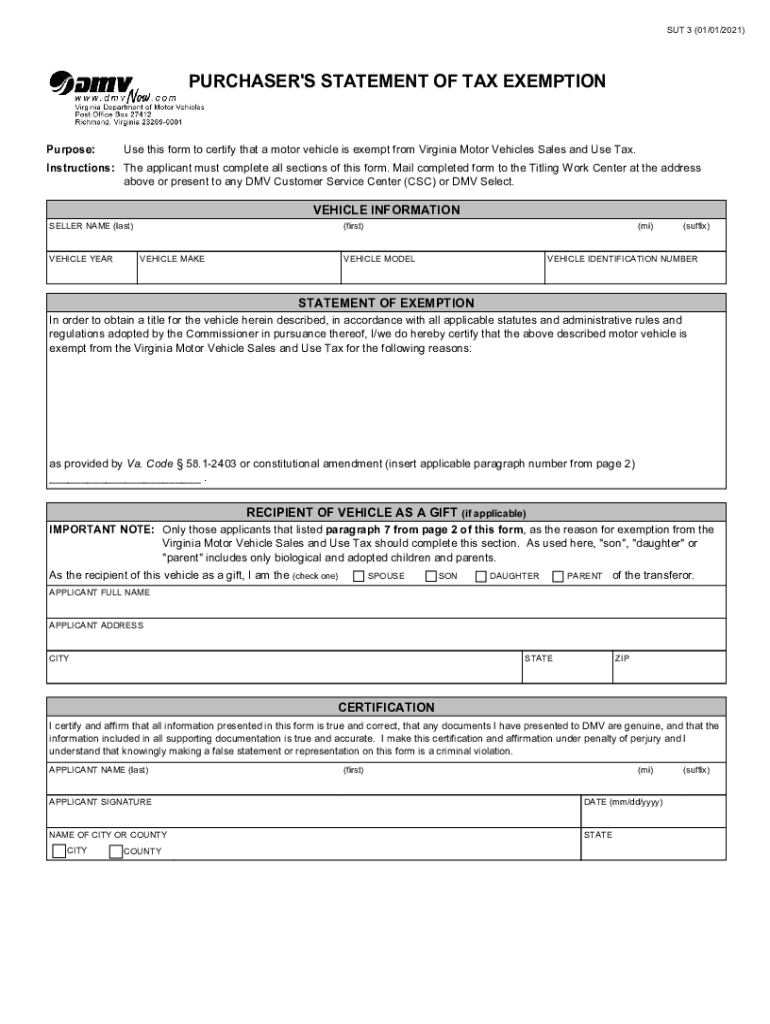
sut 3 Preview on Page 1

Here's how it works

01. Edit your sut 3 online
Type text, add images, blackout confidential details, add comments, highlights and more.
02. Sign it in a few clicks
Draw your signature, type it, upload its image, or use your mobile device as a signature pad.
03. Share your form with others
Send sut3 via email, link, or fax. You can also download it, export it or print it out.

How to use or fill out sut 3 with our platform

Form edit decoration
9.5
Ease of Setup
DocHub User Ratings on G2
9.0
Ease of Use
DocHub User Ratings on G2
  1. Click ‘Get Form’ to open the sut 3 document in the editor.
  2. Begin by filling out the 'Vehicle Information' section. Enter the seller's last name, vehicle year, make, model, and identification number accurately.
  3. In the 'Statement of Exemption' section, specify the reason for tax exemption by referencing the applicable paragraph from page 2 of the form.
  4. If applicable, complete the 'Recipient of Vehicle as a Gift' section by checking the appropriate relationship box (spouse, son, daughter, parent).
  5. Fill in your full name and address in the 'Applicant' section. Ensure all details are correct to avoid processing delays.
  6. Finally, sign and date the form in the 'Certification' area to affirm that all information is true and accurate.

Start using our platform today for free to streamline your document editing and signing process!

See more sut 3 versions

We've got more versions of the sut 3 form. Select the right sut 3 version from the list and start editing it straight away!
Versions Form popularity Fillable & printable
2021 4.8 Satisfied (181 Votes)
2019 4.4 Satisfied (161 Votes)
2015 4.4 Satisfied (57 Votes)
be ready to get more

Complete this form in 5 minutes or less

Get form

Got questions?

We have answers to the most popular questions from our customers. If you can't find an answer to your question, please contact us.
Contact us

Most eSignature solutions require users to have a paid subscription. With DocHub, there are two options for you to add an electronic signature to your sut 3 form free of charge:

  • You can do it during a 7-day trial period;
  • You can sign up for a free plan.

The second option, however, has restrictions on the number of signatures, sign requests, emails, and documents for editing available per month. You can check for full information here.

You may easily complete, modify, and even eSign your purchaser's statement of tax exemption utilizing DocHub. Create a new account and start your free trial. After that, you can upload the file with the form and simply make all the necessary edits. No need to print on paper or use a third-party application to sign it, as you can put your electronic signature on your document faster through DocHub.

The Most Common SUT Exemption If you are titling your vehicle in Virginia for the first time and you hold a valid title or registration in your name by another state or a branch of the United States Armed Forces, you will not have to pay the SUT.
Complete the Purchasers Statement of Tax Exemption (Form SUT 3) IF youre giving the vehicle to your spouse or child. Submit the required documents in person at your local VA DMV office. When you title the vehicle, youll also register it. Visit our Car Registration page for more information.
A completed Form ST3 is provided by colleges, universities, and the System Office to vendors to exempt most official expenditures from Minnesota sales tax. The exemption does not apply to purchases of meals, lodging, waste disposal services, and motor vehicles.

Security and compliance

At DocHub, your data security is our priority. We follow HIPAA, SOC2, GDPR, and other standards, so you can work on your documents with confidence.

Learn more
ccpa2
pci-dss
gdpr-compliance
hipaa
soc-compliance

People also ask

Organizations such as nonprofit professional and trade schools, scouts, youth groups, youth athletic and recreational pro- grams, etc., operated exclusively for educational purposes must apply for exempt status authorization from the department and use Form ST3 on qualifying purchases.

va sut 3 form