Type text, add images, blackout confidential details, add comments, highlights and more.
02. Sign it in a few clicks
Draw your signature, type it, upload its image, or use your mobile device as a signature pad.
03. Share your form with others
Send cap forms via email, link, or fax. You can also download it, export it or print it out.
How to use or fill out cap form with our platform
Ease of Setup
DocHub User Ratings on G2
Ease of Use
DocHub User Ratings on G2
Click ‘Get Form’ to open the cap form in the editor.
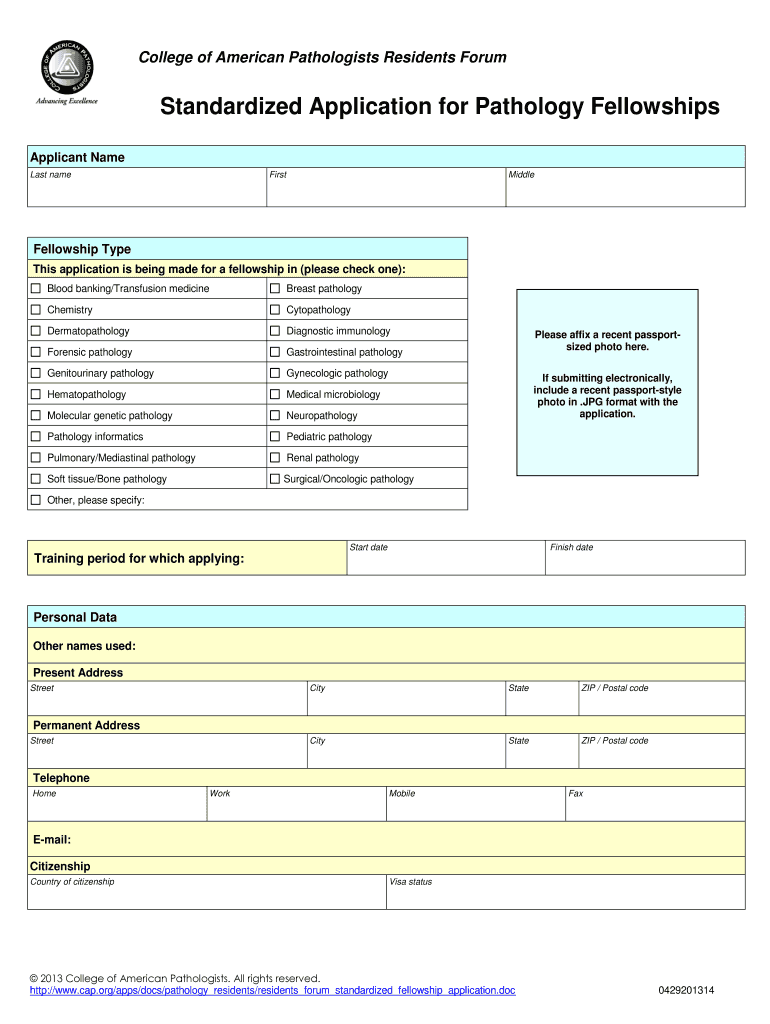
Begin by entering your personal information in the 'Applicant Name' section. Fill in your last name, first name, and middle name as required.
Select the type of fellowship you are applying for by checking one of the options listed under 'Fellowship Type'.
Upload a recent passport-sized photo by clicking on the designated area. If submitting electronically, ensure it is in .JPG format.
Complete the 'Personal Data' section with your current and permanent addresses, telephone numbers, email, citizenship details, and visa status.
Fill out the 'Education' section chronologically, providing details about your undergraduate and medical education along with any graduate studies.
List any other relevant experiences in the 'Other Experience' section and provide details about national board examinations under 'National Boards'.
Complete sections on medical licensure, board certification, honors/awards/publications, references, and finally sign the application if not submitted electronically.
Start filling out your cap form today for free using our platform!
Aug 18, 2025 The CAP application contains the following forms: Form 14234, CAP Application PDF Form 14234-A, CAP Research Credit Questionnaire (CRCQ) PDFRead more
Molina Healthcare of California Provider/Practitioner
The facility site review (FSR) is a comprehensive evaluation of the facility, administration and medical records to ensure conformance to the California
Cookie consent notice
This site uses cookies to enhance site navigation and personalize your experience.
By using this site you agree to our use of cookies as described in our Privacy Notice.
You can modify your selections by visiting our Cookie and Advertising Notice.