




Here's how it works



How to use or fill out Application/Petition for Resentencing and People's Response with our platform

- Click ‘Get Form’ to open the Application/Petition for Resentencing and People's Response in the editor.
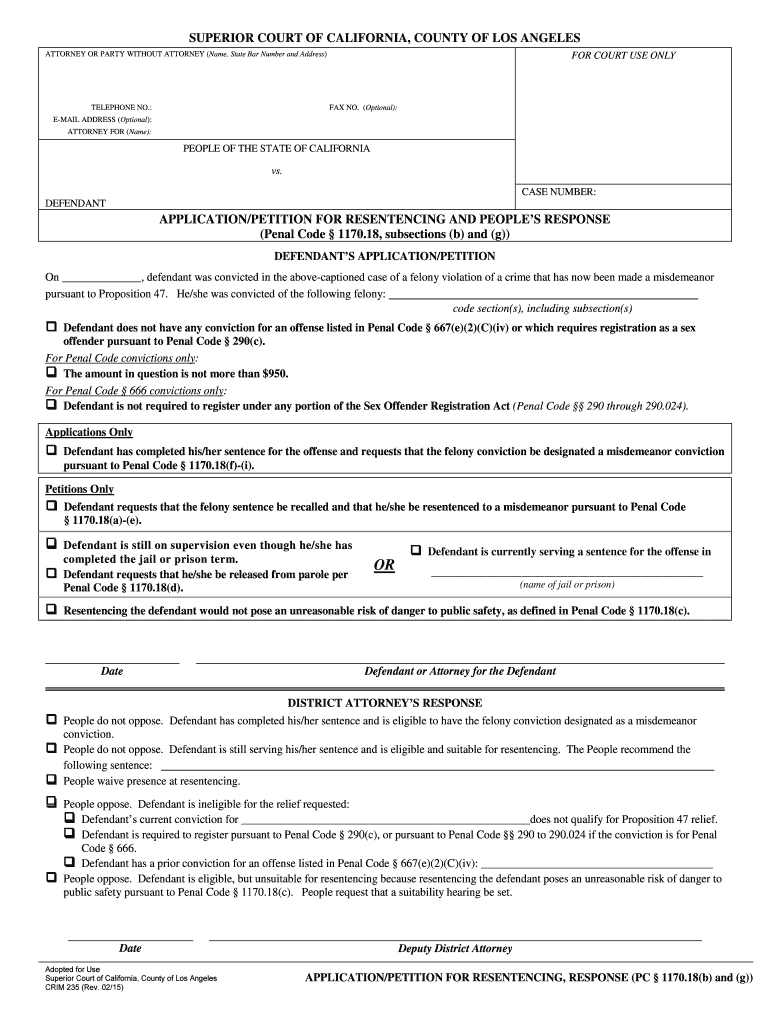
- Begin by filling in your personal information, including your name, contact details, and case number at the top of the form. Ensure accuracy as this information is crucial for processing.
- In the 'Defendant’s Application/Petition' section, specify the felony conviction you are seeking to have designated as a misdemeanor. Include relevant code sections and check any applicable boxes regarding prior convictions.
- If applicable, complete the 'Applications Only' or 'Petitions Only' sections based on your situation. Clearly indicate whether you have completed your sentence or are still under supervision.
- For the District Attorney’s Response section, ensure that all necessary options are checked according to your case specifics. This may include whether they oppose or support your petition.
- Review all entries for completeness and accuracy before saving or submitting your document through our platform.
Start using our platform today to easily fill out and manage your legal documents for free!
It's free
See more Application/Petition for Resentencing and People's Response versions
Got questions?
How can I eSign my petition for resentencing california in Word?
Microsoft Word doesn’t have signing tools to create legitimate electronic signatures and enforceable paperwork. Luckily, DocHub is an online eSignature-compliant editor that works with various document formats, such as .doc files. Sign in to your account and add the Word version of your petition for resentencing california from your device and cloud, or URL - our editor will automatically convert it into an editable PDF. Make all essential changes in your document and click Sign to create your own legally-binding electronic signature. You will find four signing options from which to choose.
How do you get petition sentence?
You can find the latest and most relevant version of the petition sentence in our DocHub forms library. Browse it by categories or use the search field to locate the exact template that fits your case. You can open this form for editing after you find it.
Security and compliance
At DocHub, your data security is our priority. We follow HIPAA, SOC2, GDPR, and other standards, so you can work on your documents with confidence.
Learn more


Related forms


