S:FORMSWork Folder800-899TC-804.cdr - tax utah 2026

Get Form
S:FORMSWork Folder800-899TC-804.cdr - tax utah Preview on Page 1

Here's how it works

01. Edit your form online
Type text, add images, blackout confidential details, add comments, highlights and more.
02. Sign it in a few clicks
Draw your signature, type it, upload its image, or use your mobile device as a signature pad.
03. Share your form with others
Send it via email, link, or fax. You can also download it, export it or print it out.

How to use or fill out S:FORMSWork Folder800-899TC-804.cdr - tax utah with our platform

Form edit decoration
9.5
Ease of Setup
DocHub User Ratings on G2
9.0
Ease of Use
DocHub User Ratings on G2
  1. Click ‘Get Form’ to open it in the editor.
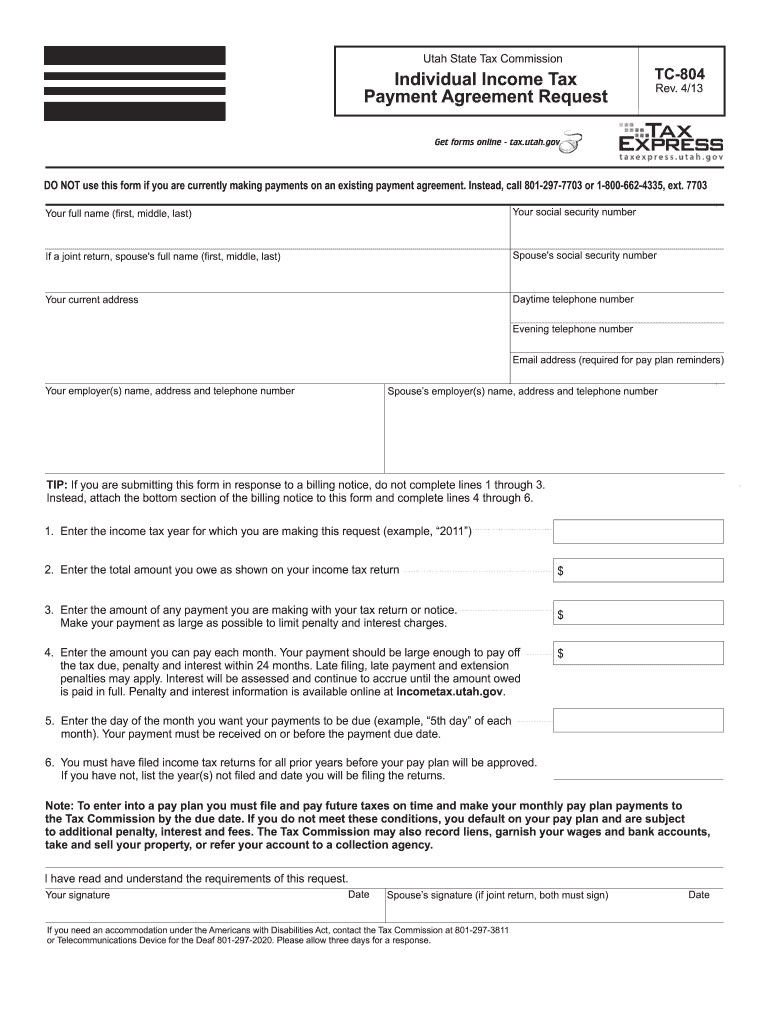
  2. Begin by entering your full name, including first, middle, and last names. If filing jointly, include your spouse's details as well.
  3. Input your social security number and your spouse's if applicable. Ensure accuracy to avoid processing delays.
  4. Fill in your current address and provide both daytime and evening telephone numbers for contact purposes.
  5. Enter your email address; this is crucial for receiving pay plan reminders.
  6. Complete the income tax year you are requesting a payment plan for, along with the total amount owed as indicated on your tax return.
  7. Specify any payment you are making with this request to minimize penalties and interest charges.
  8. Indicate the monthly payment amount you can afford, ensuring it is sufficient to settle the debt within 24 months.
  9. Choose a due date for your payments each month and ensure timely submission of all future tax returns.
  10. Sign the form along with your spouse if applicable, then submit it via mail or fax as instructed.

Start using our platform today to simplify filling out your tax forms online for free!

See more S:FORMSWork Folder800-899TC-804.cdr - tax utah versions

We've got more versions of the S:FORMSWork Folder800-899TC-804.cdr - tax utah form. Select the right S:FORMSWork Folder800-899TC-804.cdr - tax utah version from the list and start editing it straight away!
Versions Form popularity Fillable & printable
2019 4.9 Satisfied (50 Votes)
2013 4.2 Satisfied (68 Votes)
be ready to get more

Complete this form in 5 minutes or less

Get form

Got questions?

We have answers to the most popular questions from our customers. If you can't find an answer to your question, please contact us.
Contact us
Can I check my refund status online? Yes, visit Taxpayer Access Point (TAP), where you can check the status of your Individual Income Tax refund or your Circuit Breaker Renter refund.
Franchise Tax C corporation returns are filed on form TC-20. There is a minimum tax (privilege tax) of $100 on every corporation that files form TC- 20 regardless of whether the corporation exercises its right to do business.
How do I get a sales tax number? TAP tap.utah.gov. Choose Apply for tax account(s) TC-69 or go directly to the Tap Business Registration Page. You will receive your tax license information by email, after which you can go to Taxpayer Access Point tap.utah.gov and create a TAP login to file and pay your taxes online.
Seeking a Refund from the Seller If the seller is no longer in business or does not provide a credit or refund of the overpaid taxes, you may request a refund directly from the Tax Commission using form TC-62PR, Application for Refund of Utah Sales and Use Tax.

Security and compliance

At DocHub, your data security is our priority. We follow HIPAA, SOC2, GDPR, and other standards, so you can work on your documents with confidence.

Learn more
ccpa2
pci-dss
gdpr-compliance
hipaa
soc-compliance