Type text, add images, blackout confidential details, add comments, highlights and more.
02. Sign it in a few clicks
Draw your signature, type it, upload its image, or use your mobile device as a signature pad.
03. Share your form with others
Send ch 110 form via email, link, or fax. You can also download it, export it or print it out.
How to use or fill out ch 110 with our platform
Ease of Setup
DocHub User Ratings on G2
Ease of Use
DocHub User Ratings on G2
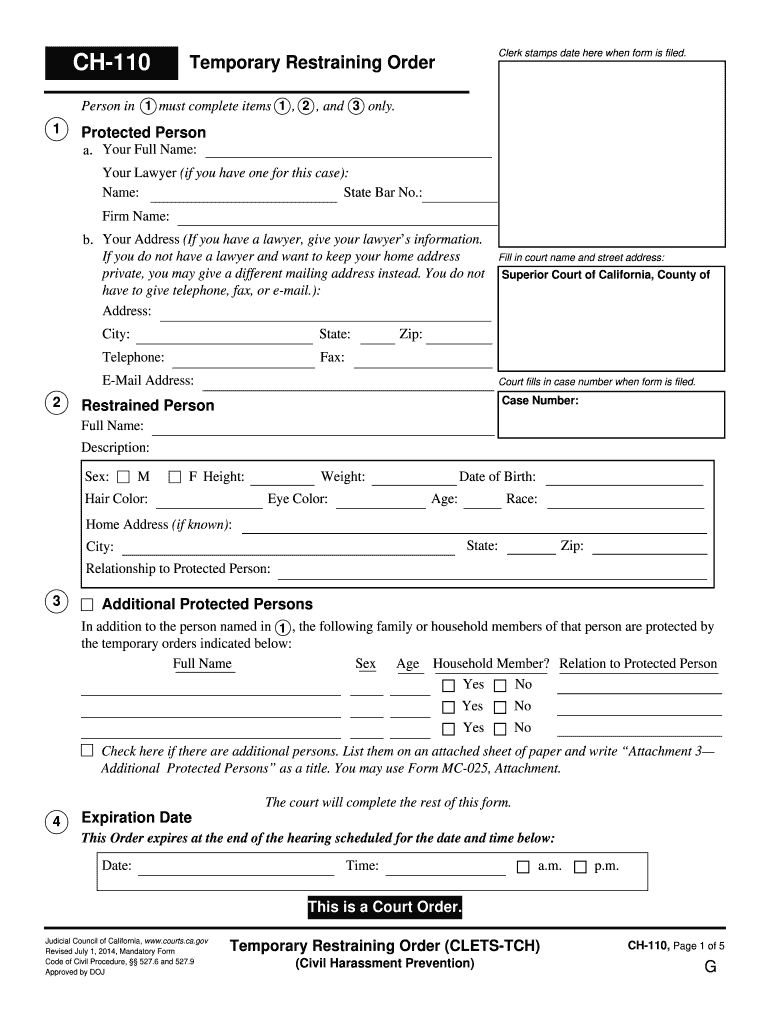
Click ‘Get Form’ to open the CH-110 in the editor.
Begin by filling out the 'Protected Person' section. Enter your full name, and if applicable, your lawyer's details including their name, state bar number, and firm name.
Provide your address. If you prefer to keep your home address private, you can enter a different mailing address instead. Telephone and email are optional.
In the 'Restrained Person' section, fill in the full name and description of the individual being restrained. Include their physical characteristics such as sex, height, weight, eye color, and date of birth.
If there are additional protected persons, list their names and relationships in section 3. If more space is needed, attach an additional sheet titled 'Attachment 3—Additional Protected Persons.'
Complete the expiration date for the order in section 4 by entering the date and time of the scheduled hearing.
Start using our platform today to easily complete your CH-110 form online for free!
18 U.S. Code Chapter 110 Part I - Cornell Law School
18 U.S. Code Chapter 110 Part I - SEXUAL EXPLOITATION AND OTHER ABUSE OF CHILDREN 2251. Sexual exploitation of children 2251A. Selling or buying ofRead more
You cannot own, possess, have, buy or try to buy, receive or try to receive, or in any other way get any prohibited items listed in 7 b on the next page. ThisRead more
Cookie consent notice
This site uses cookies to enhance site navigation and personalize your experience.
By using this site you agree to our use of cookies as described in our Privacy Notice.
You can modify your selections by visiting our Cookie and Advertising Notice.