Ma m payment dor online 2026

Get Form
comm of mass eft Preview on Page 1

Here's how it works

01. Edit your comm of mass eft online
Type text, add images, blackout confidential details, add comments, highlights and more.

02. Sign it in a few clicks
Draw your signature, type it, upload its image, or use your mobile device as a signature pad.

03. Share your form with others
Send comm of mass eft ma dor pay via email, link, or fax. You can also download it, export it or print it out.

How to use or fill out ma m payment dor online

Form edit decoration
9.5
Ease of Setup
DocHub User Ratings on G2
9.0
Ease of Use
DocHub User Ratings on G2
  1. Click ‘Get Form’ to open it in the editor.
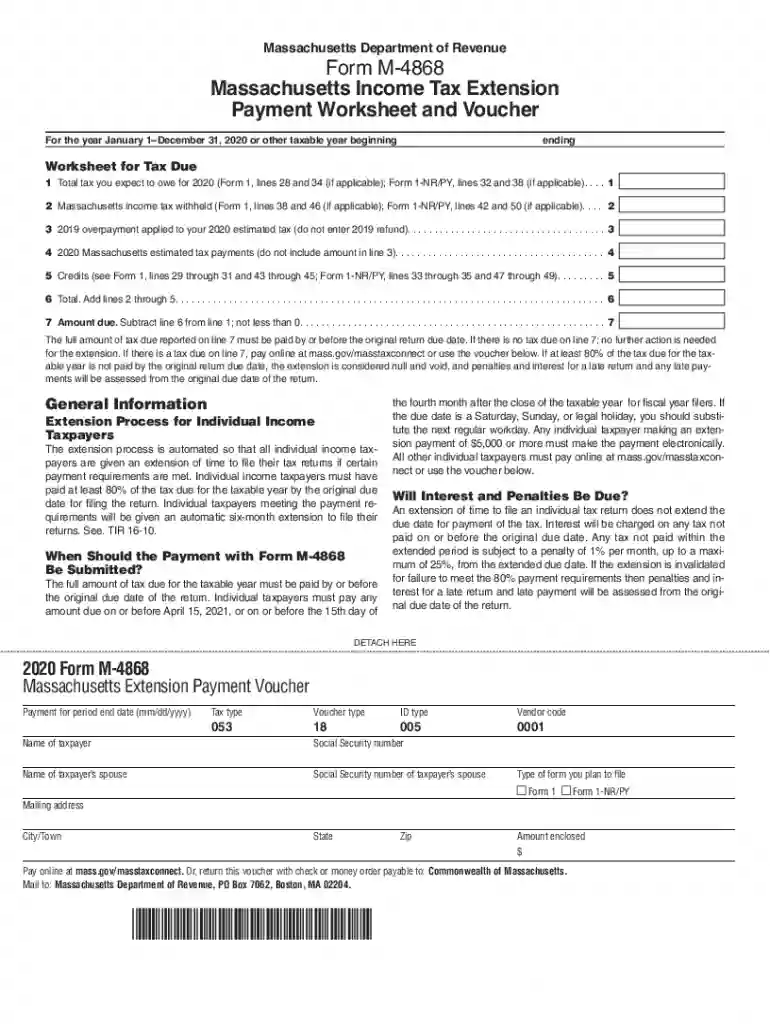
  2. Begin by entering the total tax you expect to owe for the year in line 1. This figure can be found on your previous tax forms.
  3. Next, input any Massachusetts income tax withheld in line 2, referencing the appropriate lines from your prior forms.
  4. For line 3, enter any overpayment from the previous year that you wish to apply towards your estimated tax.
  5. In line 4, record your estimated tax payments made for the current year, excluding any amounts already noted in line 3.
  6. Complete line 5 by listing any applicable credits as indicated on your previous forms.
  7. Finally, calculate the total amount due by subtracting line 6 from line 1 and enter this amount in line 7. Ensure this is paid by the original due date.

Start using our platform today to streamline your form completion process for free!

See more ma m payment dor online versions

We've got more versions of the ma m payment dor online form. Select the right ma m payment dor online version from the list and start editing it straight away!
Versions Form popularity Fillable & printable
2023 4.1 Satisfied (49 Votes)
2022 4.2 Satisfied (58 Votes)
2021 4.5 Satisfied (66 Votes)
2020 4.8 Satisfied (71 Votes)
2019 4.1 Satisfied (61 Votes)
2018 4.4 Satisfied (181 Votes)
be ready to get more

Complete this form in 5 minutes or less

Get form

Got questions?

We have answers to the most popular questions from our customers. If you can't find an answer to your question, please contact us.
Contact us
Yes, payments may be made using a debit or credit card online or at the Treasurer/Collectors office during regular hours. Convenience fees will be collected based on payment type and/or amount.
Pay Your Current Excise Tax Bill Online - Bills can be paid online, until they are turned over to the Deputy Collector for payment.
Go to the Bureau of Internal Revenues Electronic Filing and Payment System (eFPS) at ().
The Massachusetts Department of Revenue (DOR) administers a program to accept state tax payments through Electronic Funds Transfer (EFT). EFT reduces both the time and expense involved in generating and handling paper checks and allows for quicker and more accurate tax payments.
Description:Go to the MassTaxConnect site to submit your credit card payment. Under the Quick Links heading, click the Make a Payment link. On the next screen, click the Individual payment link. Next enter your name, select ID type (SSN or ITIN), enter your SSN or ITIN and confirm it, and your phone number.

Security and compliance

At DocHub, your data security is our priority. We follow HIPAA, SOC2, GDPR, and other standards, so you can work on your documents with confidence.

Learn more
ccpa2
pci-dss
gdpr-compliance
hipaa
soc-compliance

People also ask

Due Upon Receipt Due upon receipt (DOR) and immediate payment are virtually the same.
Pay with MassTaxConnect Go to MassTaxConnect. Under Quick Links, select Make a Payment. Under Select Payment Type: Enter your SSN or ITIN and Phone Number (in case we need to contact you about this payment) Choose the type of tax payment you want to make and select Next.

comm of mass eft ma dor