Type text, add images, blackout confidential details, add comments, highlights and more.
02. Sign it in a few clicks
Draw your signature, type it, upload its image, or use your mobile device as a signature pad.
03. Share your form with others
Send it via email, link, or fax. You can also download it, export it or print it out.
How to use or fill out me revocation with our platform
Ease of Setup
DocHub User Ratings on G2
Ease of Use
DocHub User Ratings on G2
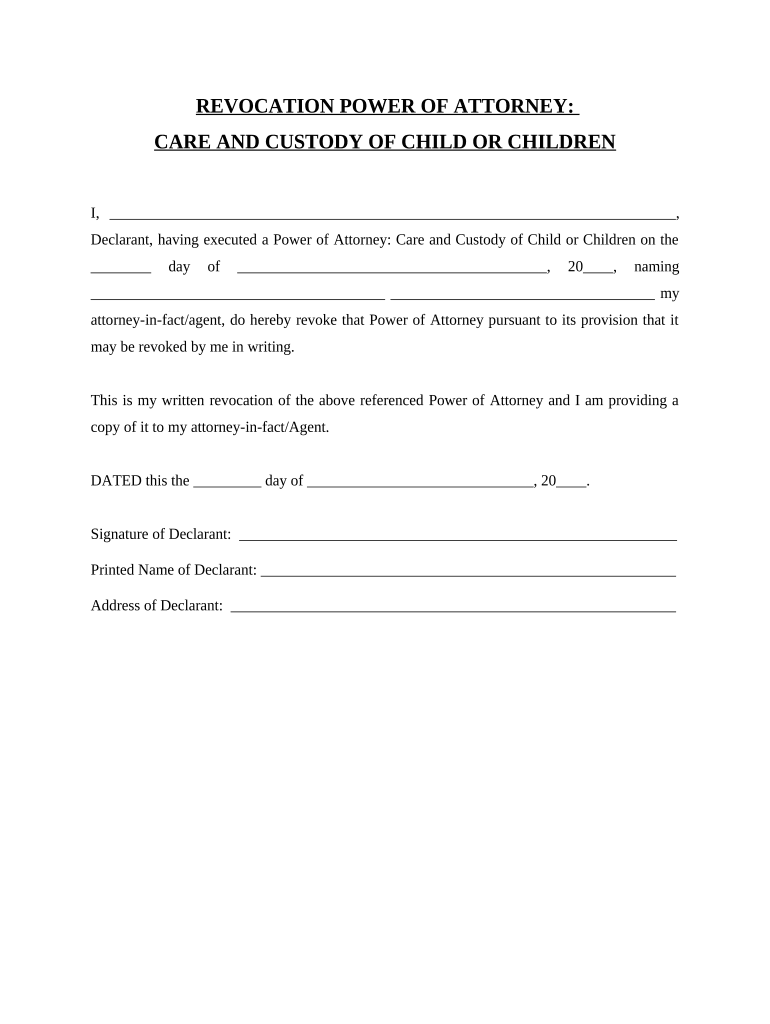
Click ‘Get Form’ to open the me revocation document in the editor.
Begin by filling in your name as the Declarant at the top of the form. This identifies you as the individual revoking the Power of Attorney.
Next, indicate the date on which you originally executed the Power of Attorney. This is crucial for clarity and legal purposes.
In the designated space, write down the name of your attorney-in-fact/agent whom you previously appointed. This ensures that there is no confusion regarding who is being revoked.
Complete the date section at the bottom of the form to finalize your revocation. Make sure this date reflects when you are signing this document.
Finally, sign and print your name in the provided fields to authenticate your revocation. Include your address for additional identification.
Start using our platform today to easily complete and manage your documents for free!
In legal terms, a revocation refers to revoking, or taking back, something of substance, like a contract or a privilege. It can apply to both criminal and civil matters.
What are the three types of revocation?
Types of Revocation Revocation by operation of law. Mutual cancellation by both parties. Revoking an offer before it is accepted. Revoking an acceptance before consideration takes place.
Related Searches
Probate CodeMaine revocation OF transfer on death deed
Security and compliance
At DocHub, your data security is our priority. We follow HIPAA, SOC2, GDPR, and other standards, so you can work on your documents with confidence.
Deploying Identity and Mobility Services within a Converged
Revocation Lists (CRL), which are CA-signed lists of all revoked certificates up to date. Relying parties should download the most recent CRL on a regular basis
by J Schuman 2021 Cited by 29 This is the first Article to study theories of punishment in revocation of community supervision, focusing on the federal system of supervised release. Federal
Cookie consent notice
This site uses cookies to enhance site navigation and personalize your experience.
By using this site you agree to our use of cookies as described in our Privacy Notice.
You can modify your selections by visiting our Cookie and Advertising Notice.