Pretrial intervention 2026

Get Form
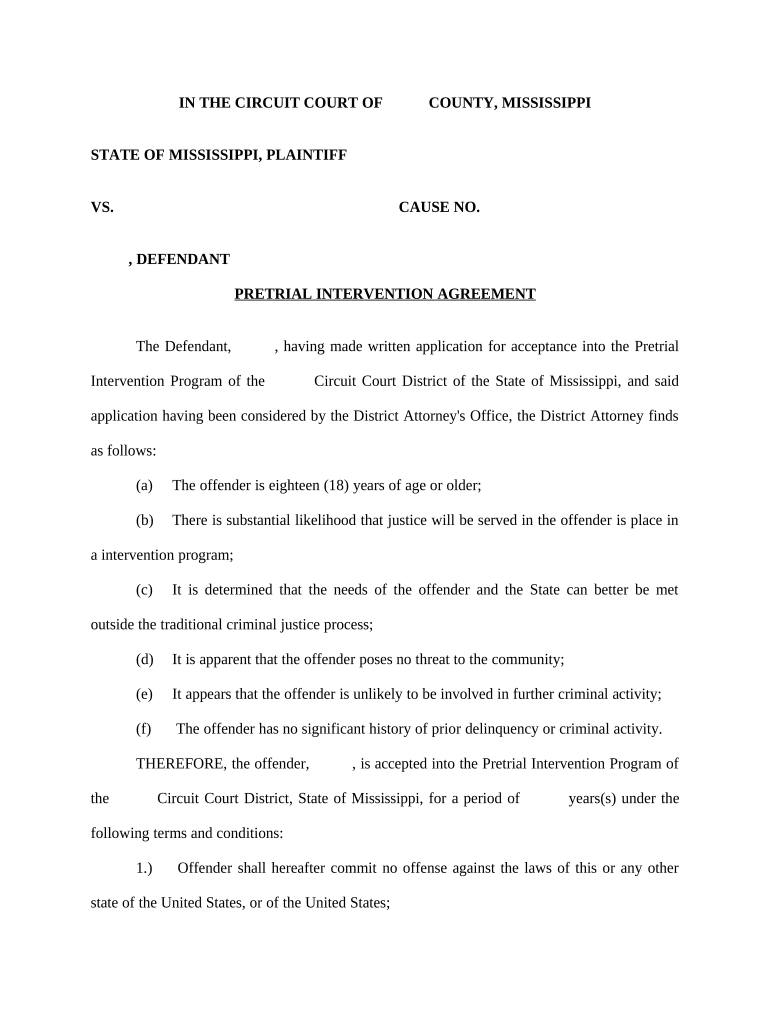
pretrial intervention Preview on Page 1

Here's how it works

01. Edit your form online
Type text, add images, blackout confidential details, add comments, highlights and more.
02. Sign it in a few clicks
Draw your signature, type it, upload its image, or use your mobile device as a signature pad.
03. Share your form with others
Send it via email, link, or fax. You can also download it, export it or print it out.

How to use or fill out pretrial intervention with our platform

Form edit decoration
9.5
Ease of Setup
DocHub User Ratings on G2
9.0
Ease of Use
DocHub User Ratings on G2
  1. Click ‘Get Form’ to open the pretrial intervention agreement in the editor.
  2. Begin by entering the defendant's name and the cause number at the top of the form. Ensure accuracy as this information is crucial for identification.
  3. In section (a), confirm that the offender is eighteen years of age or older by checking the appropriate box or writing 'Yes'.
  4. Proceed to sections (b) through (f) where you will need to affirmatively state conditions regarding justice, community safety, and prior criminal history. Use checkboxes or text fields as required.
  5. Fill in the terms and conditions outlined in numbered items 1 through 19. Be sure to provide specific details such as payment amounts and community service hours where indicated.
  6. Finally, ensure all parties sign at the bottom of the document, including the offender, attorney, district attorney, and circuit court judge.

Start using our platform today for free to streamline your pretrial intervention process!

be ready to get more

Complete this form in 5 minutes or less

Get form

Got questions?

We have answers to the most popular questions from our customers. If you can't find an answer to your question, please contact us.
Contact us

With DocHub, you can easily sign your pretrial intervention or any other paperwork on iOS, even without setting up additional programs. You can access your DocHub account from any internet-connected browser and fill out and sign your document in any preferred method with just a few clicks.

You can complete and sign your pretrial intervention on the internet, even on a tight deadline. All you need to access top-notch editing instruments on any device is a DocHub profile, that you can sign up in a couple of moments. When you register, upload your file or find what you are searching for in our catalog, complete it using the editing instruments you want, and place your electronic signature on it at the end.

For eligible defendants, PTI is generally a better option than Probation, as it avoids criminal conviction and allows for an eventual expungement of the arrest record.
Pretrial diversion programs allow you to avoid jail and a conviction as long as you complete all the required conditions. These terms typically include rehabilitation treatment and/or education classes. Finishing diversion causes your case to get completely dismissed.
PTI focuses on reducing the number of non-violent defendants in the states criminal justice systemspecifically those whose criminal activity may be caused by an underlying condition such as a mental illness or a substance abuse problemand facilitating access to necessary services.

Security and compliance

At DocHub, your data security is our priority. We follow HIPAA, SOC2, GDPR, and other standards, so you can work on your documents with confidence.

Learn more
ccpa2
pci-dss
gdpr-compliance
hipaa
soc-compliance

People also ask

The program renders early rehabilitative services and aims to deter future criminal behavior. Many states have similar programs employed under a variety of names.

Related links