Type text, add images, blackout confidential details, add comments, highlights and more.
02. Sign it in a few clicks
Draw your signature, type it, upload its image, or use your mobile device as a signature pad.
03. Share your form with others
Send it via email, link, or fax. You can also download it, export it or print it out.
How to use or fill out ms summons with our platform
Ease of Setup
DocHub User Ratings on G2
Ease of Use
DocHub User Ratings on G2
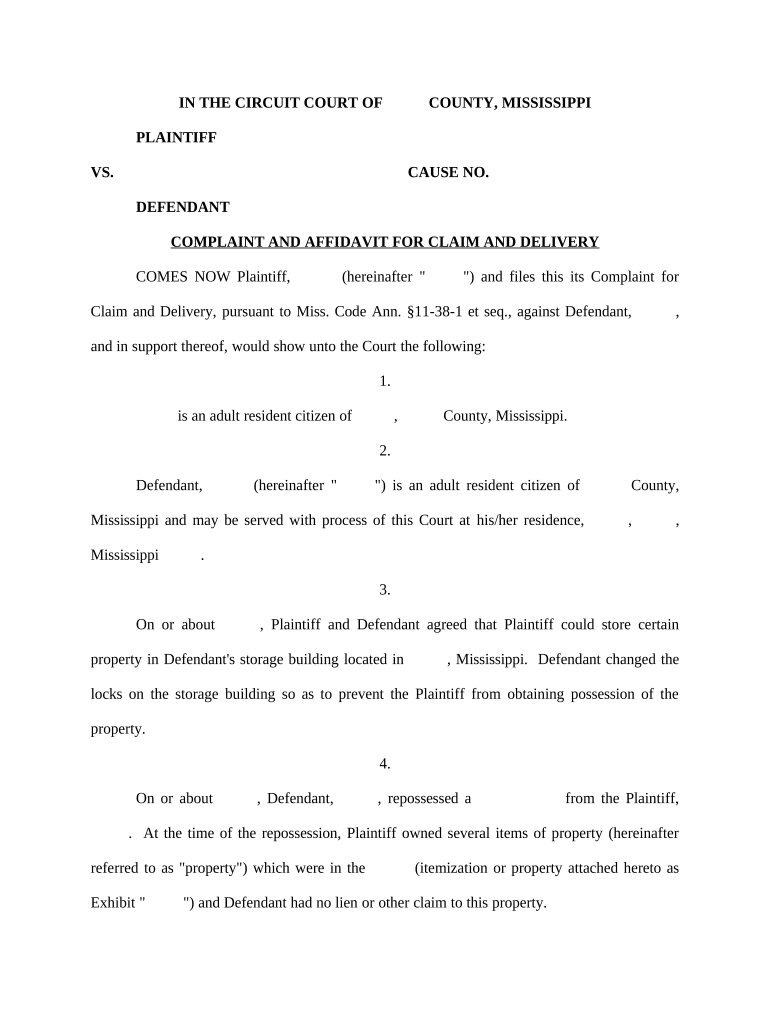
Click ‘Get Form’ to open the ms summons in the editor.
Begin by filling in the 'Plaintiff' and 'Defendant' sections with the appropriate names. Ensure accuracy as this information is crucial for court proceedings.
In the 'Cause No.' field, enter the case number assigned to your complaint. This helps in tracking your case within the court system.
Complete the 'Complaint and Affidavit' section by detailing your claims against the defendant. Be specific about dates, agreements, and property involved.
Fill out the 'Summons' section, including the date and time you require the defendant to appear in court. This ensures they are properly notified.
Review all fields for completeness and accuracy before saving or printing your document. Our platform allows you to make edits easily.
Start using our platform today for free to streamline your ms summons process!
Rule 4 summons mississippiJackson County, ms Court Docket searchMississippi rule 81 summons formMS Rules of Civil ProcedureMs Supreme Court DocketMS case SearchJefferson County MS Court DocketSimpson county ms court docket
Security and compliance
At DocHub, your data security is our priority. We follow HIPAA, SOC2, GDPR, and other standards, so you can work on your documents with confidence.
Rule 4 - Summons (a) Summons: Issuance. Upon filing of the complaint, the clerk shall forthwith issue a summons. (c) Service: (1) By Process Server. (d)Read more
Your response must be mailed or delivered within thirty (30) days from the date of delivery of this Summons and Complaint or a judgment by default will beRead more
Cookie consent notice
This site uses cookies to enhance site navigation and personalize your experience.
By using this site you agree to our use of cookies as described in our Privacy Notice.
You can modify your selections by visiting our Cookie and Advertising Notice.