Type text, add images, blackout confidential details, add comments, highlights and more.
02. Sign it in a few clicks
Draw your signature, type it, upload its image, or use your mobile device as a signature pad.
03. Share your form with others
Send it via email, link, or fax. You can also download it, export it or print it out.
How to use or fill out scheduling order ms with our platform
Ease of Setup
DocHub User Ratings on G2
Ease of Use
DocHub User Ratings on G2
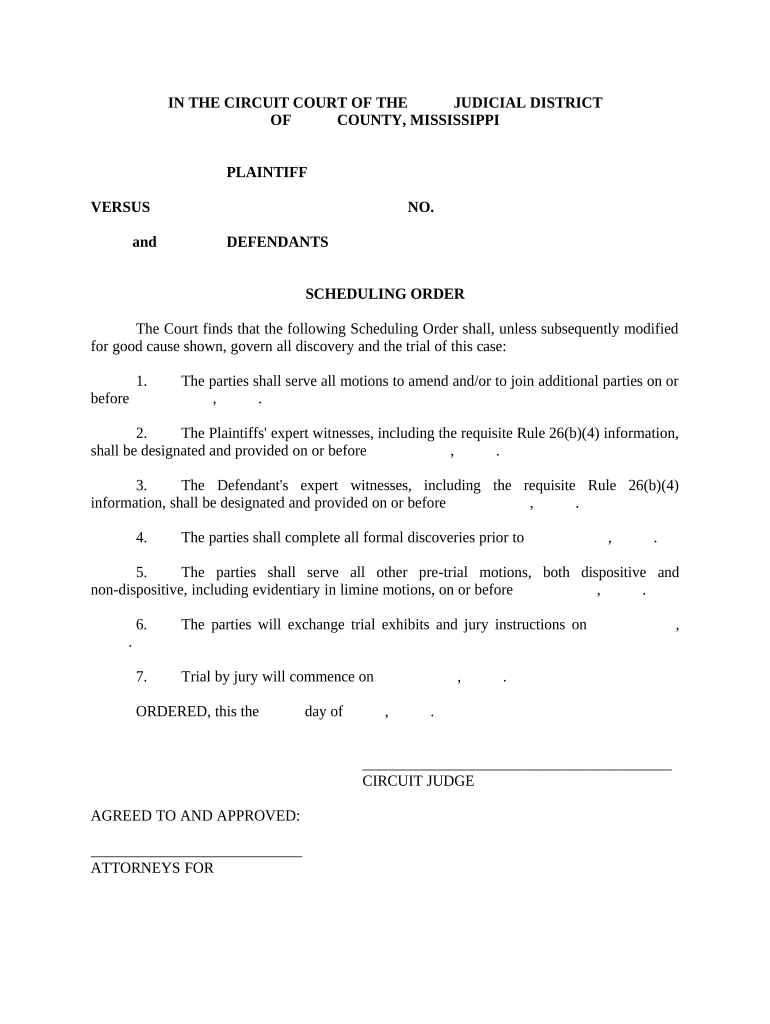
Click ‘Get Form’ to open the scheduling order ms in the editor.
Begin by entering the names of the parties involved in the case at the top of the form, ensuring accuracy for legal purposes.
Fill in the case number in the designated field to keep track of your document within court records.
For each deadline listed, input specific dates for motions, expert witness designations, and discovery completion. Use our platform's calendar feature for easy date selection.
Review sections regarding trial exhibits and jury instructions, ensuring all necessary information is included before finalizing your entries.
Once completed, save your document and utilize our platform’s signing feature if required. You can also share it directly with other parties involved.
Start using our platform today to streamline your scheduling order ms process for free!
Mississippi Rules of Civil ProcedureMississippi Rules of Civil Procedure formsRule 81 summons MississippiRule 4 Summons Mississippi FormMississippi Rules of Civil Procedure service of processRule 4 Mississippi Rules of Civil ProcedureHow long does a judge have to rule on a motion in MississippiMotion to dismiss Mississippi
Security and compliance
At DocHub, your data security is our priority. We follow HIPAA, SOC2, GDPR, and other standards, so you can work on your documents with confidence.
It may be useful for any scheduling order to specify the time or times when supplementations should be made. The obligation to supplement responses toRead more
A scheduling algorithm is the algorithm which dictates how much CPU time is allocated to Processes and Threads. It implements just one queue which holds the
The proposed order shall provide that motions to add parties or to amend the pleadings must be served no more than 30 days after the date of the schedulingRead more
Cookie consent notice
This site uses cookies to enhance site navigation and personalize your experience.
By using this site you agree to our use of cookies as described in our Privacy Notice.
You can modify your selections by visiting our Cookie and Advertising Notice.