Lease Subordination Agreement - New York 2026

Get Form
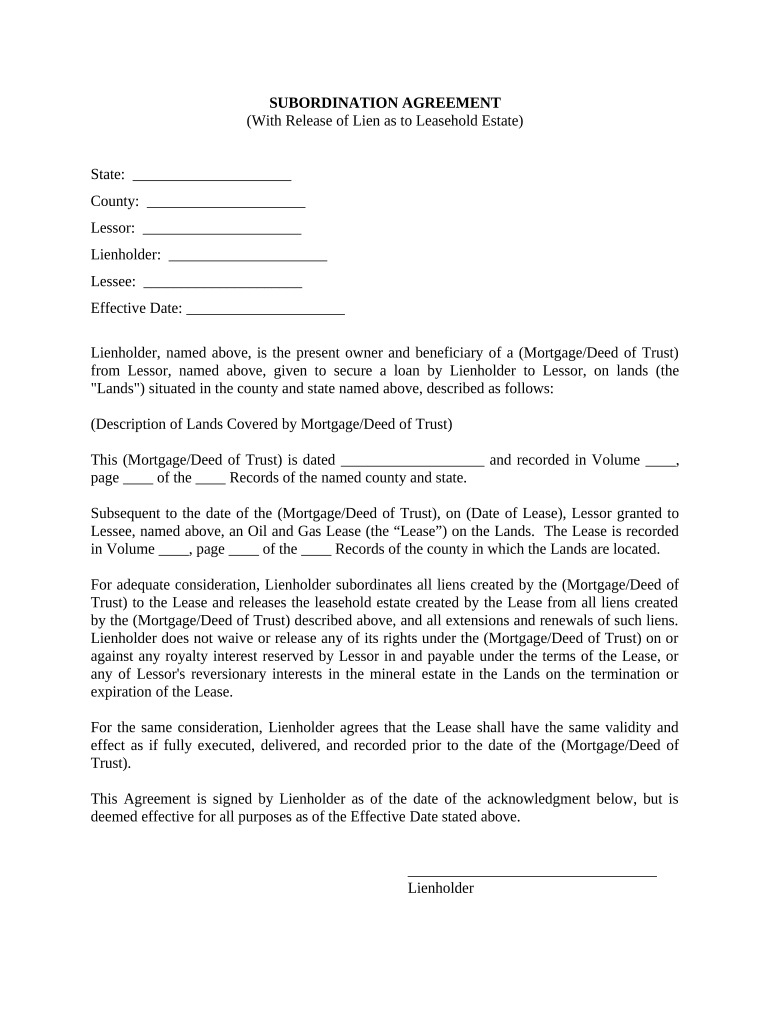
lease subordination agreement form Preview on Page 1

Here's how it works

01. Edit your lease subordination agreement form online
Type text, add images, blackout confidential details, add comments, highlights and more.
02. Sign it in a few clicks
Draw your signature, type it, upload its image, or use your mobile device as a signature pad.
03. Share your form with others
Send it via email, link, or fax. You can also download it, export it or print it out.

How to use or fill out Lease Subordination Agreement - New York with our platform

Form edit decoration
9.5
Ease of Setup
DocHub User Ratings on G2
9.0
Ease of Use
DocHub User Ratings on G2
  1. Click ‘Get Form’ to open the Lease Subordination Agreement in the editor.
  2. Begin by filling in the 'State' and 'County' fields at the top of the form. This information is crucial for identifying the jurisdiction of your agreement.
  3. Next, enter the names of the Lessor, Lienholder, and Lessee in their respective fields. Ensure that these names match those on any related documents to avoid discrepancies.
  4. Input the 'Effective Date' of the agreement. This date signifies when the terms of this subordination take effect.
  5. In the section describing the lands covered by the mortgage or deed of trust, provide a detailed description as required. This ensures clarity regarding which properties are involved.
  6. Fill in details about the mortgage or deed of trust, including its date and recording information. This establishes a clear record of prior claims.
  7. Finally, review all entries for accuracy before signing. Once satisfied, you can easily sign and distribute your completed document directly from our platform.

Start using our platform today to streamline your Lease Subordination Agreement process for free!

be ready to get more

Complete this form in 5 minutes or less

Get form

Got questions?

We have answers to the most popular questions from our customers. If you can't find an answer to your question, please contact us.
Contact us

Yes, you can use DocHub for signing any business and private paperwork, including your Lease Subordination Agreement - New York. All electronic signatures you generate with our service are legally binding and court-admissible, as DocHub complies with standards required by ESIGN and UETA. Save your completed document with a detailed Audit Trail if necessary.

If you store your paperwork in Google Drive, there is no need to download your Lease Subordination Agreement - New York on the computer and upload it back to our editor. A much easier way is to install a browser extension developed by DocHub to streamline this flow. The extension allows editing PDFs in your internet browser. Alternatively, you may integrate your DocHub and Gmail accounts for more efficient editing.

Subordination to Lender Interests: In some cases, landlords may agree to subordinate or waive their lien in favor of a tenants lender. This agreement, typically made in writing through a landlord consent agreement, allows the lender to have priority in claiming the tenants property.
A New York standard residential lease agreement is a form that allows a landlord and tenant to enter into a legally binding arrangement for leasing residential space. The term standard means a fixed term that usually lasts one year.

Security and compliance

At DocHub, your data security is our priority. We follow HIPAA, SOC2, GDPR, and other standards, so you can work on your documents with confidence.

Learn more
ccpa2
pci-dss
gdpr-compliance
hipaa
soc-compliance