Type text, add images, blackout confidential details, add comments, highlights and more.
02. Sign it in a few clicks
Draw your signature, type it, upload its image, or use your mobile device as a signature pad.
03. Share your form with others
Send it via email, link, or fax. You can also download it, export it or print it out.
How to use or fill out NY LLC Company with Our Platform
Ease of Setup
DocHub User Ratings on G2
Ease of Use
DocHub User Ratings on G2
Click ‘Get Form’ to open the NY LLC Company document in the editor.
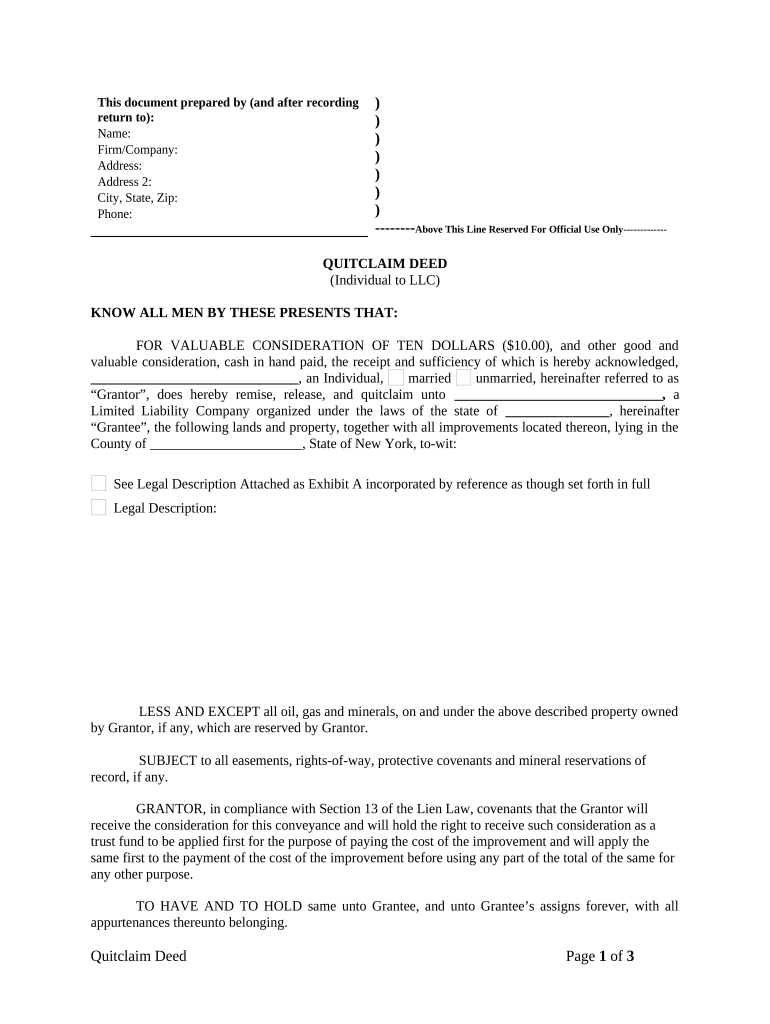
Begin by filling in the 'Prepared by' section. Enter your name, firm/company name, address, city, state, and zip code. This information identifies who is completing the form.
In the 'Grantor' section, specify the individual’s name and marital status (married/unmarried). This identifies who is transferring property rights.
Next, complete the 'Grantee' section with the name of your LLC and its state of organization. This indicates who will receive the property.
Fill in the legal description of the property being transferred. If you have an attachment (Exhibit A), ensure it is referenced correctly.
Sign and date where indicated for both Grantor and Grantee. Ensure that all signatures are properly acknowledged as per New York law.
Start using our platform today to streamline your NY LLC documentation process for free!
How to start an LLC in NY for freeNYS LLC filing onlineHow to form an LLC in NYArticles of Organization NYArticles of Organization LLC NYDOS NY gov LLCArticles of organization NY exampleLlc operating agreement ny
Security and compliance
At DocHub, your data security is our priority. We follow HIPAA, SOC2, GDPR, and other standards, so you can work on your documents with confidence.
The fee for filing the Articles of Organization is $200. The fee may be paid by cash, check, money order, MasterCard, Visa or American Express. Checks and moneyRead more
New Limited Liability Company Legislation in New York
by A Appel 1994 On July 26, 1994, Governor Cuomo signed legislation which will permit limited liability companies to be formed in New York State.Read more
Cookie consent notice
This site uses cookies to enhance site navigation and personalize your experience.
By using this site you agree to our use of cookies as described in our Privacy Notice.
You can modify your selections by visiting our Cookie and Advertising Notice.