Ssa child application 2026

Get Form
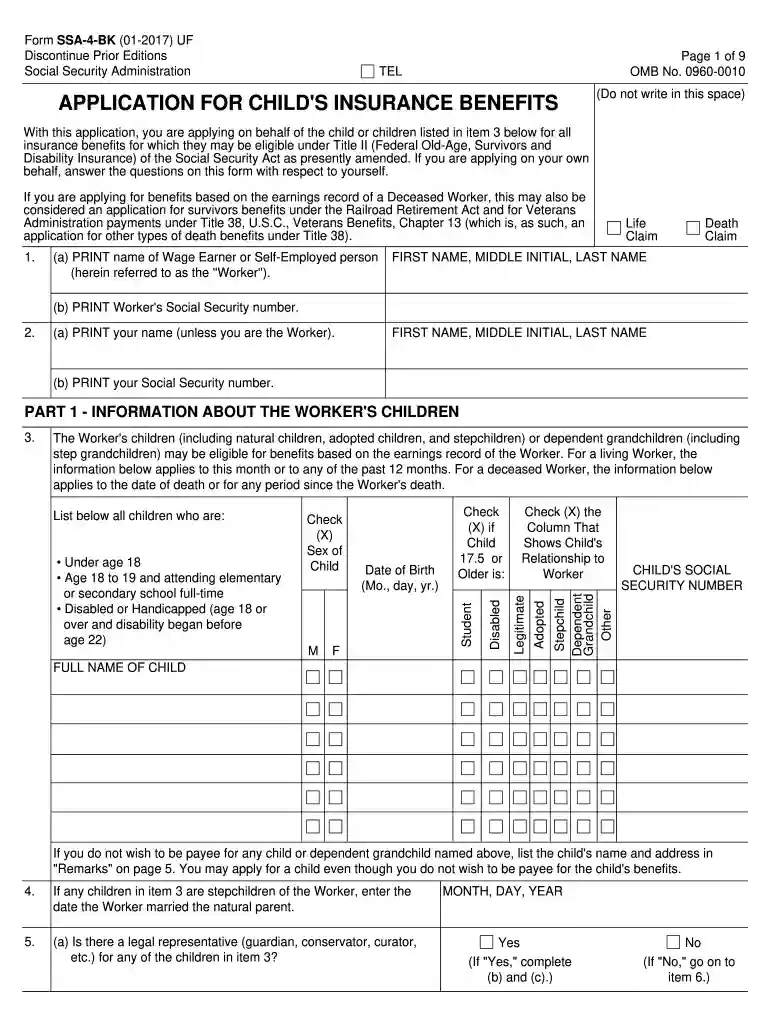
social security form ssa 4 Preview on Page 1

Here's how it works

01. Edit your social security form ssa 4 online
Type text, add images, blackout confidential details, add comments, highlights and more.

02. Sign it in a few clicks
Draw your signature, type it, upload its image, or use your mobile device as a signature pad.

03. Share your form with others
Send form ssa 4 via email, link, or fax. You can also download it, export it or print it out.

How to use or fill out SSA Child Application with DocHub

Form edit decoration
9.5
Ease of Setup
DocHub User Ratings on G2
9.0
Ease of Use
DocHub User Ratings on G2
  1. Click ‘Get Form’ to open the SSA Child Application in our editor.
  2. Begin by entering the name of the Wage Earner or Self-Employed person in the designated field. Ensure you also input their Social Security number accurately.
  3. In Part 1, provide information about the Worker’s children. Fill in each child's details, including their Social Security number, date of birth, and relationship to the Worker. Use checkboxes to indicate if they are legitimate, adopted, or disabled.
  4. Continue through the form by answering questions regarding legal representatives and living arrangements for each child. Be thorough in providing any necessary explanations in the remarks section.
  5. If applicable, complete Part II regarding information about a deceased Worker. Input dates of birth and death, as well as any relevant military service details.
  6. Finally, review all entered information for accuracy before signing and submitting your application. Utilize our platform's features to save your progress and ensure a smooth submission process.

Start filling out your SSA Child Application today for free using our platform!

See more ssa child application versions

We've got more versions of the ssa child application form. Select the right ssa child application version from the list and start editing it straight away!
Versions Form popularity Fillable & printable
2017 4.8 Satisfied (201 Votes)
2014 4.3 Satisfied (54 Votes)
2010 4.3 Satisfied (48 Votes)
be ready to get more

Complete this form in 5 minutes or less

Get form

Got questions?

We have answers to the most popular questions from our customers. If you can't find an answer to your question, please contact us.
Contact us

Upload your child legal to DocHub (once you’ve set up an account for this). If you need to complete fields in it, use proper tools from the top pane. For example, drop Signature Fields, assign each to a particular party, and click on Sign → Request signatures from others. Personalize your message for your recipients and click Send Request. You can also send your form by fax or as a Signing link instead of using email (you’ll find these options by navigating to the Menu → Send)

You may find and edit your medicaid applying online by using DocHub. Its straightforward but feature-rich design allows you to start productive work right after you register your account. Create your account and add your document, then our user interface will guide you via our stress-free form completion experience.

Call us at 1-800-772-1213 (TTY 1-800-325-0778), Monday through Friday, 8:00 a.m. \u2013 7:00 p.m.
You can apply for benefits by calling our national toll-free service at 1-800-772-1213 (TTY 1-800-325-0778) or by visiting your local Social Security office. An appointment is not required, but if you call ahead and schedule one, it may reduce the time you spend waiting to apply.
Under both the ADA and another law known as the Rehabilitation Act of 1973, ADHD is considered a disability in the United States, but with strict stipulations. For instance, ADHD is considered a protected disability if it is severe and interferes with a person's ability to work or participate in the public sector.

Security and compliance

At DocHub, your data security is our priority. We follow HIPAA, SOC2, GDPR, and other standards, so you can work on your documents with confidence.

Learn more
ccpa2
pci-dss
gdpr-compliance
hipaa
soc-compliance
be ready to get more

Complete this form in 5 minutes or less

Get form

People also ask

A common question asked by parents of children with disabilities who are receiving Supplemental Security Income (SSI) is "how can the monthly SSI payment be spent?" A parent can spend the money in many ways, assuming he or she is the representative payee for the child.
The easiest way to get a Social Security number for your newborn is to apply when you provide information for your baby's birth certificate in the hospital. If you wait to apply for a number at a Social Security office, there may be delays while we verify your child's birth certificate.
Most people apply for their child's Social Security number at birth, usually at the hospital. When the time comes for your child's first job, the number is already in place. For more information on getting your child a Social Security number and card, check out Social Security Numbers for Children.
If your child has been diagnosed with ADHD, or ADD, he or she can qualify for Supplemental Security Income (SSI) disability benefits if the severity of the child's ADHD meets the Social Security Administration's childhood impairment listing for neurodevelopmental disorders (listing 112.11).
The monthly maximum Federal amounts for 2022 are $841 for an eligible individual, $1,261 for an eligible individual with an eligible spouse, and $421 for an essential person.

ssa4 form