Type text, add images, blackout confidential details, add comments, highlights and more.
02. Sign it in a few clicks
Draw your signature, type it, upload its image, or use your mobile device as a signature pad.
03. Share your form with others
Send dmv lien release form via email, link, or fax. You can also download it, export it or print it out.
How to use or fill out Nevada Lien Form with DocHub
Ease of Setup
DocHub User Ratings on G2
Ease of Use
DocHub User Ratings on G2
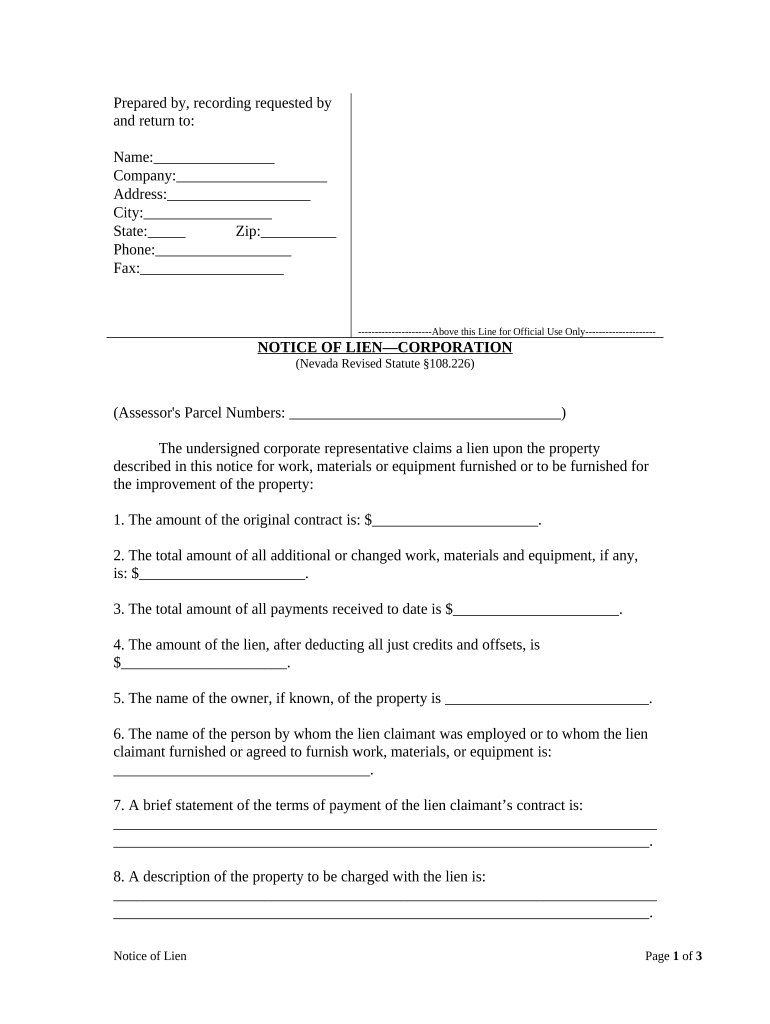
Click ‘Get Form’ to open the Nevada Lien Form in our editor.
Begin by filling in the 'Prepared by, recording requested by and return to' section. Enter your name, company, address, city, state, zip code, phone number, and fax number.
In the 'NOTICE OF LIEN—CORPORATION' section, provide the Assessor's Parcel Numbers for the property involved.
Complete the financial details: input the original contract amount, total additional work costs, total payments received to date, and calculate the lien amount after deductions.
Fill in the owner's name if known and detail who employed you or to whom you provided services.
Describe the payment terms of your contract clearly and concisely.
Provide a detailed description of the property that is subject to the lien.
Sign and date the form at the bottom. Ensure all required signatures are included for validation.
Start using our platform today to easily complete your Nevada Lien Form online for free!
Printable nevada lien formNevada lien form pdfFree nevada lien formNevada mechanics lien formNevada lien release formNevada lien servicesHow to put a lien on a car in nevadaNotice of right to lien nevada pdf
Security and compliance
At DocHub, your data security is our priority. We follow HIPAA, SOC2, GDPR, and other standards, so you can work on your documents with confidence.
VP 201 Lien Sale Registration Certificate - Nevada DMV
I, the Lien Claimant, will forward the Lien Sale Affidavit (VP-147), together with title fees collected pursuant to NRS 482.429, and other required documents toRead more
Cited by 238 NOTICE: The project that is the subject of this report was approved by the Govern- ing Board of the National Research Council, whose members are drawn fromRead more
Cookie consent notice
This site uses cookies to enhance site navigation and personalize your experience.
By using this site you agree to our use of cookies as described in our Privacy Notice.
You can modify your selections by visiting our Cookie and Advertising Notice.