Type text, add images, blackout confidential details, add comments, highlights and more.
02. Sign it in a few clicks
Draw your signature, type it, upload its image, or use your mobile device as a signature pad.
03. Share your form with others
Send it via email, link, or fax. You can also download it, export it or print it out.
How to use or fill out nj statutory with our platform
Ease of Setup
DocHub User Ratings on G2
Ease of Use
DocHub User Ratings on G2
Click ‘Get Form’ to open the nj statutory document in the editor.
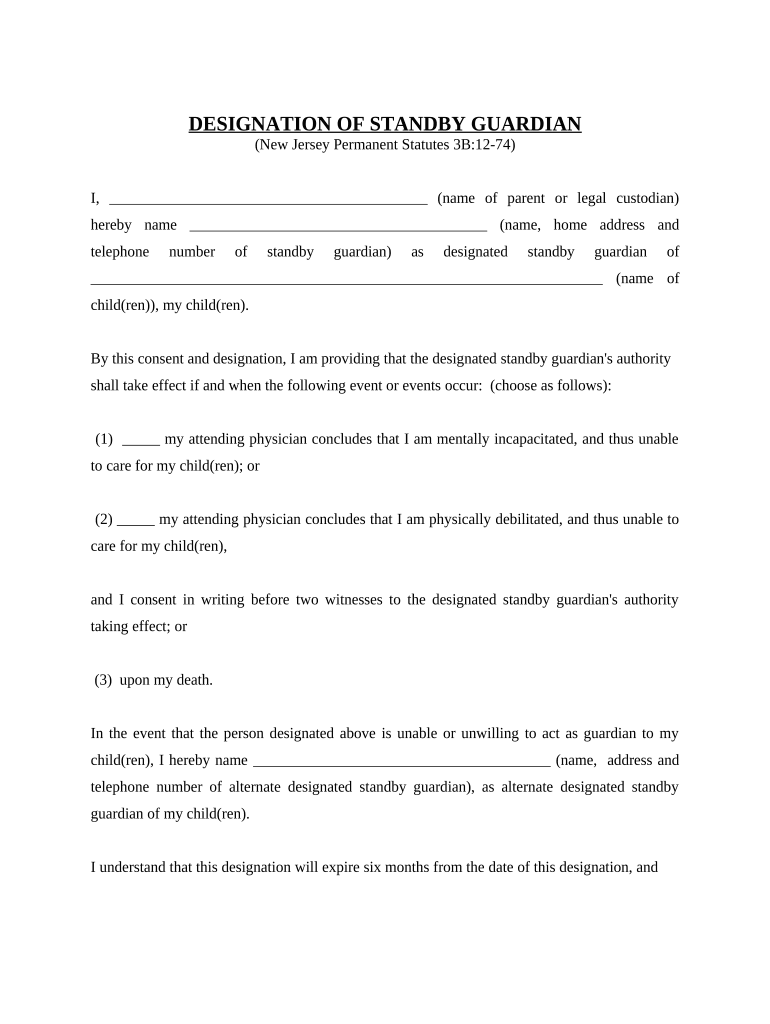
Begin by entering your name as the parent or legal custodian in the designated field.
Next, provide the name, home address, and telephone number of the standby guardian you are designating.
Fill in the names of your child(ren) for whom this guardianship applies.
Select the event that will activate the standby guardian's authority by checking one of the provided options regarding mental incapacity, physical debilitation, or upon your death.
If applicable, designate an alternate standby guardian by providing their name, address, and telephone number.
Sign and date the document at the bottom. Ensure two witnesses also sign and provide their addresses.
Start using our platform today to easily complete your nj statutory form online for free!
Mar 5, 2026 This lib guide will provide information for students, practitioners, and unrepresented litigants on New Jersey resources, including practice materials.Read more
In January 2014, the Governor signed into law P.L. 2013, c. 259. Pursuant to that statute the Department of State provides the following Laws and Regulations asRead more
Technical and Regulatory Guidance for In Situ Chemical
A PBR allows the New Jersey Department of. Environmental Protection (NJDEP) to permit certain discharges just by writing a letter with certain conditions (Read more
Cookie consent notice
This site uses cookies to enhance site navigation and personalize your experience.
By using this site you agree to our use of cookies as described in our Privacy Notice.
You can modify your selections by visiting our Cookie and Advertising Notice.