Type text, add images, blackout confidential details, add comments, highlights and more.
02. Sign it in a few clicks
Draw your signature, type it, upload its image, or use your mobile device as a signature pad.
03. Share your form with others
Send it via email, link, or fax. You can also download it, export it or print it out.
How to use or fill out Warranty Deed from two Individuals to Corporation - New Jersey with our platform
Ease of Setup
DocHub User Ratings on G2
Ease of Use
DocHub User Ratings on G2
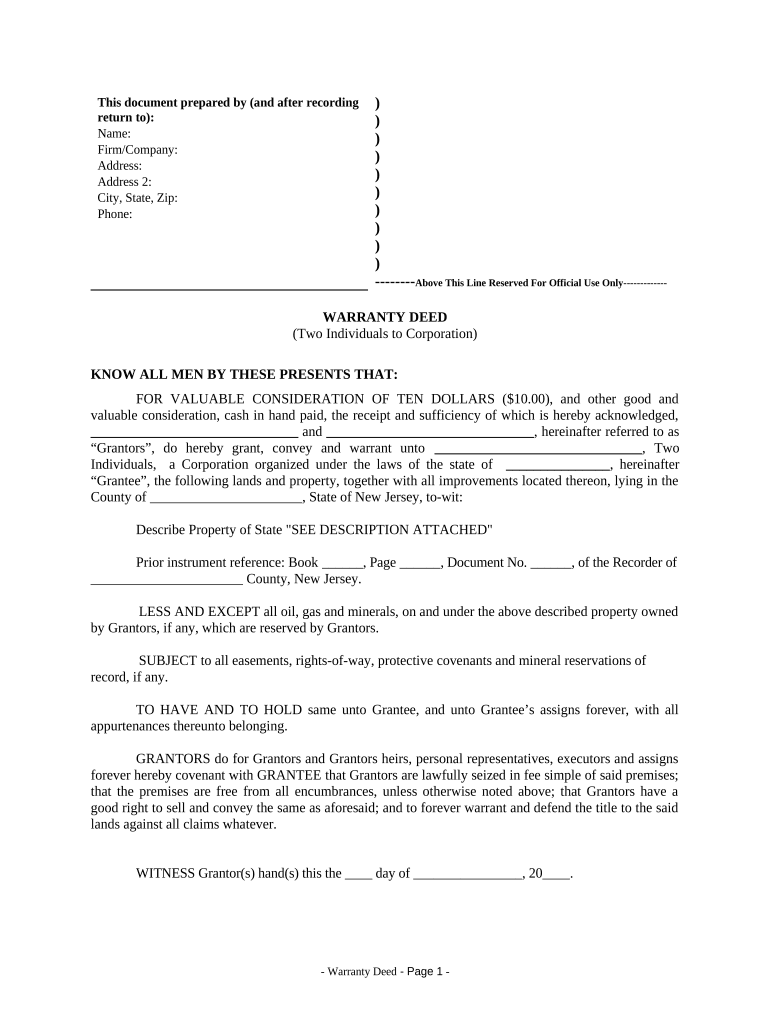
Click ‘Get Form’ to open the Warranty Deed in the editor.
Begin by entering the names of the Grantors in the designated fields. Ensure that both individuals' names are clearly typed.
In the Grantee section, input the name of the Corporation receiving the property. Specify the state of incorporation as required.
Describe the property being transferred in detail. If there is an attachment, indicate 'SEE DESCRIPTION ATTACHED' and ensure that this document is included.
Fill in any prior instrument references, including Book, Page, and Document Number if applicable.
Complete the date field where indicated for when the deed is executed.
Both Grantors should sign in their respective fields and type their names below their signatures for clarity.
Finally, ensure a Notary Public acknowledges the document by filling out their information and signing as required.
Start using our platform today to easily complete your Warranty Deed online for free!
Fill out Warranty Deed from two Individuals to Corporation - New Jersey online It's free
Warranty deed from two individuals to corporation new jersey sampleWarranty deed from two individuals to corporation new jersey exampleWarranty deed from two individuals to corporation new jersey onlineWarranty deed from two individuals to corporation new jersey formWhat is essential for a deed to be recorded in New Jersey quizletAffidavit of consideration for Use by seller
Security and compliance
At DocHub, your data security is our priority. We follow HIPAA, SOC2, GDPR, and other standards, so you can work on your documents with confidence.
by WF Timpone 1978 Cited by 2 The acceptance of the deed raises the presumption that the purchaser agreed to take title at his own risk and had the deed been faulty as to its terms, theRead more
Cookie consent notice
This site uses cookies to enhance site navigation and personalize your experience.
By using this site you agree to our use of cookies as described in our Privacy Notice.
You can modify your selections by visiting our Cookie and Advertising Notice.