Nj quitclaim deed 2026

Get Form
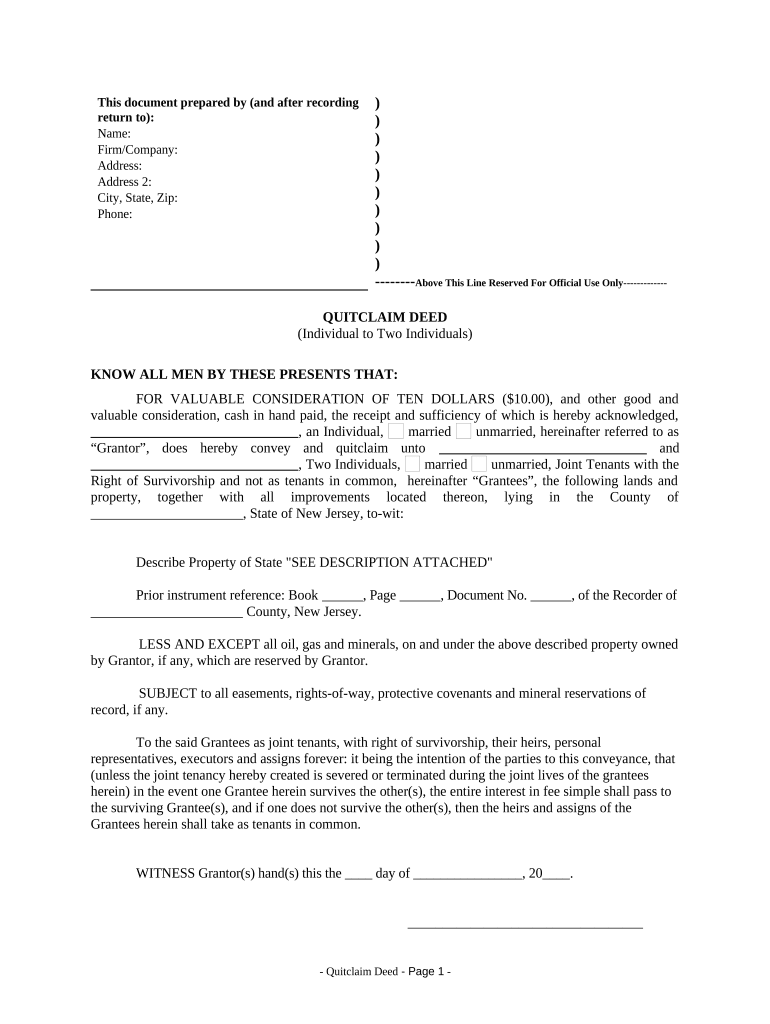
nj quitclaim deed Preview on Page 1

Here's how it works

01. Edit your form online
Type text, add images, blackout confidential details, add comments, highlights and more.
02. Sign it in a few clicks
Draw your signature, type it, upload its image, or use your mobile device as a signature pad.
03. Share your form with others
Send it via email, link, or fax. You can also download it, export it or print it out.

How to use or fill out nj quitclaim deed with our platform

Form edit decoration
9.5
Ease of Setup
DocHub User Ratings on G2
9.0
Ease of Use
DocHub User Ratings on G2
  1. Click ‘Get Form’ to open the nj quitclaim deed in the editor.
  2. Begin by filling in the 'Prepared by' section with your name, firm/company, address, and contact information. This ensures proper identification of the document's origin.
  3. In the main body, identify yourself as the 'Grantor' and specify your marital status. Then, enter the names of the 'Grantees' who will receive the property.
  4. Describe the property being transferred. If there is a detailed description attached, indicate that by writing 'SEE DESCRIPTION ATTACHED'.
  5. Complete any prior instrument references if applicable, including book and page numbers from previous records.
  6. Sign and date the document where indicated to finalize your intent to convey ownership.
  7. Ensure a notary public certifies your signature for legal validity.

Start using our platform today to easily complete your nj quitclaim deed online for free!

be ready to get more

Complete this form in 5 minutes or less

Get form

Got questions?

We have answers to the most popular questions from our customers. If you can't find an answer to your question, please contact us.
Contact us

Sure, it is possible with DocHub. This safe and compliant online solution features a phone-based signing option. After you log in to your DocHub account and add your nj quitclaim deed to our editor, fill out all required fields and utilize the Sign tool on the top barf. Click on Create your signature and select Phone from the available choices. Here, you scan a QR code using your smartphone and draw your signature on your phone screen, as you normally do when signing physical papers. If you access DocHub right from your mobile device, you can eSign your paperwork by drawing your eSignature, uploading its photo, or simply with a typed name.

In case your go-to electronic mail service is Gmail, it is simple to incorporate your DocHub editor into your work. Edit your nj quitclaim deed with DocHub instruments and attach it to your drafts in Gmail. See how straightforward it is to exchange files and collaborate with a swift PDF editing solution at hand.

Since the deed offers no legal protection, there is little recourse if issues arise after the transfer. These risks make it essential to consult a qualified Quitclaim Deed Attorney before proceeding.
As you imagine, 9 Grantors requires 9 docHubd signatures, and cost may increase. Plan on $400 and up to have the Quitclaim created, executed and recorded. How long does it take to prepare a quitclaim? About two hours, assuming there are no problems.

Security and compliance

At DocHub, your data security is our priority. We follow HIPAA, SOC2, GDPR, and other standards, so you can work on your documents with confidence.

Learn more
ccpa2
pci-dss
gdpr-compliance
hipaa
soc-compliance