Type text, add images, blackout confidential details, add comments, highlights and more.
02. Sign it in a few clicks
Draw your signature, type it, upload its image, or use your mobile device as a signature pad.
03. Share your form with others
Send it via email, link, or fax. You can also download it, export it or print it out.
How to use or fill out nd warranty with our platform
Ease of Setup
DocHub User Ratings on G2
Ease of Use
DocHub User Ratings on G2
Click ‘Get Form’ to open the nd warranty in the editor.
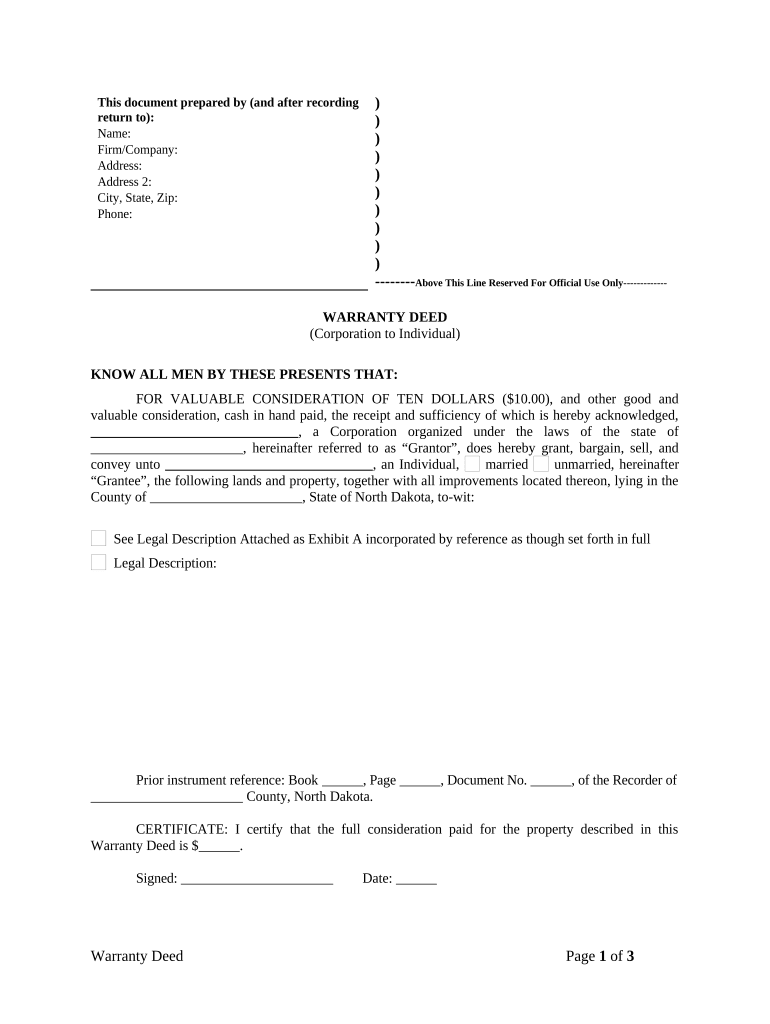
Begin by filling in the 'Prepared by' section with your name, firm/company, address, city, state, zip, and phone number. This information is essential for identification.
In the 'Grantor' section, enter the corporation's name and state of incorporation. For the 'Grantee', specify the individual's name and marital status (married/unmarried).
Provide a detailed legal description of the property being conveyed in the designated area. If you have an attachment (Exhibit A), ensure it is referenced correctly.
Complete the certificate section by stating the full consideration paid for the property. Sign and date where indicated.
Fill in Grantor(s) and Grantee(s) names, addresses, and phone numbers at the end of the document. This ensures all parties are clearly identified.
Start using our platform today to easily complete your nd warranty form online for free!
The only warranties for HP products and services are set forth in the express warranty statements accompanying such products and services. Nothing hereinRead more
In addition, a motor vehicle manufacturer shall provide adequate time allowances for diagnosis and performance of warranty work and service for the work.Read more
Cookie consent notice
This site uses cookies to enhance site navigation and personalize your experience.
By using this site you agree to our use of cookies as described in our Privacy Notice.
You can modify your selections by visiting our Cookie and Advertising Notice.