Minnesota motion judgment 2026

Get Form
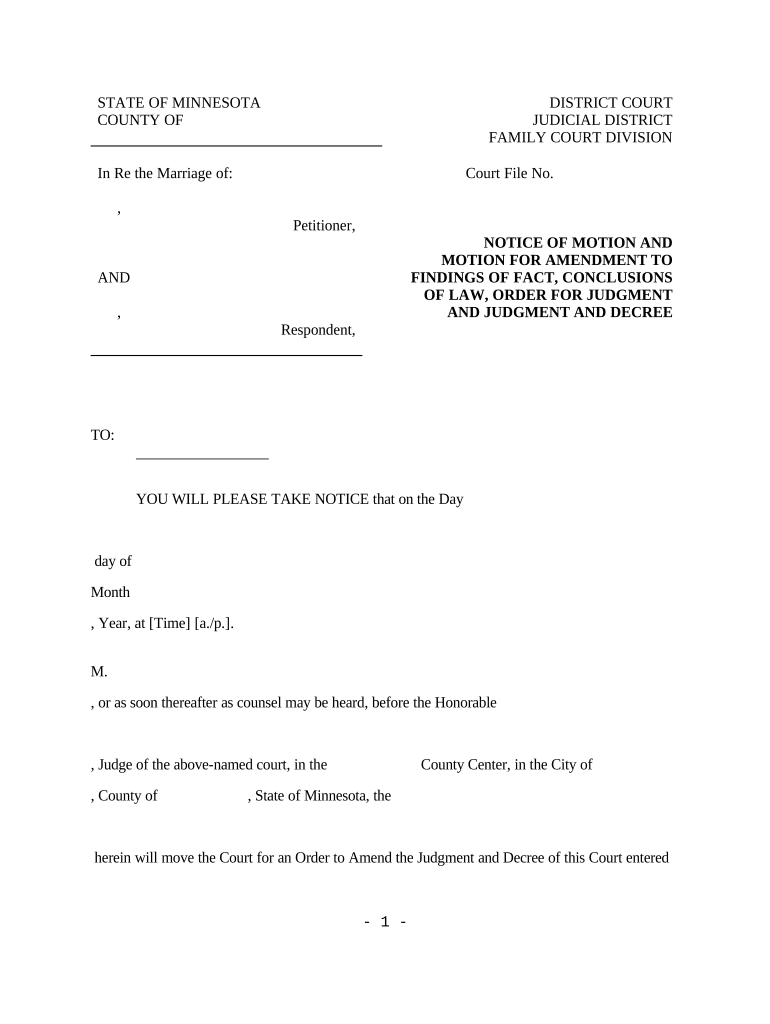
minnesota motion judgment Preview on Page 1

Here's how it works

01. Edit your form online
Type text, add images, blackout confidential details, add comments, highlights and more.
02. Sign it in a few clicks
Draw your signature, type it, upload its image, or use your mobile device as a signature pad.
03. Share your form with others
Send it via email, link, or fax. You can also download it, export it or print it out.

How to use or fill out Minnesota Motion Judgment with our platform

Form edit decoration
9.5
Ease of Setup
DocHub User Ratings on G2
9.0
Ease of Use
DocHub User Ratings on G2
  1. Click ‘Get Form’ to open the Minnesota Motion Judgment in the editor.
  2. Begin by filling in the 'Court File No.' at the top of the form. This number is essential for identifying your case.
  3. In the section labeled 'Petitioner,' enter your name as it appears in court documents, followed by the name of the 'Respondent' in the corresponding field.
  4. Specify the date and time of your motion hearing in the designated fields. Ensure accuracy to avoid any scheduling conflicts.
  5. Detail your requests regarding amendments to findings of fact and conclusions of law in their respective sections. Be clear and concise to facilitate understanding.
  6. Complete the attorney information section, including your name, attorney ID, address, and contact number. This ensures proper communication with the court.
  7. Review all entries for accuracy before saving or printing your completed document.

Start using our platform today to streamline your document editing and ensure a smooth filing process!

be ready to get more

Complete this form in 5 minutes or less

Get form

Got questions?

We have answers to the most popular questions from our customers. If you can't find an answer to your question, please contact us.
Contact us
A motion for judgment on the pleadings under FRCP 12(c) is designed to dispose of cases before trial where the material facts are not in dispute and a judgment on the merits can be rendered by looking to the substance of the pleadings and any judicially noticed facts.
A motion for summary judgment is a motion asking the court to issue summary judgment on at least one claim. If the motion is granted, a decision is made on the claims involved without holding a trial.
When a party does not respond within the timeframe specified in the summons, they may be subject to default. If a default occurs, that party would need to file a motion to have it vacated and provide an explanation to the Judge regarding their failure to respond.
Judgments come in different forms, including in personam (against a person), in rem (against property), and quasi in rem (limited to specific property), and can arise from both civil and criminal cases.
A motion for judgment as a matter of law asks the court to enter a judgment based on the conclusion that no reasonable jury could docHub a different conclusion. The motion is made before the case is submitted to the jury but after a party has been fully heard on the issue.

Security and compliance

At DocHub, your data security is our priority. We follow HIPAA, SOC2, GDPR, and other standards, so you can work on your documents with confidence.

Learn more
ccpa2
pci-dss
gdpr-compliance
hipaa
soc-compliance
be ready to get more

Complete this form in 5 minutes or less

Get form