Type text, add images, blackout confidential details, add comments, highlights and more.
02. Sign it in a few clicks
Draw your signature, type it, upload its image, or use your mobile device as a signature pad.
03. Share your form with others
Send what is a cso complaint via email, link, or fax. You can also download it, export it or print it out.
How to use or fill out Warning Notice Due to Complaint from Neighbors - Minnesota
Ease of Setup
DocHub User Ratings on G2
Ease of Use
DocHub User Ratings on G2
Click ‘Get Form’ to open it in the editor.
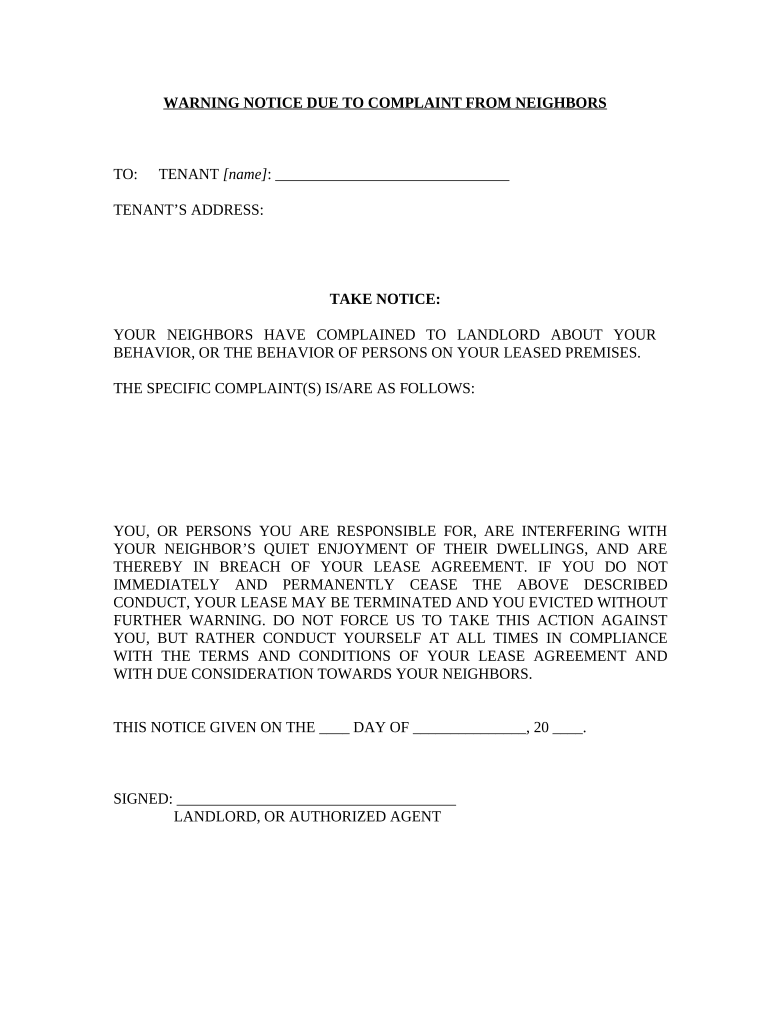
Begin by entering the tenant's name in the designated field labeled 'TENANT [name]'. This personalizes the notice and ensures clarity regarding who is being addressed.
Next, fill in the tenant’s address in the 'TENANT’S ADDRESS' section. Accurate information is crucial for effective communication.
In the 'SPECIFIC COMPLAINT(S)' section, detail the complaints received from neighbors. Be specific to avoid ambiguity and ensure that the tenant understands the issues at hand.
Complete the date on which this notice is given by filling in both day and month in the provided fields.
Finally, sign off as the landlord or authorized agent in the designated area. This formalizes your notice and adds legitimacy to your communication.
Start using our platform today to easily complete and manage your documents for free!
Fill out Warning Notice Due to Complaint from Neighbors - Minnesota online It's free
City of st Paul nuisance propertiesReport noise complaint onlineNoise complaint MinneapolisCity of st paul complaintsNoise complaint st paulNoise ordinance columbia heights mnMN noise ordinance timesProperty complaints
Security and compliance
At DocHub, your data security is our priority. We follow HIPAA, SOC2, GDPR, and other standards, so you can work on your documents with confidence.
Nov 18, 2024 WARNING means the pesticide product is moderately toxic if eaten, absorbed through the skin, inhaled, or it causes moderate eye or skinRead more
1998 Corvette - CARMANS.NET! Owners Manual in PDF!
This manual includes the latest information at the time it was printed. We reserve the right to make changes in the product after that time without furtherRead more
Cookie consent notice
This site uses cookies to enhance site navigation and personalize your experience.
By using this site you agree to our use of cookies as described in our Privacy Notice.
You can modify your selections by visiting our Cookie and Advertising Notice.