Type text, add images, blackout confidential details, add comments, highlights and more.
02. Sign it in a few clicks
Draw your signature, type it, upload its image, or use your mobile device as a signature pad.
03. Share your form with others
Send it via email, link, or fax. You can also download it, export it or print it out.
How to use or fill out mn reconciliation with our platform
Ease of Setup
DocHub User Ratings on G2
Ease of Use
DocHub User Ratings on G2
Click ‘Get Form’ to open the mn reconciliation document in the editor.
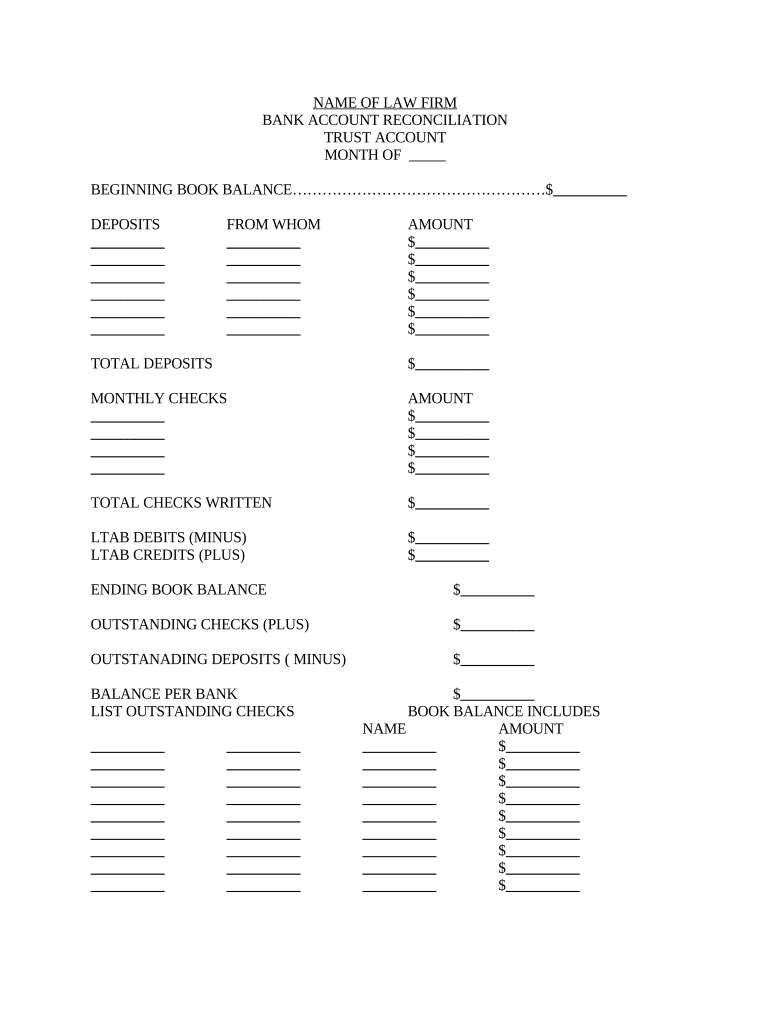
Begin by entering the 'Beginning Book Balance' at the top of the form. This is your starting point for the month.
In the 'Deposits' section, list each deposit made during the month. Fill in the 'From Whom' and 'Amount' fields for each entry to ensure accurate tracking.
Calculate and enter the 'Total Deposits' at the bottom of this section, summing all amounts listed.
Next, move to the 'Monthly Checks' section. Document each check written, including amounts in their respective fields.
After listing all checks, calculate and input the 'Total Checks Written'.
Complete the 'LTAB Debits (Minus)' and 'LTAB Credits (Plus)' sections as applicable, followed by calculating your 'Ending Book Balance'.
Finally, account for any outstanding checks and deposits before confirming your balance per bank.
Start using our platform today to streamline your mn reconciliation process for free!
Conciliation Court is also known as small claims court. It is a specialty court where people can have their cases heard without complicated legal procedures.Read more
Reconciliation Park: Controversy and Mystery in Mankato
After broken treaties and being forced onto reservations by the government, the Dakota people began fighting back against their oppressors, which would later beRead more
Cookie consent notice
This site uses cookies to enhance site navigation and personalize your experience.
By using this site you agree to our use of cookies as described in our Privacy Notice.
You can modify your selections by visiting our Cookie and Advertising Notice.