Bill of Sale without Warranty by Individual Seller - Michigan 2026

Get Form
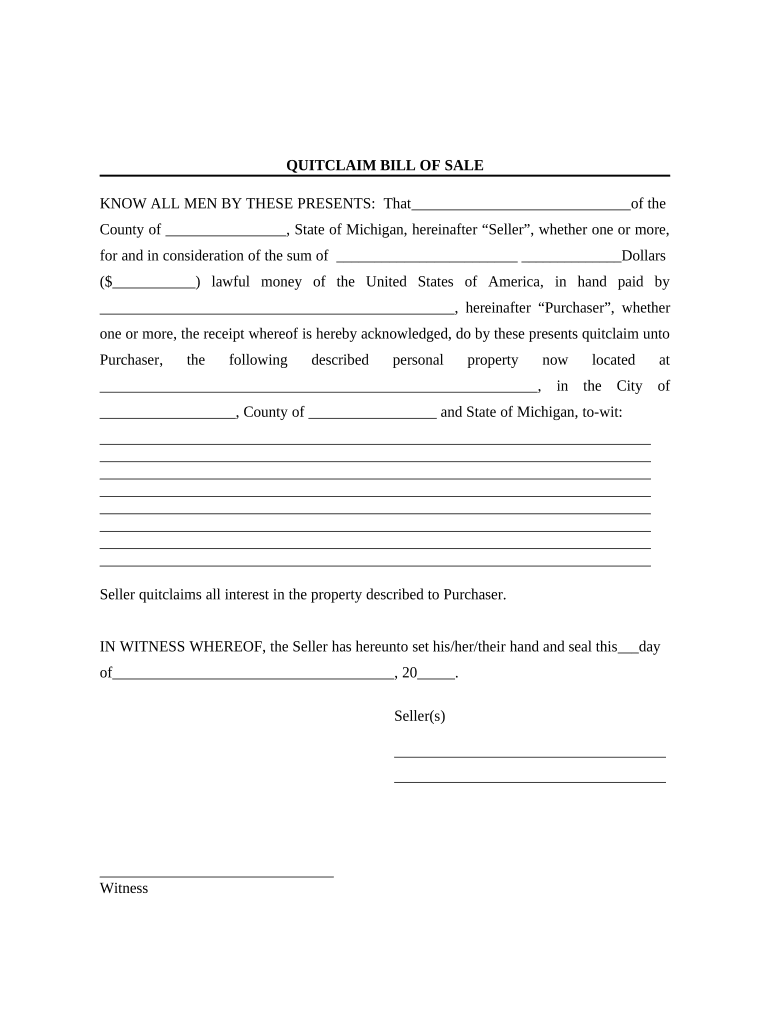
bill of sale as is no warranty Preview on Page 1

Here's how it works

01. Edit your bill of sale as is no warranty online
Type text, add images, blackout confidential details, add comments, highlights and more.
02. Sign it in a few clicks
Draw your signature, type it, upload its image, or use your mobile device as a signature pad.
03. Share your form with others
Send as is no warranty car sale form via email, link, or fax. You can also download it, export it or print it out.

How to use or fill out Bill of Sale without Warranty by Individual Seller - Michigan with DocHub

Form edit decoration
9.5
Ease of Setup
DocHub User Ratings on G2
9.0
Ease of Use
DocHub User Ratings on G2
  1. Click ‘Get Form’ to open the Bill of Sale without Warranty by Individual Seller - Michigan in our editor.
  2. Begin by entering the Seller's name and county in the designated fields. This identifies who is selling the property.
  3. Next, input the total sale amount in both numeric and written form. This ensures clarity on the transaction value.
  4. Fill in the Purchaser's name, ensuring it matches their identification for legal purposes.
  5. Describe the personal property being sold in detail. Include any identifying features or serial numbers to avoid confusion.
  6. Indicate the location of the property within Michigan, providing city and county details for accurate identification.
  7. Have all Sellers sign and date the document at the bottom, confirming their agreement to transfer ownership.
  8. Include witness signatures and print names as required, ensuring that all parties are legally recognized.
  9. Finally, complete the acknowledgment section with a notary public to validate your document officially.

Start using our platform today to fill out your Bill of Sale effortlessly and for free!

be ready to get more

Complete this form in 5 minutes or less

Get form

Got questions?

We have answers to the most popular questions from our customers. If you can't find an answer to your question, please contact us.
Contact us

Microsoft Word doesn’t have signing tools to create legitimate eSignatures and enforceable paperwork. Luckily, DocHub is an online eSignature-compliant editor that supports various document formats, such as .doc files. Log in to your account and import the Word edition of your rv bill of sale as is no warranty from your device and cloud, or URL - our editor will automatically transform it into an editable PDF. Make all required alterations in your document and click Sign to create your own legally-binding eSignature. You will find four signing options from which to choose.

Document editing with DocHub is equally convenient on desktop and mobile devices. You only need an internet browser to revise your used car bill of sale as is no warranty on Android. Open our website and sign in to access the tools you need. Add your document and introduce your intended modifications. Next, you can keep your form in your document storage or send it out instantly.

The Materials are provided as is, without any express or implied warranty of any kind including warranties of merchantability, non-infringement, title, or fitness for a particular purpose. The Materials may include pre-release software or algorithms and may not be fully functional.
Can a bill of sale be handwritten? While it is common to present a bill of sale in a digital format, you can also create a handwritten bill of sale. Whats most important is to include all of the pertinent details in the bill of sale in order to protect both parties.
How can I create my own Michigan bill of sale? Simply list all the details of the transaction, including the buyer, seller, any identifying numbers or serial numbers, a clear description of the property and its condition, and the date of the sale. Gather signatures for all parties involved in the transaction.

Security and compliance

At DocHub, your data security is our priority. We follow HIPAA, SOC2, GDPR, and other standards, so you can work on your documents with confidence.

Learn more
ccpa2
pci-dss
gdpr-compliance
hipaa
soc-compliance

People also ask

An As-Is Bill of Sale, or No Warranty Bill of Sale, is a legal document used to document a transaction of personal property in its current condition between a buyer and seller. It clearly states that the item is sold as is, meaning the seller offers no guarantees about its condition or performance.
An as is bill of sale form, also known as a quitclaim or no-warranty bill of sale, is like a detailed receipt but with a special caveat. It doesnt make any promises about item performance or guarantee a property (like a boat or plane), and it doesnt have any claims against it.
The legal term as is means that you are purchasing a car or any item in its current condition at the time of the sale. In addition, it means the car is being sold without any warranty coverage.
Yes, an As-Is Bill of Sale helps protect sellers from future claims, but it must be properly worded and signed. 2. Is an As-Is Bill of Sale legally binding? Yes, once signed by both parties, it is legally binding and enforceable.
There isnt a statewide requirement for you to have a bill of sale in Alabama. Some counties will require a document showing that the vehicle is sold. Those counties may offer a bill of sale online, such as Baldwin County. In other countries, you may need to create a generic bill of sale document.

Related links