Type text, add images, blackout confidential details, add comments, highlights and more.
02. Sign it in a few clicks
Draw your signature, type it, upload its image, or use your mobile device as a signature pad.
03. Share your form with others
Send it via email, link, or fax. You can also download it, export it or print it out.
How to use or fill out deed wife with our platform
Ease of Setup
DocHub User Ratings on G2
Ease of Use
DocHub User Ratings on G2
Click ‘Get Form’ to open the deed wife in the editor.
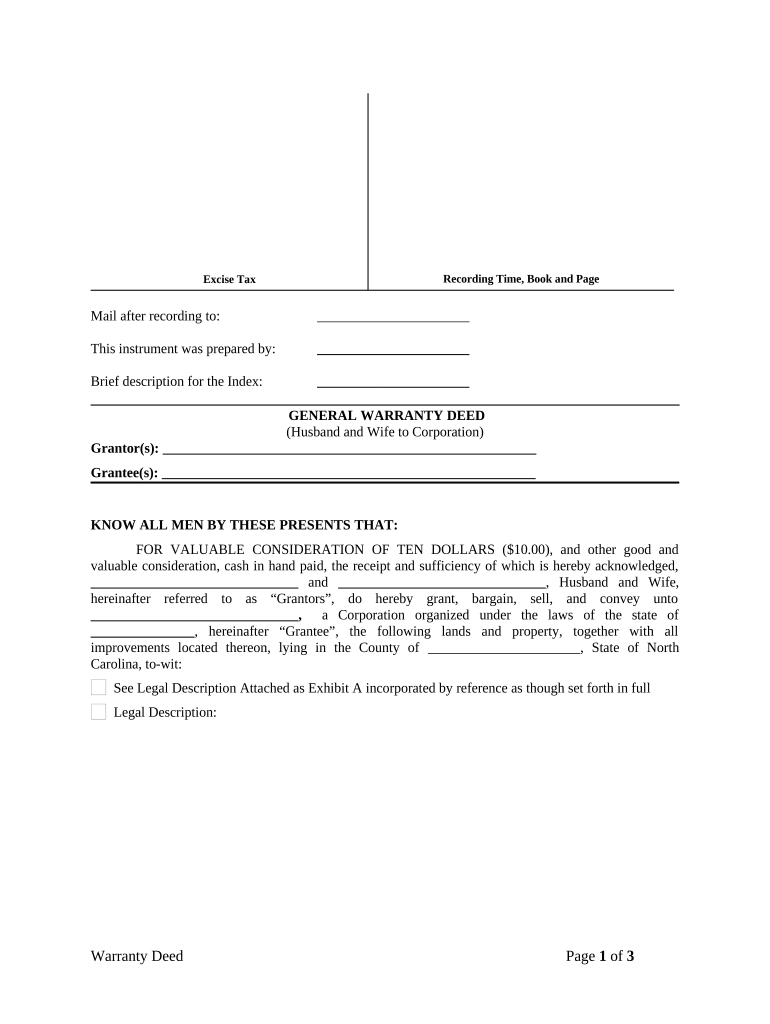
Begin by filling in the 'Grantor(s)' section with the names of both husband and wife. Ensure that both names are clearly printed.
In the 'Grantee(s)' field, enter the name of the corporation receiving the property. This should be followed by specifying the state of incorporation.
Complete the legal description section by attaching Exhibit A, which details the property being conveyed. Make sure this is accurate and comprehensive.
Fill in any prior instrument references, including Book, Page, and Document Number as applicable.
Both grantors must sign and date at the bottom of the form. Ensure that their names are typed or printed beneath their signatures for clarity.
Finally, have a Notary Public witness your signatures and complete their section to validate the document.
Start using our platform today to effortlessly fill out your deed wife for free!
Tax implications of adding spouse to deedPros and cons of adding spouse to deedHow to add wife to deed of houseHow much does it cost to add spouse to deedAdd spouse to deed but not mortgageQuitclaim deed to add spouse to titleAdding spouse to deed with mortgageHow to add spouse to house title in california
Security and compliance
At DocHub, your data security is our priority. We follow HIPAA, SOC2, GDPR, and other standards, so you can work on your documents with confidence.
by AH Phillips 1963 39-13.3(d) (Supp. 1961) provides that the wife may convey directly to her husband without his joinder in the deed, subject to the provisions of N.C..Read more
THIS DEED OF TRUST, is made and entered into this day of. , 20, by and among. [NAME IN ALL CAPS] and among. [NAME IN ALL CAPS], husband and wifeRead more
Cookie consent notice
This site uses cookies to enhance site navigation and personalize your experience.
By using this site you agree to our use of cookies as described in our Privacy Notice.
You can modify your selections by visiting our Cookie and Advertising Notice.