Montana motion form 2026

Get Form
montana motion form Preview on Page 1

Here's how it works

01. Edit your montana motion form online
Type text, add images, blackout confidential details, add comments, highlights and more.
02. Sign it in a few clicks
Draw your signature, type it, upload its image, or use your mobile device as a signature pad.
03. Share your form with others
Send it via email, link, or fax. You can also download it, export it or print it out.

How to use or fill out Montana Motion Form with DocHub

Form edit decoration
9.5
Ease of Setup
DocHub User Ratings on G2
9.0
Ease of Use
DocHub User Ratings on G2
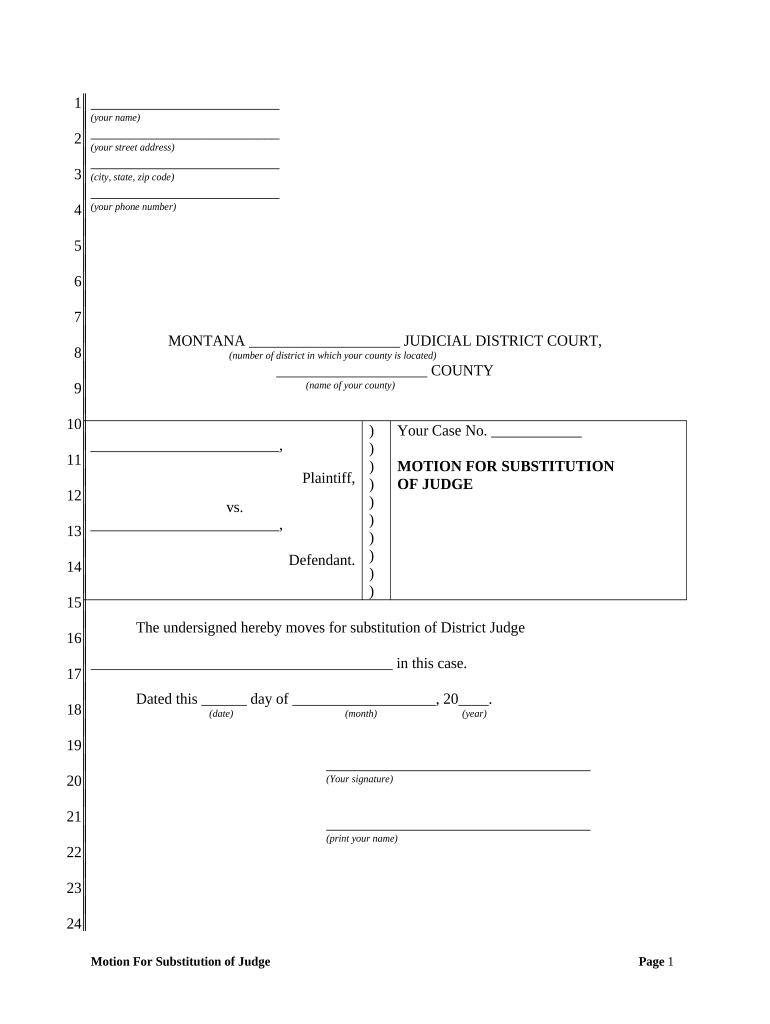
  1. Click ‘Get Form’ to open the Montana Motion Form in our editor.
  2. Begin by entering your name in the first field, followed by your street address in the second field. Ensure accuracy for proper identification.
  3. In the third section, input your city, state, and zip code. This information is crucial for jurisdiction purposes.
  4. Next, provide your phone number in the designated field to facilitate communication regarding your case.
  5. Identify the judicial district court by filling in the appropriate district number and county name where your case is filed.
  6. In the motion section, clearly state the name of the District Judge you are requesting to substitute. Be precise to avoid any confusion.
  7. Complete the date fields with the current day, month, and year when you are submitting this motion.
  8. Finally, sign and print your name at the bottom of the form to validate your request before submission.

Start using our platform today for free to streamline your document editing and signing process!

be ready to get more

Complete this form in 5 minutes or less

Get form

Got questions?

We have answers to the most popular questions from our customers. If you can't find an answer to your question, please contact us.
Contact us
1) In writing by filing a Motion or responding to a Motion; or 2) In person at a hearing scheduled by the Judge, with both sides present.
A motion is simply a request to the court for some action. An example is a motion for an extension of time to file something.
How to Write a Motion for Court? Step-by-Step Guide Step 1: Understand the Purpose of Your Motion. Step 2: Research Court Rules and Requirements. Step 3: Start with a Clear and Concise Title. Step 4: Draft the Introduction. Step 5: Present the Relevant Facts. Step 6: Provide Legal Arguments.
Using AI like ChatGPT for litigation is still new, and its responses may contain errors that require verification. However, you can use ChatGPT to draft initial versions of pleadings, motions, and other court filings.
If you want to file a motion, the process is generally something like this: You write your motion. You file your motion with the court clerk. The court clerk inserts the date and time your motion will be heard by the judge. You serve (mail) your motion to the other side.

Security and compliance

At DocHub, your data security is our priority. We follow HIPAA, SOC2, GDPR, and other standards, so you can work on your documents with confidence.

Learn more
ccpa2
pci-dss
gdpr-compliance
hipaa
soc-compliance

People also ask

General format - each motion generally consists of a case caption, a title that briefly identifies the relief sought, a series of numbered paragraphs that explains -- in a logical way -- why you are entitled to that relief, a prayer for relief, a signature block, a certification that a copy of the motion was sent to
When you respond to a motion, be clear and direct about your legal position. Begin with an introduction that summarizes the nature of the motion and states your position. Develop key points to answer every argument your opponent made. Then, present your arguments in a logical sequence.
How to Write a Kick-Ass Motion Make an Outline. Keep Your Motion Simple. Maintain Credibility. Mind Your Citations. Focus on Facts. Keep Your Intro Short. Respect the Opposition. Write in English, Not Legalese.

Related links