Type text, add images, blackout confidential details, add comments, highlights and more.
02. Sign it in a few clicks
Draw your signature, type it, upload its image, or use your mobile device as a signature pad.
03. Share your form with others
Send it via email, link, or fax. You can also download it, export it or print it out.
How to use or fill out Amendment to Living Trust - Montana with our platform
Ease of Setup
DocHub User Ratings on G2
Ease of Use
DocHub User Ratings on G2
Click ‘Get Form’ to open the Amendment to Living Trust - Montana in the editor.
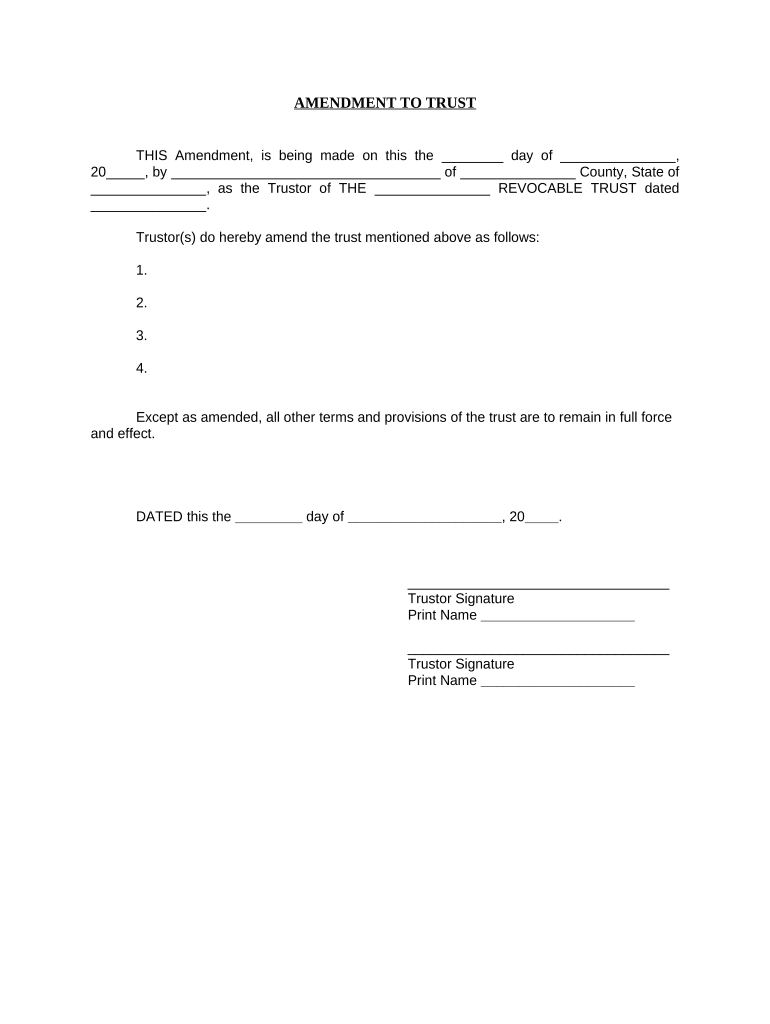
Begin by entering the date of the amendment in the first blank field. This should reflect the day you are completing the document.
Next, fill in your name as the Trustor along with your county and state in the designated fields. Ensure accuracy for legal purposes.
In the section that begins with 'Trustor(s) do hereby amend...', list any amendments you wish to make to your trust. Number each amendment clearly for easy reference.
Complete the signature section by signing and printing your name as the Trustor. If there are multiple Trustors, ensure all signatures are included.
Finally, have a Notary Public acknowledge your signatures by filling out their information at the bottom of the form, including their printed name and commission expiration date.
Start editing your Amendment to Living Trust - Montana online for free today!
Fill out Amendment to Living Trust - Montana online It's free
Simple amendments, like changing a beneficiary or trustee, can range between $300 to $500. More substantial changes, such as a complete restatement of the trust to reflect docHub alterations, could exceed $2,000.
Do amendments to a trust need to be docHubd?
California law does not require notarization of trust amendments, but having your signature docHubd can provide additional proof of authenticity and may help prevent future challenges to the validity of your changes.
What is the difference between a codicil and an amendment to a trust?
An amendment is a formal document making a change to one or multiple parts of a Revocable Living Trust. A codicil is a formal document making a change to one or multiple parts of a Last Will and Testament.
How do I write an amendment to a living trust?
When you write the change you are making, be sure to refer to the original trust document by paragraph number so it is clear what provision you are changing. Be very clear about how you are changing this section of the trust. Make sure you state you are amending this section of the trust.
How do I add an amendment to a living trust?
To amend a living trust in California, youll need to create a written amendment document that clearly states the changes you want to make to your trust. Amending your trust allows you to update beneficiaries, change asset distributions, or modify trustee appointments without having to create an entirely new trust.
Related Searches
Amendment to living trust montana templateAmendment to living trust montana sampleAmendment to living trust montana pdfFree amendment to living trust montanaAmendment to living trust montana formMontana trust CodeMontana living trust formsIrrevocable trust Montana
Security and compliance
At DocHub, your data security is our priority. We follow HIPAA, SOC2, GDPR, and other standards, so you can work on your documents with confidence.
72-38-602 Revocation or amendment of revocable trust
The settlor may revoke or amend a revocable trust: (a) by substantial compliance with a method provided in the terms of the trust; or (b) if the terms of the
The settlor must change the title of ownership of each asset to be placed in the trust from the settlors name to ownership by the trust. Merely setting up a
(h) Plan amendment. During the term of a plan, a bank may request the Board to approve an amendment to the plan on grounds that there has been a material
Cookie consent notice
This site uses cookies to enhance site navigation and personalize your experience.
By using this site you agree to our use of cookies as described in our Privacy Notice.
You can modify your selections by visiting our Cookie and Advertising Notice.