Reply response motion 2026

Get Form
reply response motion Preview on Page 1

Here's how it works

01. Edit your form online
Type text, add images, blackout confidential details, add comments, highlights and more.
02. Sign it in a few clicks
Draw your signature, type it, upload its image, or use your mobile device as a signature pad.
03. Share your form with others
Send it via email, link, or fax. You can also download it, export it or print it out.

How to use or fill out reply response motion with our platform

Form edit decoration
9.5
Ease of Setup
DocHub User Ratings on G2
9.0
Ease of Use
DocHub User Ratings on G2
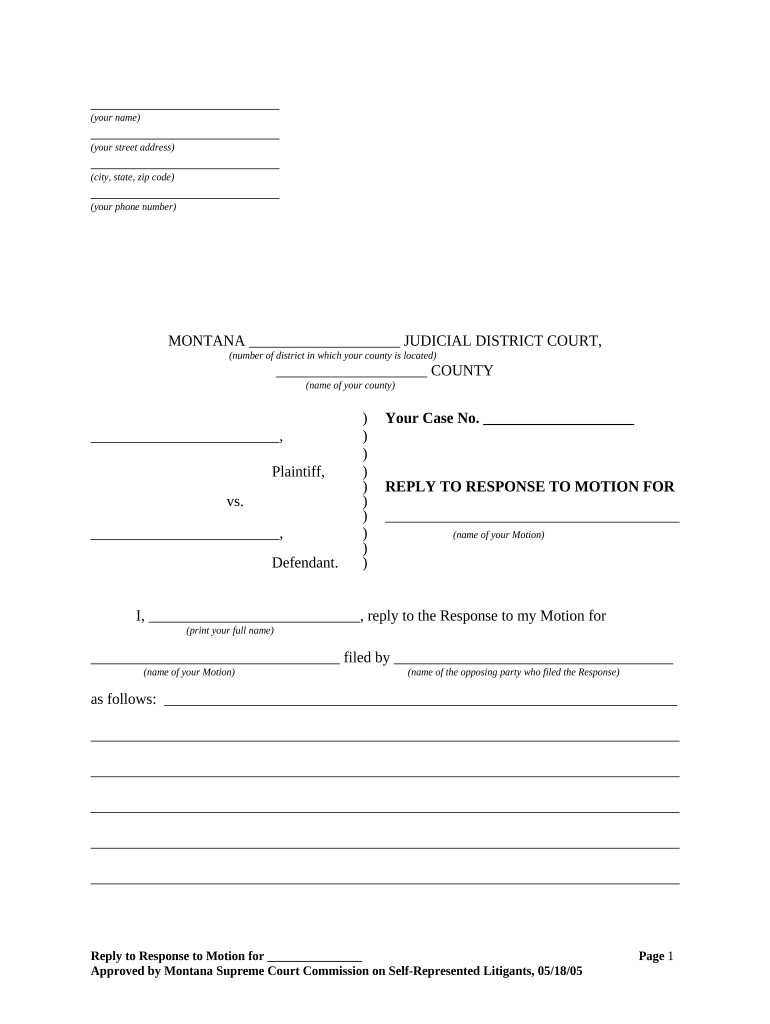
  1. Click ‘Get Form’ to open the reply response motion in the editor.
  2. Begin by entering your personal information at the top of the form. Fill in your name, street address, city, state, and zip code accurately.
  3. Next, specify the district court details by selecting the appropriate judicial district number and county name where your case is filed.
  4. Input your case number in the designated field to ensure proper identification of your case.
  5. In the section labeled 'REPLY TO RESPONSE TO MOTION FOR', clearly state the name of your motion for reference.
  6. Provide a detailed reply to the opposing party's response in the space provided. Be thorough and concise in your explanation.
  7. Finally, date your document and sign it at the bottom. Ensure that you print your name below your signature for clarity.

Start using our platform today to streamline your document editing and filing process for free!

be ready to get more

Complete this form in 5 minutes or less

Get form

Got questions?

We have answers to the most popular questions from our customers. If you can't find an answer to your question, please contact us.
Contact us
This can include a rebuttal to issues of fact or law raised in the Response. A Reply should only address points raised in the Response. A Reply is not a place to reargue the points made in the original Motion or to raise new issues. This process may continue if any more motions or responses are filed.
When you receive a response to your filed motion, review it carefully to understand the arguments presented. Check the courts local rules for deadlines to file a reply, which often range from 7 to 14 days after service. Your reply should address specific points raised, be concise, and follow formatting requirements.
Any reply to a response must be filed within 7 days after service of the response. A reply must not present matters that do not relate to the response. (b) Disposition of a Motion for a Procedural Order.
The other side can file opposition papers in response to the cross-motion. Sometimes the Judge will issue a decision on the court date. Otherwise, the Judge has 60 days to decide the motion. Sometimes the decision will be mailed to you; if it isnt you can call the Judges chambers and make arrangements to get a copy.
When you respond to a motion, be clear and direct about your legal position. Begin with an introduction that summarizes the nature of the motion and states your position. Develop key points to answer every argument your opponent made. Then, present your arguments in a logical sequence.

Security and compliance

At DocHub, your data security is our priority. We follow HIPAA, SOC2, GDPR, and other standards, so you can work on your documents with confidence.

Learn more
ccpa2
pci-dss
gdpr-compliance
hipaa
soc-compliance
be ready to get more

Complete this form in 5 minutes or less

Get form

People also ask

A circuit judge may act alone on any motion, but may not dismiss or otherwise determine an appeal or other proceeding. A court of appeals may provide by rule or by order in a particular case that only the court may act on any motion or class of motions. The court may review the action of a single judge.

Related links