Type text, add images, blackout confidential details, add comments, highlights and more.
02. Sign it in a few clicks
Draw your signature, type it, upload its image, or use your mobile device as a signature pad.
03. Share your form with others
Send it via email, link, or fax. You can also download it, export it or print it out.
How to use or fill out mt procedure court with our platform
Ease of Setup
DocHub User Ratings on G2
Ease of Use
DocHub User Ratings on G2
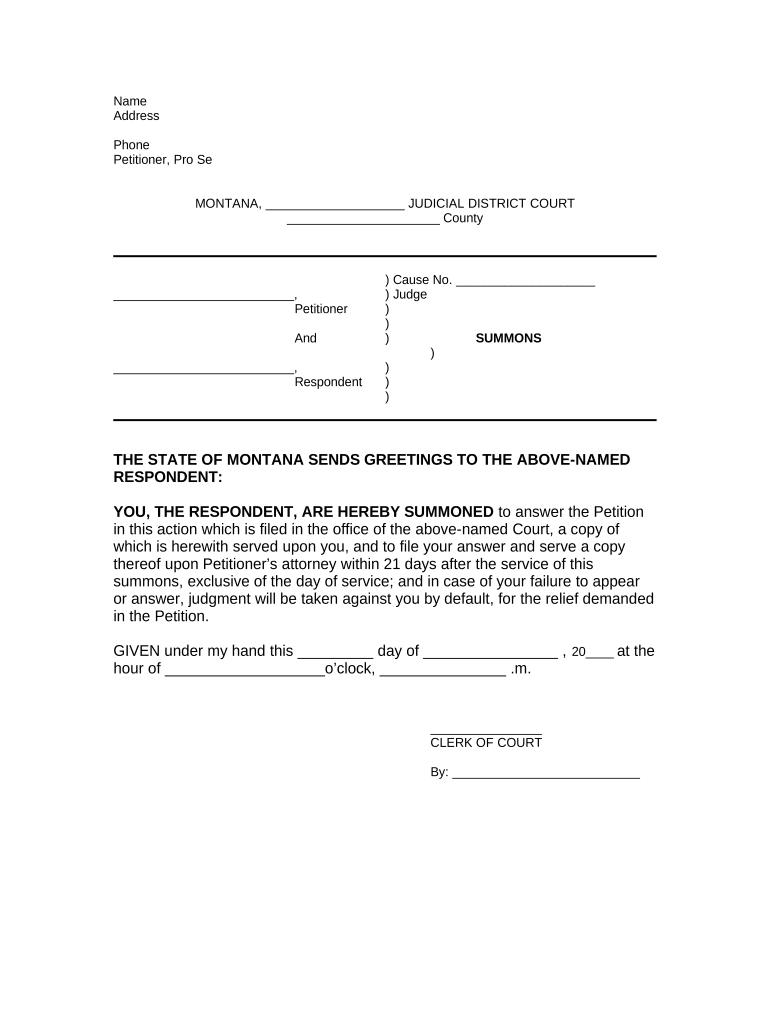
Click ‘Get Form’ to open the mt procedure court document in the editor.
Begin by entering your name, address, and phone number in the designated fields at the top of the form. Ensure that all information is accurate and up-to-date.
Identify yourself as the Petitioner, Pro Se, and fill in the appropriate judicial district and county details.
In the section for Respondent, enter the name of the individual you are summoning. This is crucial for ensuring proper legal notification.
Fill in the Cause Number and Judge's name as required. If you do not have this information, consult your local court records.
Review the summons text carefully. Make sure it accurately reflects your intentions and complies with legal requirements.
Finally, sign and date the document where indicated. You can easily add your signature using our platform’s signing feature.
Start filling out your mt procedure court form online for free today!
Mt court case searchCourts MT govMt public court portalGallatin county court docketWww courts mt gov formsMontana rules of appellate procedureGallatin county court case searchBeaverhead County Court docket
Security and compliance
At DocHub, your data security is our priority. We follow HIPAA, SOC2, GDPR, and other standards, so you can work on your documents with confidence.
by DR Mason 1961 Cited by 10 Illustrations are the Rules with re- spect to the pleading of statutes, dismissals of actions, examination of wit- nesses, service of subpoenas,Read more
Welcome to the Montana Judicial Branch. Making our court systems work for all Montanans by providing helpful, accessible, easy-to-use information.Read more
Cookie consent notice
This site uses cookies to enhance site navigation and personalize your experience.
By using this site you agree to our use of cookies as described in our Privacy Notice.
You can modify your selections by visiting our Cookie and Advertising Notice.