Type text, add images, blackout confidential details, add comments, highlights and more.
02. Sign it in a few clicks
Draw your signature, type it, upload its image, or use your mobile device as a signature pad.
03. Share your form with others
Send it via email, link, or fax. You can also download it, export it or print it out.
How to use or fill out montana response with our platform
Ease of Setup
DocHub User Ratings on G2
Ease of Use
DocHub User Ratings on G2
Click ‘Get Form’ to open the montana response in the editor.
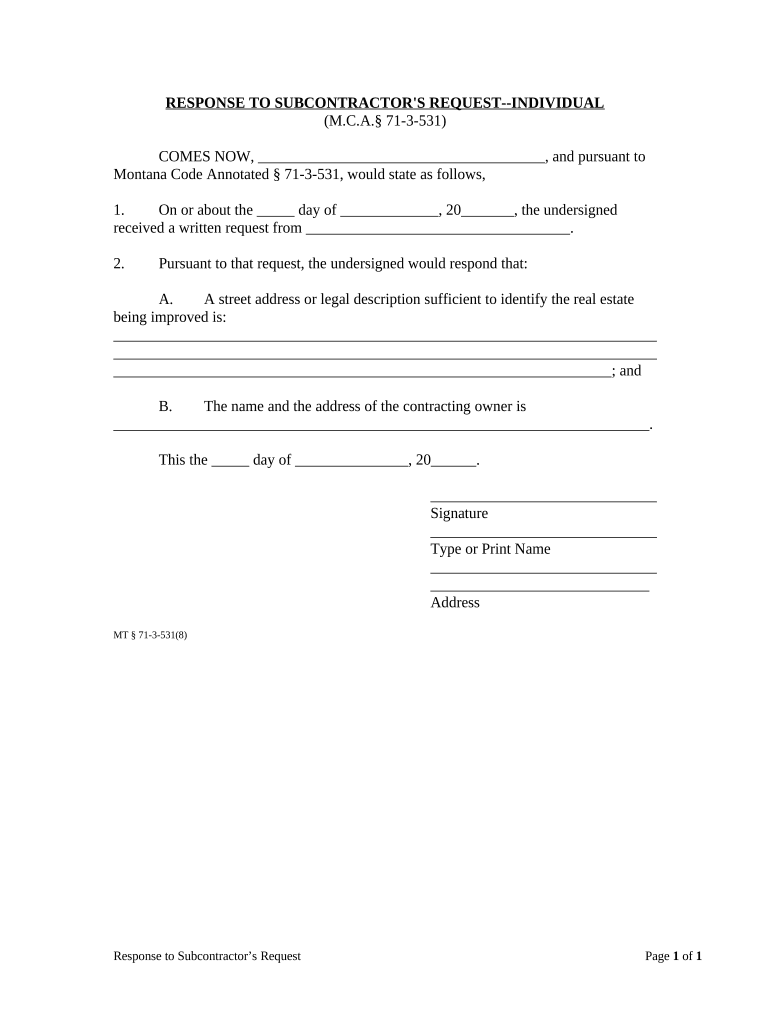
Begin by entering your name in the first blank space, indicating who is responding to the subcontractor's request.
In the second section, specify the date you received the written request. Use the format 'day of month, year' for clarity.
Next, provide the name of the subcontractor who made the request in the designated space.
For section A, enter a street address or legal description that clearly identifies the real estate being improved. Ensure this information is accurate and complete.
In section B, fill in the name and address of the contracting owner. This should match official records for consistency.
Finally, sign and date at the bottom of the form. Type or print your name and provide your address as required.
Start using our platform today to easily fill out your montana response for free!
Montana response to parenting planResponse to Motion SampleHow to respond to a motion in family courtMontana parenting planIs montana a 50 50 custody stateMontana Family Transition ProjectMontana Motion PacketMotion to Amend parenting plan Montana
Security and compliance
At DocHub, your data security is our priority. We follow HIPAA, SOC2, GDPR, and other standards, so you can work on your documents with confidence.
If you receive a Motion from an opposing party, you have the right to respond and tell the Judge whether you agree or disagree with the other sides Motion.Read more
Cookie consent notice
This site uses cookies to enhance site navigation and personalize your experience.
By using this site you agree to our use of cookies as described in our Privacy Notice.
You can modify your selections by visiting our Cookie and Advertising Notice.