Type text, add images, blackout confidential details, add comments, highlights and more.
02. Sign it in a few clicks
Draw your signature, type it, upload its image, or use your mobile device as a signature pad.
03. Share your form with others
Send it via email, link, or fax. You can also download it, export it or print it out.
How to use or fill out order hearing notice with our platform
Ease of Setup
DocHub User Ratings on G2
Ease of Use
DocHub User Ratings on G2
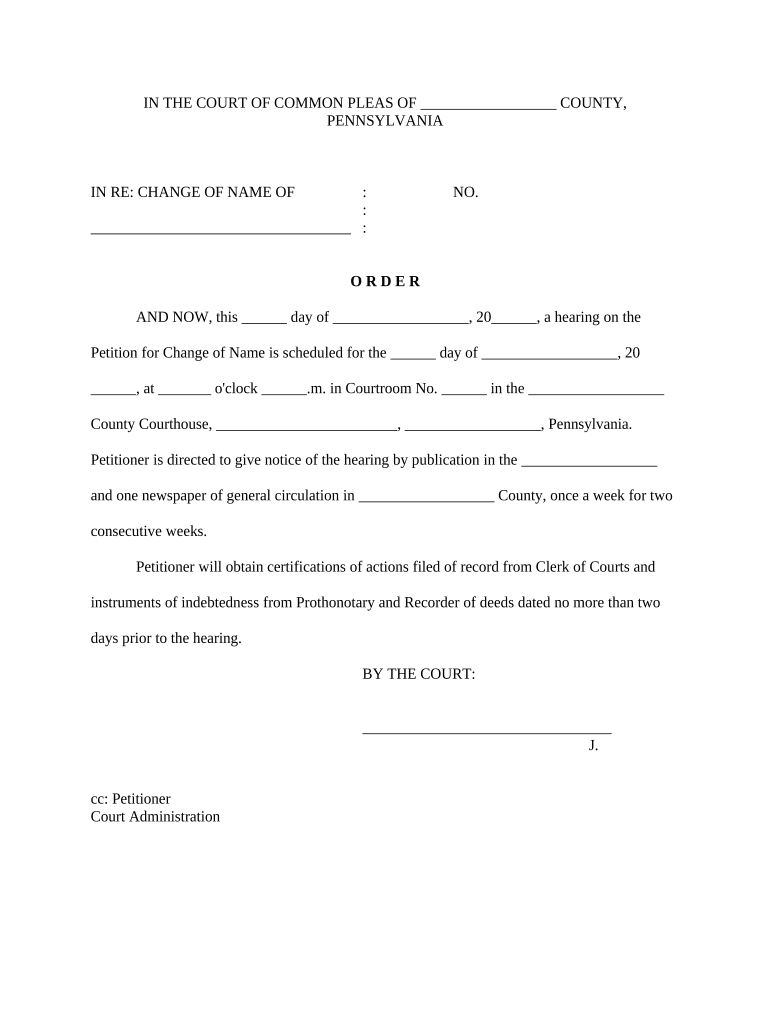
Click ‘Get Form’ to open the order hearing notice in the editor.
Begin by filling in the blank fields at the top of the form, including the county name and case number. This information is crucial for identifying your petition.
Next, specify the date of the hearing by entering it in the designated field. Ensure that you also fill in the time and courtroom number accurately.
Instructively, indicate where you will publish notice of the hearing. Fill in both publication names and ensure they are newspapers with general circulation in your county.
Lastly, remember to note that certifications from Clerk of Courts and instruments from Prothonotary must be obtained no more than two days prior to your hearing date.
Start using our platform today to easily complete your order hearing notice for free!
What happens at a notice of hearingDo I have to attend a notice of hearingCH-110 formCH-109 formCH-110 Temporary restraining orderProbate Notice of hearingHow to file a restraining order in paResponse to restraining order california
Security and compliance
At DocHub, your data security is our priority. We follow HIPAA, SOC2, GDPR, and other standards, so you can work on your documents with confidence.
Application and Notice of Hearing for Order to Terminate
Ask the court for a decision (order) to end (terminate), change (modify), or cancel (vacate) an order the court made limiting your right to spend money orRead more
Cookie consent notice
This site uses cookies to enhance site navigation and personalize your experience.
By using this site you agree to our use of cookies as described in our Privacy Notice.
You can modify your selections by visiting our Cookie and Advertising Notice.