Legal Last Will and Testament Form for Widow or Widower with Minor Children - Oregon 2026

Get Form
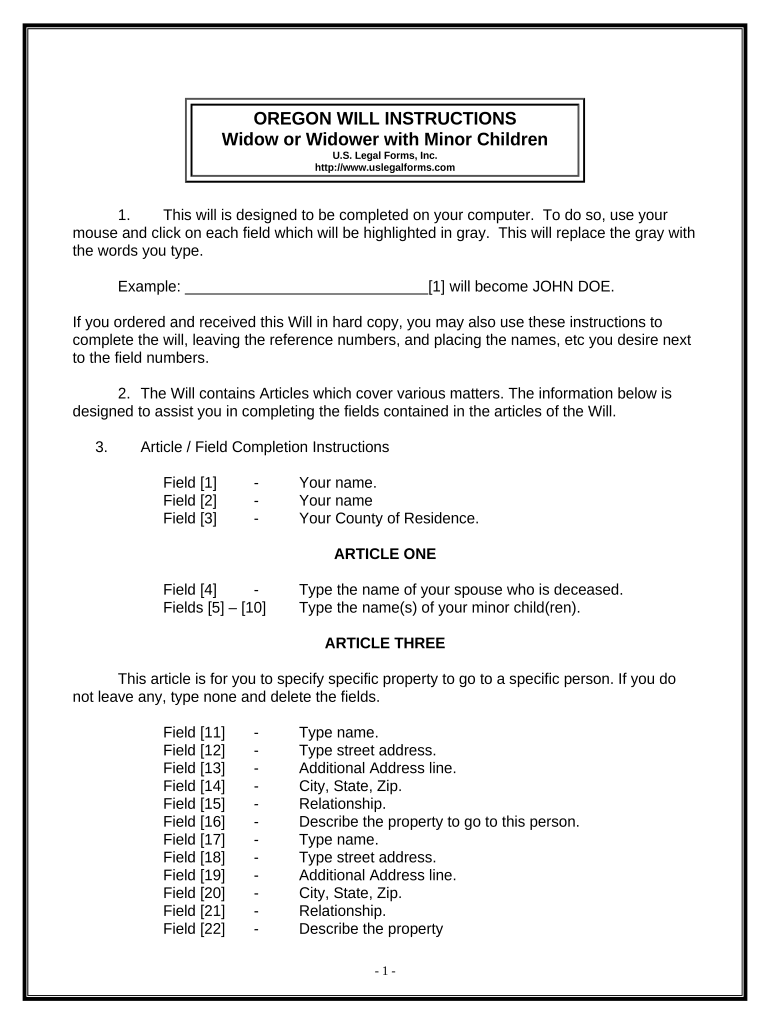
Legal Last Will and Testament Form for Widow or Widower with Minor Children - Oregon Preview on Page 1

Here's how it works

01. Edit your form online
Type text, add images, blackout confidential details, add comments, highlights and more.
02. Sign it in a few clicks
Draw your signature, type it, upload its image, or use your mobile device as a signature pad.
03. Share your form with others
Send it via email, link, or fax. You can also download it, export it or print it out.

How to use or fill out Legal Last Will and Testament Form for Widow or Widower with Minor Children - Oregon

Form edit decoration
9.5
Ease of Setup
DocHub User Ratings on G2
9.0
Ease of Use
DocHub User Ratings on G2
  1. Click ‘Get Form’ to open it in the editor.
  2. Begin by entering your name in Field [1] and your county of residence in Field [3].
  3. In Article One, specify the name of your deceased spouse in Field [4] and list your minor children’s names in Fields [5] to [10].
  4. For Article Three, if you wish to bequeath specific property, fill out the relevant fields with names, addresses, relationships, and descriptions of the property.
  5. In Article Four, designate who will receive your homestead by typing their names in Field [29].
  6. Complete Articles Six through Ten by specifying trust details for minor beneficiaries, appointing a trustee, guardian, and personal representative as needed.
  7. Review all entries for accuracy before printing. Ensure you sign the document in front of two witnesses.

Start using our platform today to easily complete your Legal Last Will and Testament form online for free!

be ready to get more

Complete this form in 5 minutes or less

Get form

Got questions?

We have answers to the most popular questions from our customers. If you can't find an answer to your question, please contact us.
Contact us

You need to use only trustworthy software solutions with strong data protection compliance to sign your documents electronically. DocHub is just the type of software you need! It stores data on Amazon Web Servers and complies with all required security criteria and eSignature regulations, so it’s a trusted way to electronically sign your Legal Last Will and Testament Form for Widow or Widower with Minor Children - Oregon or other documents with this tool.

You need only a web connection and a browser to complete your Legal Last Will and Testament Form for Widow or Widower with Minor Children - Oregon by using an iOS phone. Open the DocHub website and authenticate. Then, add your file or select it from the list in your dashboard. Then use our editing instruments to complete your form and save all your modifications. You can also send it to a specified recipient right away.

If your language is ambiguous or your intentions are not clear it could lead to instructions not being followed properly or the will being ruled invalid. Ensure you seek professional advice when writing a will, and that all of the proper steps are taken, including having the will witnessed.
Free Resource for Creating a Will We believe it is so important to plan and get ones financial affairs in order that we have partnered with FreeWill.com so that you can create your will online entirely for free. FreeWill is a secure, online tool that will take you through the will preparation process step by step.
Unclear witness rules or improper signing can invalidate a will. In Oregon, you can legally write your own will without an attorney. The will must be signed by you and witnessed by at least two competent individuals who are not beneficiaries. Notarization is not required but can help in proving authenticity.

Security and compliance

At DocHub, your data security is our priority. We follow HIPAA, SOC2, GDPR, and other standards, so you can work on your documents with confidence.

Learn more
ccpa2
pci-dss
gdpr-compliance
hipaa
soc-compliance

People also ask

How to Create Oregon Last Will and Testament Online Select a trusted online estate planning platform, service, or template. Draft your Will. Review and finalize your Will. Print out your Will. Sign the Will. Obtain signatures from two competent witnesses. Optional: get your Will docHubd if you want it to be self-proving.
You can create your own will in the state of Oregon. You do not have to use an attorney to draft your will. If you know who you want to handle your estate, what assets you have, and who you wish to receive those assets, you are ready to make a will.
Although Oregon does not require a will to be docHubd, the state allows you to make your will self-proving, which does require a notary. A self-proving will speeds up probate because the court can accept the will without contacting the witnesses who signed it.

Related links