Type text, add images, blackout confidential details, add comments, highlights and more.
02. Sign it in a few clicks
Draw your signature, type it, upload its image, or use your mobile device as a signature pad.
03. Share your form with others
Send it via email, link, or fax. You can also download it, export it or print it out.
How to use or fill out Oregon Legal Form with DocHub
Ease of Setup
DocHub User Ratings on G2
Ease of Use
DocHub User Ratings on G2
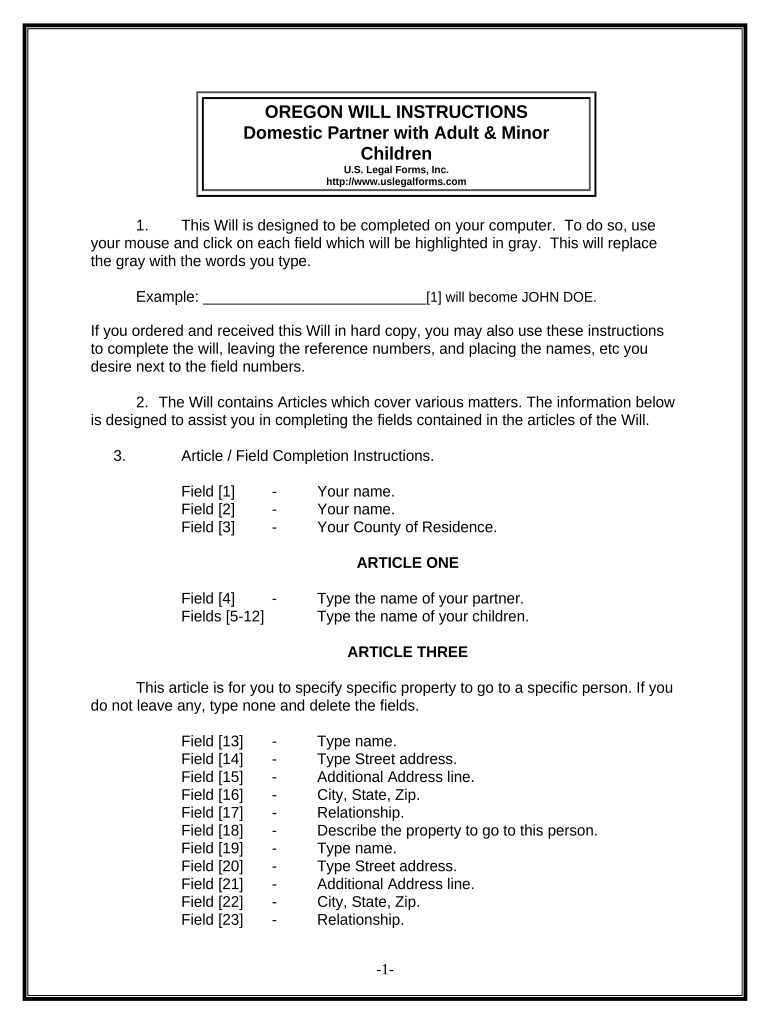
Click ‘Get Form’ to open the Oregon Will in our editor.
Begin by entering your name and county of residence in the designated fields. These are crucial for identifying you as the testator.
In Article One, specify your domestic partner's name and list your children. Ensure accuracy as this section establishes your family structure.
Proceed to Article Three to detail any specific bequests. Fill in the names, addresses, and relationships of individuals receiving property, ensuring clarity on what each person is entitled to.
Continue through Articles Four to Eleven, filling in information about your homestead, remaining property, trustees, guardianship for minor children, and personal representatives as applicable.
Review all entries for accuracy. Once completed, print the document and sign it in front of two witnesses who are not related to you.
Start using our platform today to easily complete your Oregon legal form online for free!
The Oregon Judicial Department (OJD) provides access to court records maintained in the Oregon eCourt Information system without charge, through public access terminals in each circuit court. In addition, routine requests to inspect court case files may be made at the court clerks counter in each state court.
How to write a legal will in Oregon?
Steps to Create a Will in Oregon Decide what property to include in your will. Decide who will inherit your property. Choose an executor to handle your estate. Choose a guardian for your children. Choose someone to manage childrens property. Make your will. Sign your will in front of witnesses. Store your will safely.
How to form LLC in Oregon?
1:25 4:00 Step one find a business name start by visiting sos. Orggon.go. /business to search for your desiredMoreStep one find a business name start by visiting sos. Orggon.go. /business to search for your desired. Business name use the state of Oregons. Business name search to check whether your desired
How much does it cost to access Oregon court records?
Copy Cost Per Page: 25 cents per page. Certified Copy: $5.00 + per page copy charge. Exemplified Copy: $10.00 + per page copy charge. Cost per Request in a Case for Regular copies: $3.00 per case request + per page copy charge.
What is the best way to get court documents?
First, go to the courthouse. Second, find a clerk and tell the clerk the name of the person whose court records you want to see. Third, if you want copies of the court records, ask the court clerk the cost of copies. Fourth, pay the clerk the cost. Fifth, leave the courthouse. Its very complicated.
Related Searches
Oregon legal forms free downloadOregon Civil complaint formOregon Family Law formsOregon subpoena formOregon Court formsWashington County Oregon Court FormsOregon circuit Court formsOregon Courts
Security and compliance
At DocHub, your data security is our priority. We follow HIPAA, SOC2, GDPR, and other standards, so you can work on your documents with confidence.
Cookie consent notice
This site uses cookies to enhance site navigation and personalize your experience.
By using this site you agree to our use of cookies as described in our Privacy Notice.
You can modify your selections by visiting our Cookie and Advertising Notice.