Affidavit for Deferral of Fees with emphasis On persons supported and employment - Oregon 2026

Get Form
Affidavit for Deferral of Fees with emphasis On persons supported and employment - Oregon Preview on Page 1

Here's how it works

01. Edit your form online
Type text, add images, blackout confidential details, add comments, highlights and more.
02. Sign it in a few clicks
Draw your signature, type it, upload its image, or use your mobile device as a signature pad.
03. Share your form with others
Send it via email, link, or fax. You can also download it, export it or print it out.

How to use or fill out Affidavit for Deferral of Fees with emphasis On persons supported and employment - Oregon

Form edit decoration
9.5
Ease of Setup
DocHub User Ratings on G2
9.0
Ease of Use
DocHub User Ratings on G2
  1. Click ‘Get Form’ to open it in the editor.
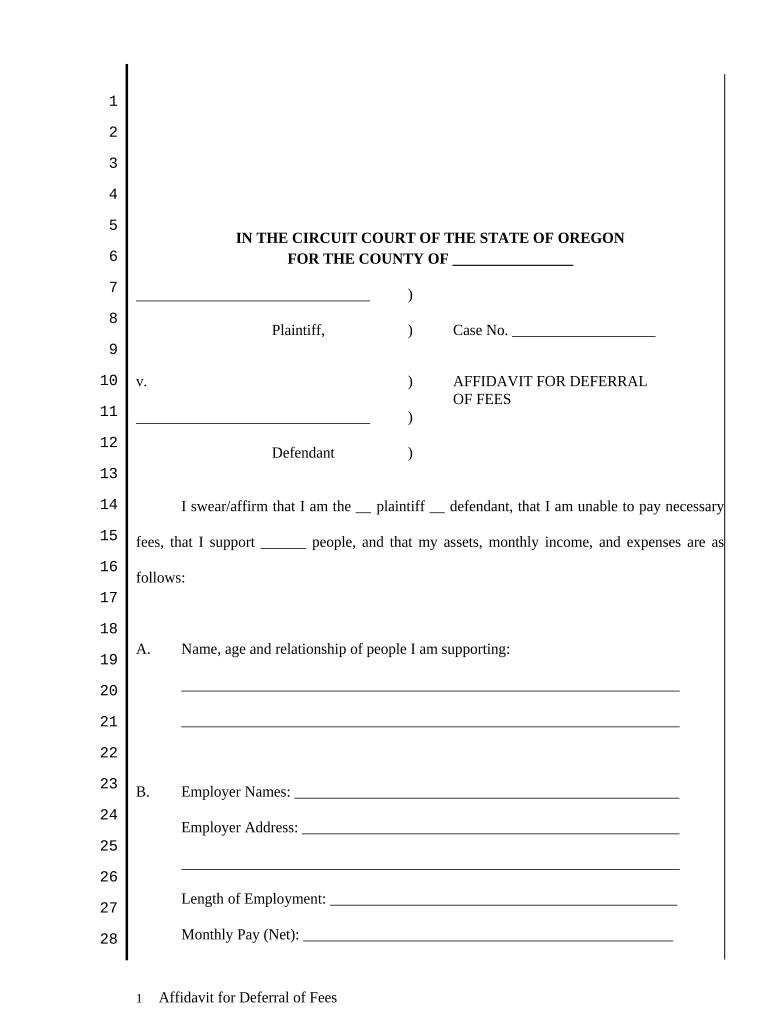
  2. Begin by identifying yourself as either the plaintiff or defendant in the designated field. This establishes your role in the case.
  3. In section A, list the names, ages, and relationships of the individuals you support. This information is crucial for assessing your financial responsibilities.
  4. Proceed to section B to provide details about your employment. Fill in your employer's name, address, length of employment, and monthly net pay.
  5. In section C, disclose any additional income sources, including your spouse’s income if applicable. Ensure you calculate the total monthly income accurately.
  6. Section D requires you to detail all other assets and their values. Be thorough in listing real property, vehicles, and any other significant items.
  7. Complete sections E and F by detailing bank accounts, cash on hand, and any money owed to you or your spouse.
  8. Finally, outline your monthly expenses in section G. Include housing costs, car payments, loans, and other living expenses for a comprehensive overview.
  9. After filling out all sections, sign and date the affidavit at the bottom before submitting it for review.

Start using our platform today to easily complete your Affidavit for Deferral of Fees online for free!

be ready to get more

Complete this form in 5 minutes or less

Get form

Got questions?

We have answers to the most popular questions from our customers. If you can't find an answer to your question, please contact us.
Contact us

With DocHub, it’s pretty simple. The platform offers users an add-on called DocHub for Gmail, which you can find in the Google Workspace Marketplace free of charge. Install it and give it access to your Google account. Open your email with your Affidavit for Deferral of Fees with emphasis On persons supported and employment - Oregon attached and click on the add-on button in the right-side panel. Log in to your DocHub account, and import the form to our editor, where you can complete it and sign.

If you store your files in Google Drive, there is no need to download your Affidavit for Deferral of Fees with emphasis On persons supported and employment - Oregon on the computer and upload it back to our editor. A much simpler way is to set up a browser extension created by DocHub to simplify this flow. The extension allows editing PDFs right in your internet browser. Alternatively, you may integrate your DocHub and Gmail accounts for more efficient modifying.

Security and compliance

At DocHub, your data security is our priority. We follow HIPAA, SOC2, GDPR, and other standards, so you can work on your documents with confidence.

Learn more
ccpa2
pci-dss
gdpr-compliance
hipaa
soc-compliance