Type text, add images, blackout confidential details, add comments, highlights and more.
02. Sign it in a few clicks
Draw your signature, type it, upload its image, or use your mobile device as a signature pad.
03. Share your form with others
Send it via email, link, or fax. You can also download it, export it or print it out.
How to use or fill out Warning Notice Due to Complaint from Neighbors - Oregon
Ease of Setup
DocHub User Ratings on G2
Ease of Use
DocHub User Ratings on G2
Click ‘Get Form’ to open it in the editor.
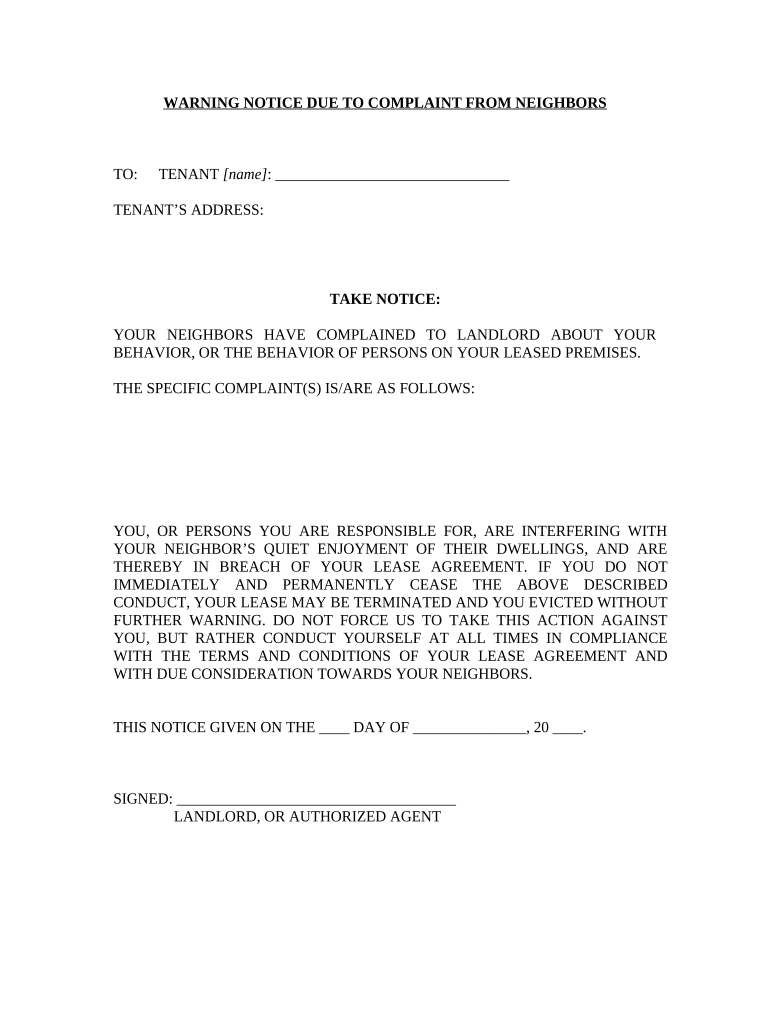
Begin by entering the tenant's name in the designated field labeled 'TENANT [name]'. This ensures that the notice is addressed correctly.
Next, fill in the tenant’s address under 'TENANT’S ADDRESS'. Accurate information is crucial for proper delivery of the notice.
In the section titled 'TAKE NOTICE', review and ensure that any specific complaints are clearly articulated. You may need to customize this section based on the complaints received.
Make sure to complete the date on which this notice is given, filling in both day and month appropriately.
Finally, sign the document as 'LANDLORD, OR AUTHORIZED AGENT' at the bottom. This validates the notice and confirms its authenticity.
Start using our platform today to easily edit and manage your documents for free!
Fill out Warning Notice Due to Complaint from Neighbors - Oregon online It's free
Noise complaint PortlandPortland noise complaint redditNoise complaint greshamReport a noise concern formWho to call for a noise complaint at nightWhat qualifies as a noise complaintMultnomah County noise ordinancePortland maps complaints
Security and compliance
At DocHub, your data security is our priority. We follow HIPAA, SOC2, GDPR, and other standards, so you can work on your documents with confidence.
All warnings contain a compliance date. If compliance is not met by the compliance date, staff may issue a second notice. In certain situations, such as healthRead more
Nov 18, 2024 This notice is to inform you of a pending lawn care pesticide application to a neighboring property. You may wish to take precautions to minimize pesticideRead more
ITRC, ERIS and ECOS shall not be liable in the event of any conflict between inform- ation in ITRC Materials and such laws, regulations, and/or other ordinancesRead more
Cookie consent notice
This site uses cookies to enhance site navigation and personalize your experience.
By using this site you agree to our use of cookies as described in our Privacy Notice.
You can modify your selections by visiting our Cookie and Advertising Notice.