Type text, add images, blackout confidential details, add comments, highlights and more.
02. Sign it in a few clicks
Draw your signature, type it, upload its image, or use your mobile device as a signature pad.
03. Share your form with others
Send it via email, link, or fax. You can also download it, export it or print it out.
How to use or fill out husband wife corporation with our platform
Ease of Setup
DocHub User Ratings on G2
Ease of Use
DocHub User Ratings on G2
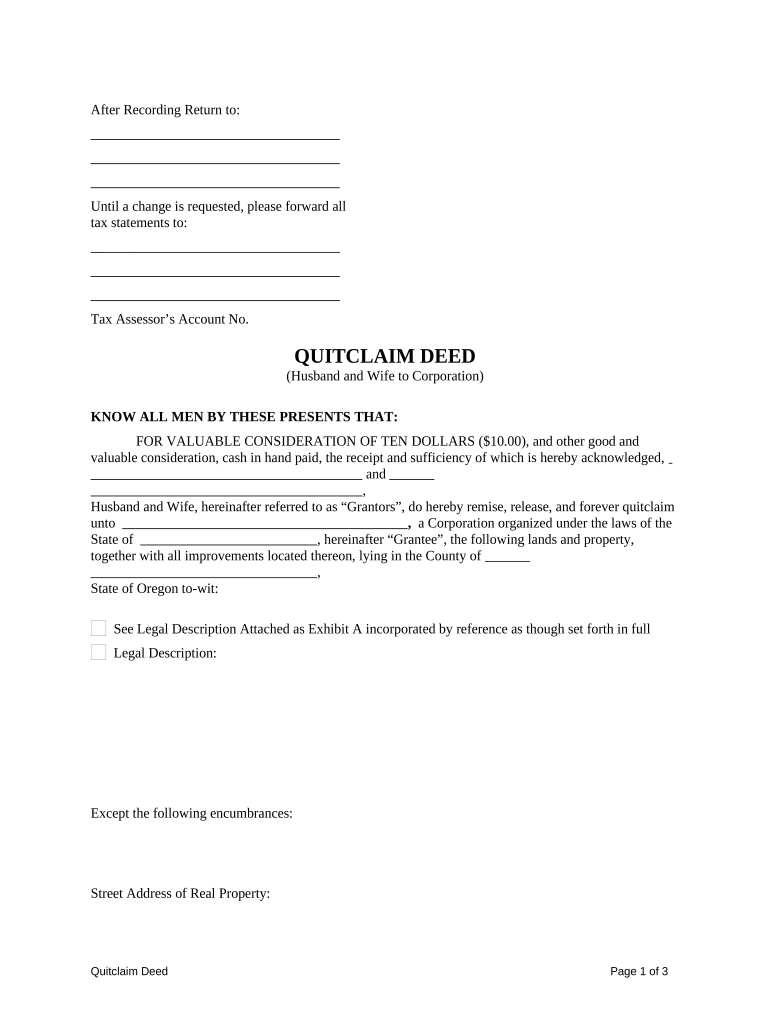
Click ‘Get Form’ to open the husband wife corporation document in the editor.
Begin by entering the names of the Grantors (Husband and Wife) in the designated fields. Ensure that both names are spelled correctly as they will appear on the deed.
Fill in the Grantee's name, which is the Corporation receiving the property. Make sure to include any necessary details about its organization under state laws.
Provide a detailed legal description of the property being transferred. If you have an attachment, upload it using our platform’s file upload feature.
Indicate any encumbrances or exceptions related to the property, such as oil, gas, and mineral rights. This section is crucial for clarity on what is included in the transfer.
Complete tax-related information by specifying how taxes for the current year will be prorated between Grantors and Grantee.
Both Grantors must sign and print their names at the bottom of the form. Ensure that all signatures are clear and legible.
Finally, arrange for a Notary Public to acknowledge your signatures as required by law before finalizing your document.
Start editing your husband wife corporation document today for free on our platform!
Fill out husband wife corporation online It's free
Husband wife corporation pros and consHusband and wife partnership LLCHusband and wife LLC pros and consMulti member LLC married coupleDoes a husband and wife LLC have to file a partnership returnHusband wife corporation californiaHusband and wife LLC single-memberCan both husband and wife be shareholders of S Corp
Security and compliance
At DocHub, your data security is our priority. We follow HIPAA, SOC2, GDPR, and other standards, so you can work on your documents with confidence.
Definition: members of a family from 26 USC 1361(c)(1)
The term members of a family means a common ancestor, any lineal descendant of such common ancestor, and any spouse or former spouse of such common ancestor.Read more
The real estate excise tax applies to a conveyance to a corporation by a husband and wife under a property settlement agreement which provides that aRead more
Cookie consent notice
This site uses cookies to enhance site navigation and personalize your experience.
By using this site you agree to our use of cookies as described in our Privacy Notice.
You can modify your selections by visiting our Cookie and Advertising Notice.