Lessor residential 2026

Get Form
lessor residential Preview on Page 1

Here's how it works

01. Edit your form online
Type text, add images, blackout confidential details, add comments, highlights and more.
02. Sign it in a few clicks
Draw your signature, type it, upload its image, or use your mobile device as a signature pad.
03. Share your form with others
Send it via email, link, or fax. You can also download it, export it or print it out.

How to use or fill out lessor residential with our platform

Form edit decoration
9.5
Ease of Setup
DocHub User Ratings on G2
9.0
Ease of Use
DocHub User Ratings on G2
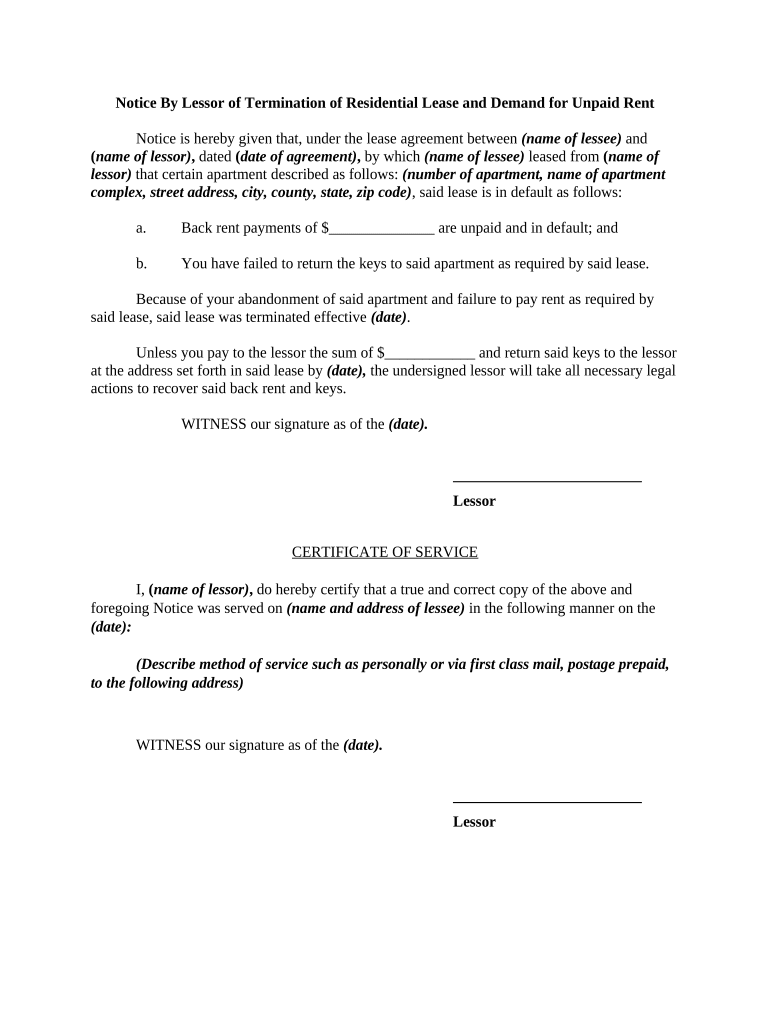
  1. Click ‘Get Form’ to open the lessor residential document in the editor.
  2. Begin by entering the name of the lessee and lessor in the designated fields. Ensure accuracy as this information is crucial for legal purposes.
  3. Fill in the date of the lease agreement, followed by the apartment details including number, complex name, street address, city, county, state, and zip code.
  4. Specify the amount of unpaid back rent in the appropriate field. This should reflect any outstanding payments as per your records.
  5. Indicate whether keys have been returned as required by checking the relevant box or providing a brief explanation if necessary.
  6. Set an effective termination date for the lease and ensure it aligns with your records.
  7. Complete the certificate of service section by certifying that a copy of this notice was served to the lessee, including their name and address.
  8. Finally, sign and date at the bottom of the document to validate your notice before saving or sending it directly from our platform.

Start using our platform today to streamline your document editing and signing process for free!

be ready to get more

Complete this form in 5 minutes or less

Get form

Got questions?

We have answers to the most popular questions from our customers. If you can't find an answer to your question, please contact us.
Contact us
53111 - Lessors of residential buildings and dwellings This industry comprises establishments primarily engaged in renting and leasing residential buildings and dwellings, such as apartments, single family homes and semi-detached or row houses.
lessee: Whats the difference? In a lease agreement, the lessor is the person or party that issues the lease (allows the property to be rented), and the lessee is the person that the lease is granted to (the person paying rent to use the property).
As such, a lessor is the owner of an asset that is leased under an agreement to a lessee. The lessee makes a one-time payment or a series of periodic payments to the lessor in return for the use of the asset. For example, a landlord is a lessor, and a tenant is a lessee.
Lessor meaning A lessor is an entity that is allowing another party to use an asset in exchange for something, such as a cash payment. For example, an entity owning a building may allow a company the right to use its building for office space. The owners of the building are the lessor and the company is the lessee.
Lessor is a person or organization that legally owns an asset (such as real estate, equipment, machinery, etc.) and allows others to use that asset through signing a lease contract.

Security and compliance

At DocHub, your data security is our priority. We follow HIPAA, SOC2, GDPR, and other standards, so you can work on your documents with confidence.

Learn more
ccpa2
pci-dss
gdpr-compliance
hipaa
soc-compliance

People also ask

The lessor is typically the owner of the property, while the lessee is the tenant who occupies the property and pays rent. The lease agreement is the contract that outlines the terms of their respective duties and responsibilities.
The lessor is the owner of property who contracts with another, the lessee, to allow them to take temporary possession of their property through a lease. If the property is real estate, the lessor is referred to as a landlord. [Last reviewed in April of 2022 by the Wex Definitions Team] Wex.

Related links