Employment agreement sales 2026

Get Form
employment agreement sales Preview on Page 1

Here's how it works

01. Edit your form online
Type text, add images, blackout confidential details, add comments, highlights and more.
02. Sign it in a few clicks
Draw your signature, type it, upload its image, or use your mobile device as a signature pad.
03. Share your form with others
Send it via email, link, or fax. You can also download it, export it or print it out.

How to use or fill out employment agreement sales with our platform

Form edit decoration
9.5
Ease of Setup
DocHub User Ratings on G2
9.0
Ease of Use
DocHub User Ratings on G2
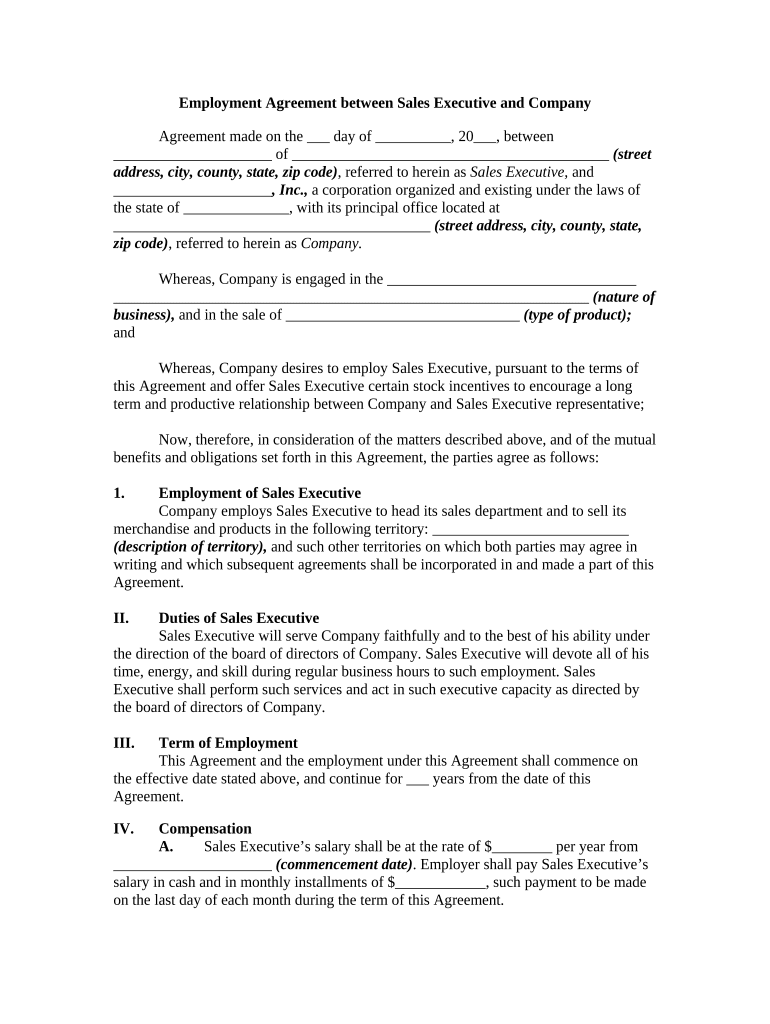
  1. Click ‘Get Form’ to open the employment agreement sales document in the editor.
  2. Begin by filling in the date of the agreement and the names and addresses of both the Sales Executive and the Company. Ensure all details are accurate for legal purposes.
  3. In Section I, specify the territory where the Sales Executive will operate. This is crucial for defining sales responsibilities.
  4. For Section II, outline the duties expected from the Sales Executive. Be clear about performance expectations to avoid misunderstandings.
  5. In Section III, indicate the term of employment. Specify how long this agreement will be valid.
  6. Fill out Section IV regarding compensation, including salary, commission rates, and stock incentives. Ensure these figures are precise to prevent disputes later.
  7. Complete any additional sections as necessary, such as expenses and vacation policies, ensuring all fields are filled out completely.

Start using our platform today to streamline your employment agreements for free!

be ready to get more

Complete this form in 5 minutes or less

Get form

Got questions?

We have answers to the most popular questions from our customers. If you can't find an answer to your question, please contact us.
Contact us

If you regularly deal with documents stored in your Google Drive, DocHub is a superb option for you to easily and quickly fill out, edit, and sign them. This editor integrates properly with Google apps, so you can export your employment agreement sales from your Google Drive to the editor without the need of downloading and re-uploading it. Right-click on your file, select Open With → DocHub PDF Sign and Edit. In our editor, add and assign Signature Fields for all parties involved, then click on the Menu button above → Send → choose how you want to share your paperwork.

You can easily edit and complete your employment agreement sales on any iOS gadget. Open an internet browser of your liking, visit the DocHub website, authorize or create a new account, add your file for editing, and make your required alterations. Our service is mobile-friendly, so using its features on your phone will be a no-brainer, even on the first try.

An employment agreement is a contract between an employer and an employee that defines the terms and conditions of employment. An employment agreement, or workplace agreement, solidifies the working relationship between the employer and employee by outlining both parties rights, responsibilities, and expectations.
Pros of an employment agreement They can define expectations: Employment agreements provide specific details about the terms you can expect from employment. If you have questions about compensation, benefits or responsibilities, you can refer to the document for clear guidance.
How do I write a Sales Agreement? Specify your location. Provide the buyers and sellers information. Describe the goods and services. State the price and deposit details (if applicable) Outline payment details. Provide delivery terms. Include liability details. State if theres a warranty on the goods.

Security and compliance

At DocHub, your data security is our priority. We follow HIPAA, SOC2, GDPR, and other standards, so you can work on your documents with confidence.

Learn more
ccpa2
pci-dss
gdpr-compliance
hipaa
soc-compliance
be ready to get more

Complete this form in 5 minutes or less

Get form

People also ask

In doing so, California recognizes several forms of employment contracts. So, how do you know if you, as an employee, are protected by an employment contract? One obvious way to know you have an employment contract would be that you negotiated terms and signed a contract with your employer.
The purpose of a sales agreement is to act as a legally binding contract between two parties involved in an exchange of money for goods, services, and/or property. One party is a buyer, while the other is a seller. Both the buyer and seller may be individuals or organizations.
Unliked fixed-term or casual contracts, the permanent contract definition is a contract that will not expire, but remain valid until either employer or employee chooses to end the relationship.
In Alberta, an employment contract usually includes details about your job, what youll be doing, how much youll be paid, when youll work, vacation time, and workplace rules.

Related links