Type text, add images, blackout confidential details, add comments, highlights and more.
02. Sign it in a few clicks
Draw your signature, type it, upload its image, or use your mobile device as a signature pad.
03. Share your form with others
Send it via email, link, or fax. You can also download it, export it or print it out.
How to use or fill out issue shares with our platform
Ease of Setup
DocHub User Ratings on G2
Ease of Use
DocHub User Ratings on G2
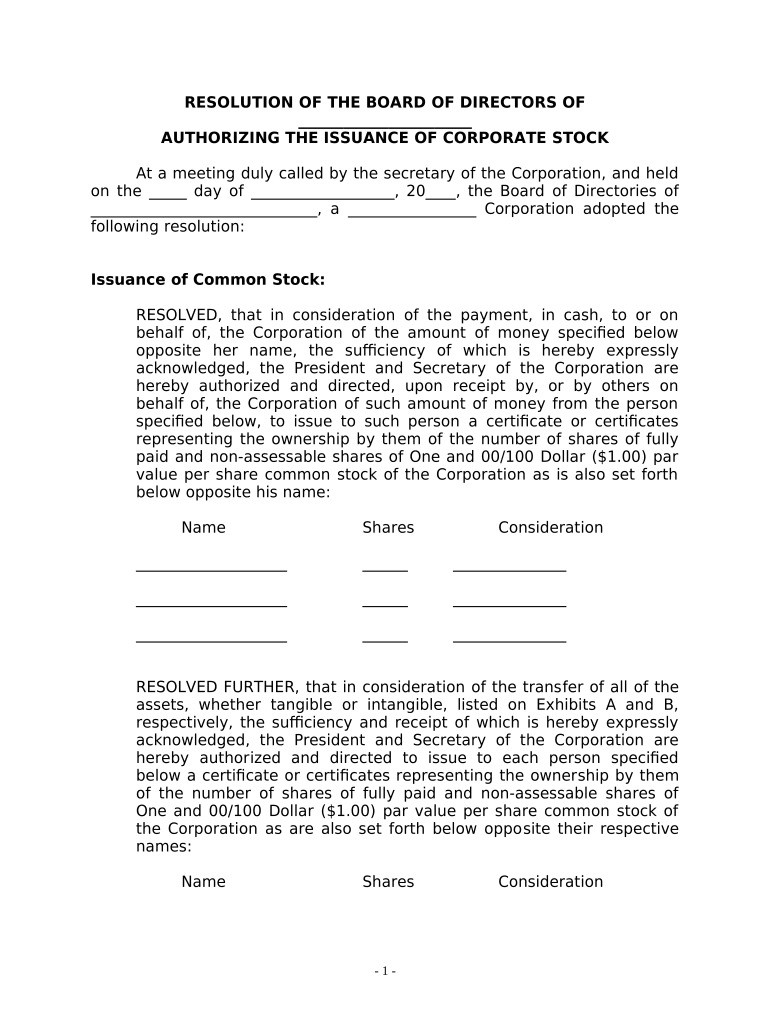
Click ‘Get Form’ to open the issue shares document in the editor.
Begin by entering the date of the meeting in the designated field labeled '__ day of _______, 20_'. This sets the context for your resolution.
Fill in the name of your corporation where indicated. Ensure that it matches your official business name for accuracy.
In the section for 'Issuance of Common Stock', list each individual's name, number of shares, and consideration amount in the respective fields. This information is crucial for documenting ownership.
For any assets being transferred, refer to Exhibits A and B. Ensure that all relevant details are accurately filled out to reflect these transactions.
Finally, have all directors sign at the bottom of the document. You can easily add signature fields using our platform’s tools to streamline this process.
Start editing your issue shares form online for free today!
Issue shares meaningIssue shares listIssued shares vs outstanding sharesIssue of shares Examples4 methods of issuing sharesIssue of shares pdfAuthorized vs issued sharesIssued shares formula
Security and compliance
At DocHub, your data security is our priority. We follow HIPAA, SOC2, GDPR, and other standards, so you can work on your documents with confidence.
Its issued by a company to raise capital without jeopardizing the controlling interests of the common stockholders. The benefits of investing in this type ofRead more
REASON FOR ISSUE? Raising capital without diluting their control. Preventing hostile takeover by separating economic interests and voting rightsRead more
Cookie consent notice
This site uses cookies to enhance site navigation and personalize your experience.
By using this site you agree to our use of cookies as described in our Privacy Notice.
You can modify your selections by visiting our Cookie and Advertising Notice.