Type text, add images, blackout confidential details, add comments, highlights and more.
02. Sign it in a few clicks
Draw your signature, type it, upload its image, or use your mobile device as a signature pad.
03. Share your form with others
Send school waiver via email, link, or fax. You can also download it, export it or print it out.
How to use or fill out school waiver form with DocHub
Ease of Setup
DocHub User Ratings on G2
Ease of Use
DocHub User Ratings on G2
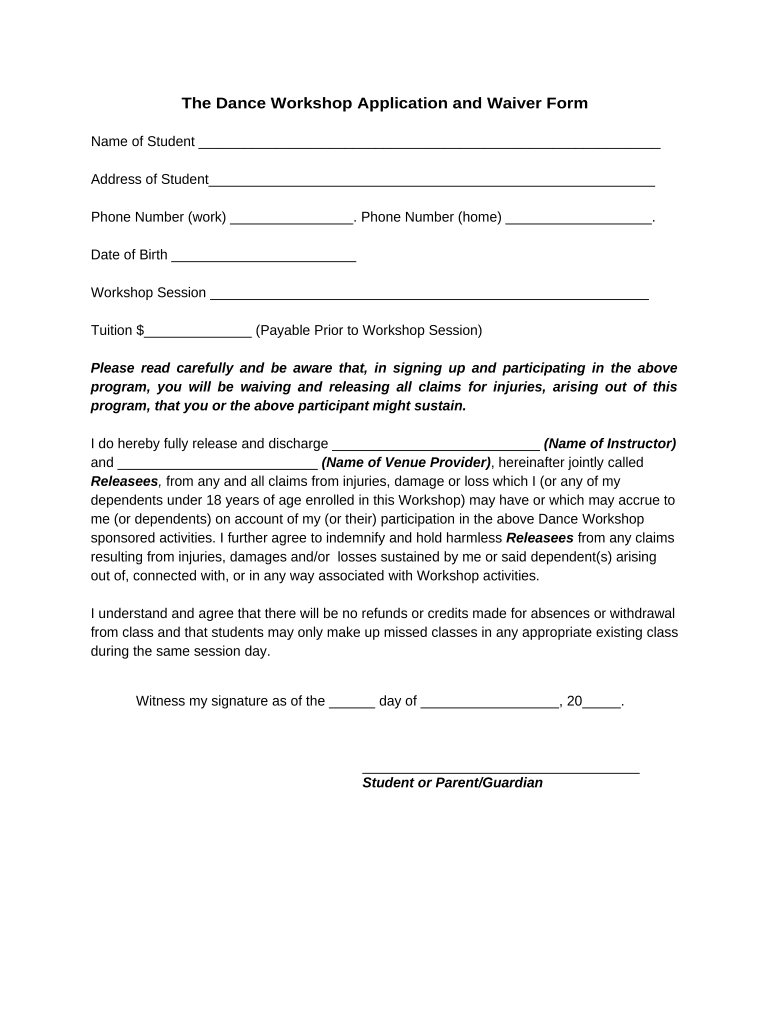
Click ‘Get Form’ to open the school waiver form in our editor.
Begin by entering the student's name in the designated field at the top of the form. This ensures that all information is accurately linked to the correct participant.
Next, fill in the address and phone numbers for both work and home. This contact information is crucial for any necessary communication regarding the workshop.
Input the date of birth of the student. This helps verify age requirements for participation in the workshop.
Select your desired workshop session from the provided options. Make sure to choose a session that fits your schedule.
Enter the tuition amount in the specified field, ensuring you are aware of payment requirements prior to attending.
Read through the waiver carefully, acknowledging that you understand and agree to its terms by signing at the bottom as either a student or parent/guardian.
Start using our platform today to easily complete your school waiver form online for free!
School waiver form pdfSchool waiver form onlineSchool waiver form texasSchool waiver form californiaTEA waiver applicationLee County school transfer formNSD waiver formWaiver for School
Security and compliance
At DocHub, your data security is our priority. We follow HIPAA, SOC2, GDPR, and other standards, so you can work on your documents with confidence.
An Application For Waiver of School Fees form may be included with the first bill or fee notice. The notification must describe: the Policy For Waiver ofRead more
Nov 5, 2025 Non-staff chaperones should sign a waiver provided by the school and are encouraged to purchase personal insurance if they do not already haveRead more
Cookie consent notice
This site uses cookies to enhance site navigation and personalize your experience.
By using this site you agree to our use of cookies as described in our Privacy Notice.
You can modify your selections by visiting our Cookie and Advertising Notice.