Forwarding correspondence 2026

Get Form
apar forwarding letter Preview on Page 1

Here's how it works

01. Edit your apar forwarding letter online
Type text, add images, blackout confidential details, add comments, highlights and more.
02. Sign it in a few clicks
Draw your signature, type it, upload its image, or use your mobile device as a signature pad.
03. Share your form with others
Send it via email, link, or fax. You can also download it, export it or print it out.

How to use or fill out forwarding correspondence with our platform

Form edit decoration
9.5
Ease of Setup
DocHub User Ratings on G2
9.0
Ease of Use
DocHub User Ratings on G2
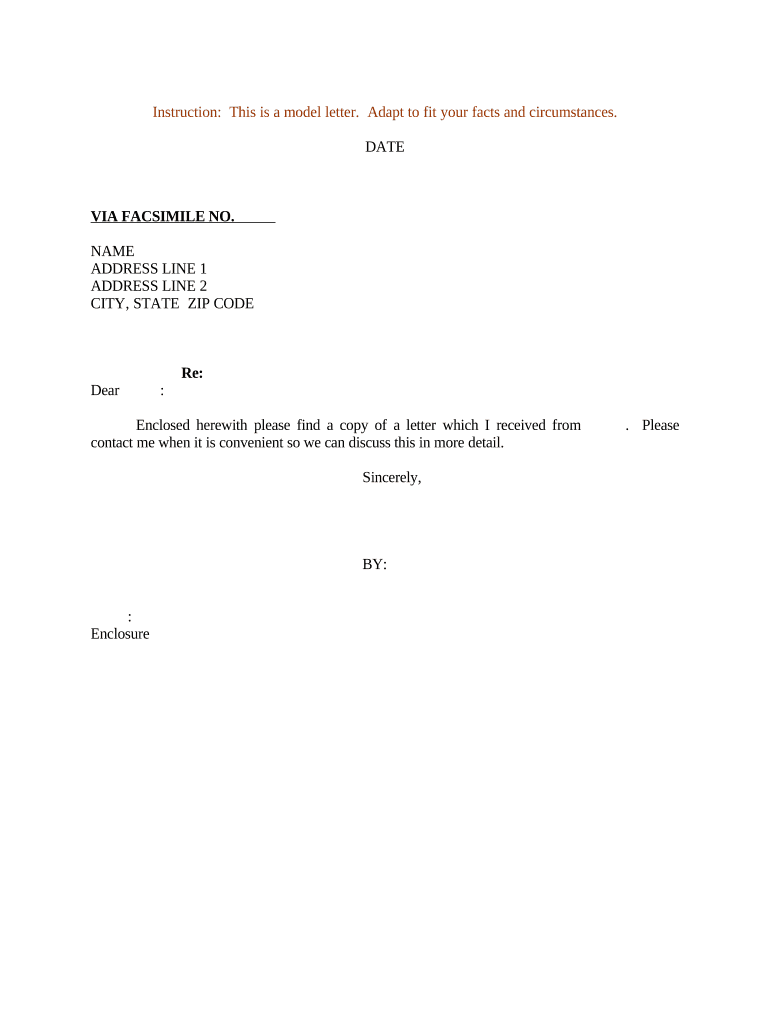
  1. Click ‘Get Form’ to open the forwarding correspondence template in the editor.
  2. Begin by entering the date at the top of the document. This is crucial for record-keeping and ensures clarity regarding when the correspondence was sent.
  3. In the 'VIA FACSIMILE NO.' field, input the recipient's fax number. This allows for direct communication and ensures your letter reaches them promptly.
  4. Fill in the recipient's name and address details in the designated fields. Make sure to include all necessary information such as street address, city, state, and ZIP code to avoid any delivery issues.
  5. In the 'Re:' section, specify the subject of your correspondence. This helps clarify the purpose of your letter right from the start.
  6. Compose a personalized greeting using 'Dear' followed by the recipient's name. This adds a professional touch to your communication.
  7. In the body of your letter, clearly state that you are enclosing a copy of another letter you received. Invite them to contact you for further discussion on this matter.
  8. Conclude with a polite closing such as 'Sincerely,' followed by your name and title in the 'BY:' section. Don’t forget to attach any enclosures mentioned.

Start using our platform today for free to streamline your document editing and correspondence!

be ready to get more

Complete this form in 5 minutes or less

Get form

Got questions?

We have answers to the most popular questions from our customers. If you can't find an answer to your question, please contact us.
Contact us
Forwarding an email I am forwarding the email below to you, hoping you will be able to reply to the students questions. I have received some questions about XX (see below). I received the following email and hope you will be able to get in touch with XX.
Going forward synonyms As we move forward, lets prioritize customer feedback. As we proceed, please ensure all reports are fact-checked before submission. From here on out, all team meetings will be held once a month instead of once a week. From now on, expense reports must be submitted to Katherine.
Forwarding the email, add a message informing the new recipient about the context of the forwarded email: I am forwarding the email below to you, hoping you will be able to reply to the students questions.
Hello Team, I hope this message finds you well. Im looping in [New Participants Name], from [Department/Role], to provide their expertise on [Topic/Reason]. Provide Context: Offer a brief summary of the conversation so far, highlighting key points that the new participant needs to be aware of.
Open an email. At the bottom of the email, click Forward. In the email, add your recipients. Click Send.

Security and compliance

At DocHub, your data security is our priority. We follow HIPAA, SOC2, GDPR, and other standards, so you can work on your documents with confidence.

Learn more
ccpa2
pci-dss
gdpr-compliance
hipaa
soc-compliance
be ready to get more

Complete this form in 5 minutes or less

Get form

People also ask

Here are six email phrases to consider when sharing information or directions: Please note the following: Quick heads up Im sending you a friendly reminder that It may serve you to know You may find this helpful: When you youll need to

Related links