Bartering contract 2026

Get Form
contract barter Preview on Page 1

Here's how it works

01. Edit your contract barter online
Type text, add images, blackout confidential details, add comments, highlights and more.
02. Sign it in a few clicks
Draw your signature, type it, upload its image, or use your mobile device as a signature pad.
03. Share your form with others
Send it via email, link, or fax. You can also download it, export it or print it out.

How to use or fill out bartering contract with our platform

Form edit decoration
9.5
Ease of Setup
DocHub User Ratings on G2
9.0
Ease of Use
DocHub User Ratings on G2
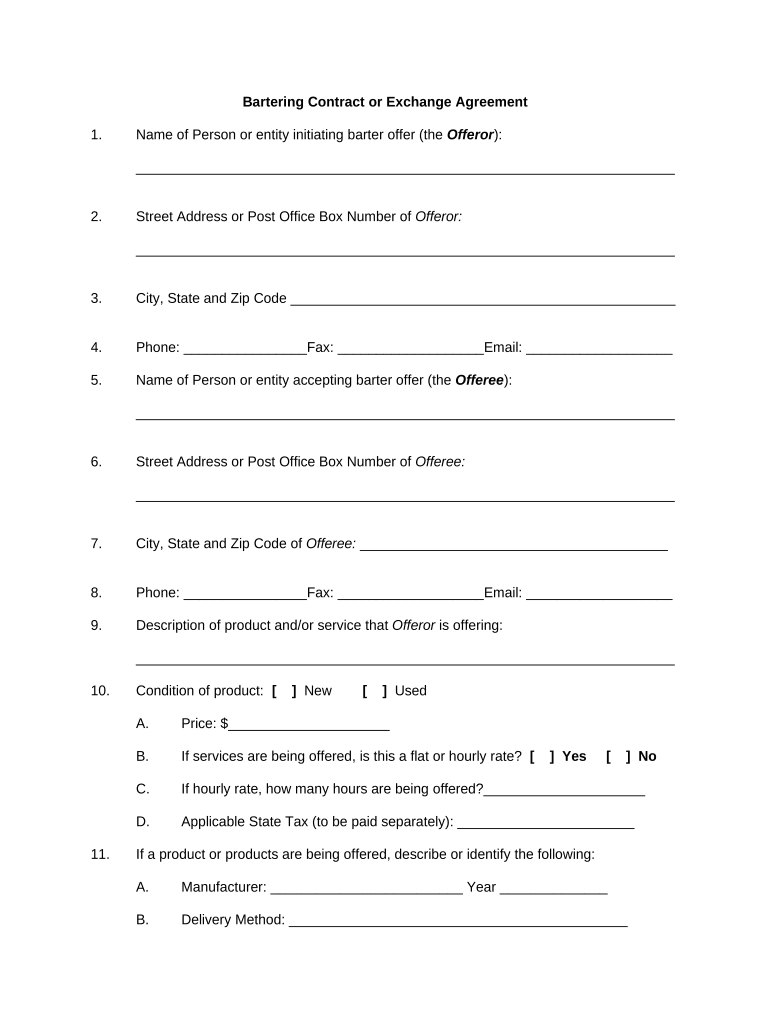
  1. Click ‘Get Form’ to open the bartering contract in the editor.
  2. Begin by entering the name of the person or entity initiating the barter offer in the designated field for the Offeror.
  3. Fill in the Offeror's street address, city, state, and zip code to ensure accurate identification.
  4. Provide contact information including phone, fax, and email for both the Offeror and Offeree.
  5. Describe the product or service being offered by filling out the relevant fields, including its condition (new or used) and price.
  6. Specify any additional details about delivery methods and responsibilities for both parties regarding payment and delivery.
  7. Review all entered information carefully before finalizing your agreement to ensure accuracy and completeness.

Start using our platform today to streamline your bartering agreements effortlessly!

be ready to get more

Complete this form in 5 minutes or less

Get form

Got questions?

We have answers to the most popular questions from our customers. If you can't find an answer to your question, please contact us.
Contact us

eSignatures are a great replacement for traditional signing, as they save time, effort, and money people spend on printing, scanning, and paper delivery. You can electronically sign your bartering contract using a trustworthy and powerful online document management tool like DocHub. It complies with main eSignature standards (ESIGN and UETA), so all forms approved there are legally binding and have the same validity as manually signed ones.

If you want to edit your bartering contract on the internet easily, it does not matter what web browser you use. DocHub’s straightforward editing instruments are available using any internet browser. Simply open the appropriate tab in the editor, add your document, and fill it out without stress.

Security and compliance

At DocHub, your data security is our priority. We follow HIPAA, SOC2, GDPR, and other standards, so you can work on your documents with confidence.

Learn more
ccpa2
pci-dss
gdpr-compliance
hipaa
soc-compliance