Type text, add images, blackout confidential details, add comments, highlights and more.

02. Sign it in a few clicks
Draw your signature, type it, upload its image, or use your mobile device as a signature pad.

03. Share your form with others
Send it via email, link, or fax. You can also download it, export it or print it out.

How to use or fill out form corporate resolutions with our platform
Ease of Setup
DocHub User Ratings on G2
Ease of Use
DocHub User Ratings on G2
Click ‘Get Form’ to open the corporate resolutions form in the editor.
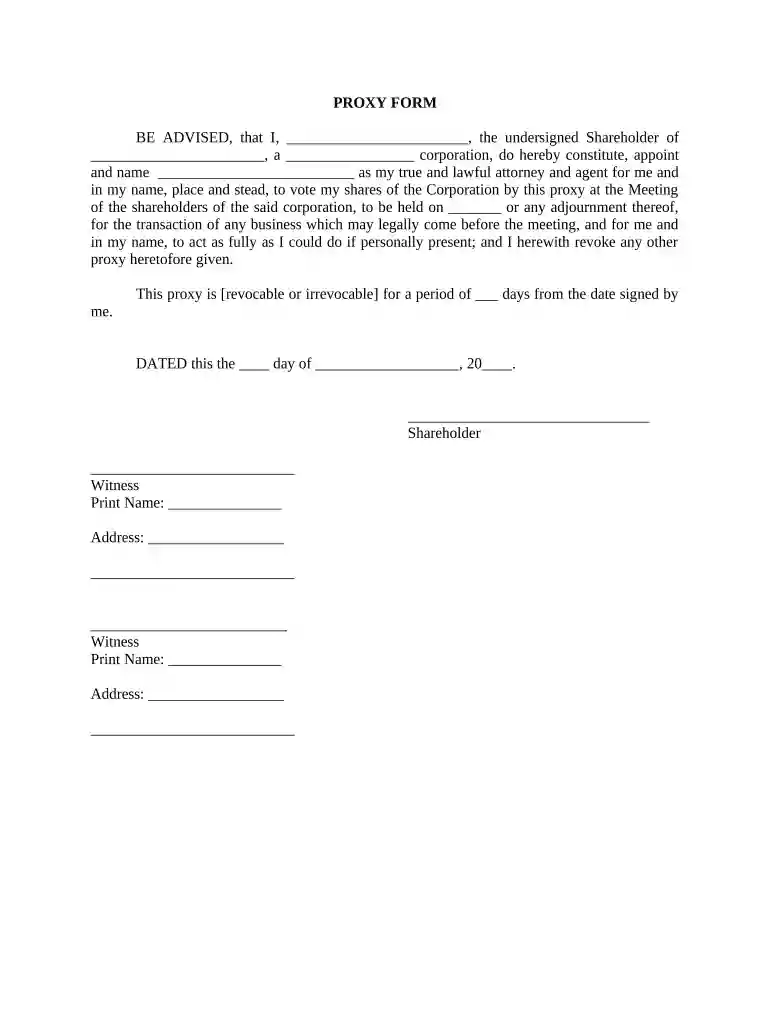
Begin by filling in your name as the Shareholder in the designated field. This identifies you as the individual granting the proxy.
Next, enter the name of your corporation and its type (e.g., 'for-profit', 'non-profit') in the appropriate sections to specify which entity this proxy pertains to.
Designate your attorney and agent by entering their name in the provided space. This person will represent you at the shareholder meeting.
Indicate the date of the meeting where this proxy will be used, ensuring it is accurate for proper representation.
Select whether this proxy is revocable or irrevocable and specify the duration in days from when you sign it.
Finally, complete the form by signing and dating it, along with providing witness information as required.
Start using our platform today to streamline your corporate resolutions process for free!
Fill out form corporate resolutions online It's free
A resolution has two parts: the heading and the body. The heading is the administrative/organizational portion of a resolution and contains the name of the committee, the topic, and the names of the sponsoring countries, the countries that are signatories, and the committee code.
What is an example of a company resolution?
RESOLVED, that the Board of Directors is hereby authorized and approved to authorize and empower the following individual to make, execute, endorse and deliver in the name of and on behalf of the corporation, but shall not be limited to, any and all written instruments, agreements, documents, execution of deeds, powers
What is the purpose of a corporate resolution?
A corporate resolution is a written document created by the board of directors of a company detailing a binding corporate action. A corporate resolution is a legal document that provides the rules and framework for how the board can act under various circumstances.
How to create a company resolution?
7 steps for writing a resolution Put the date and resolution number at the top. Give the resolution a title that relates to the decision. Use formal language. Continue writing out each critical statement. Wrap up the heart of the resolution in the last statement.
What is a corporate resolution form?
Corporate resolution (also known as a board resolution) is a written legal document issued by the board of directors of a corporation documenting a binding decision made on behalf of the corporation.
Related Searches
Form corporate resolutions templateForm corporate resolutions pdfSample form corporate resolutionsFree corporate resolution Form pdfForm corporate resolutions template wordCorporate resolution template wordForm corporate resolutions exampleCorporate resolution letter
Security and compliance
At DocHub, your data security is our priority. We follow HIPAA, SOC2, GDPR, and other standards, so you can work on your documents with confidence.
RESOLVED: That the of the Corporation is hereby authorized to sign on behalf of the Corporation any contracts or forms for the Enterprise Project Application;.
Company), do hereby docHub that the following is a true and correct copy of a resolution duly adopted at a meeting of the Board of Directors of the Company.
Cookie consent notice
This site uses cookies to enhance site navigation and personalize your experience.
By using this site you agree to our use of cookies as described in our Privacy Notice.
You can modify your selections by visiting our Cookie and Advertising Notice.