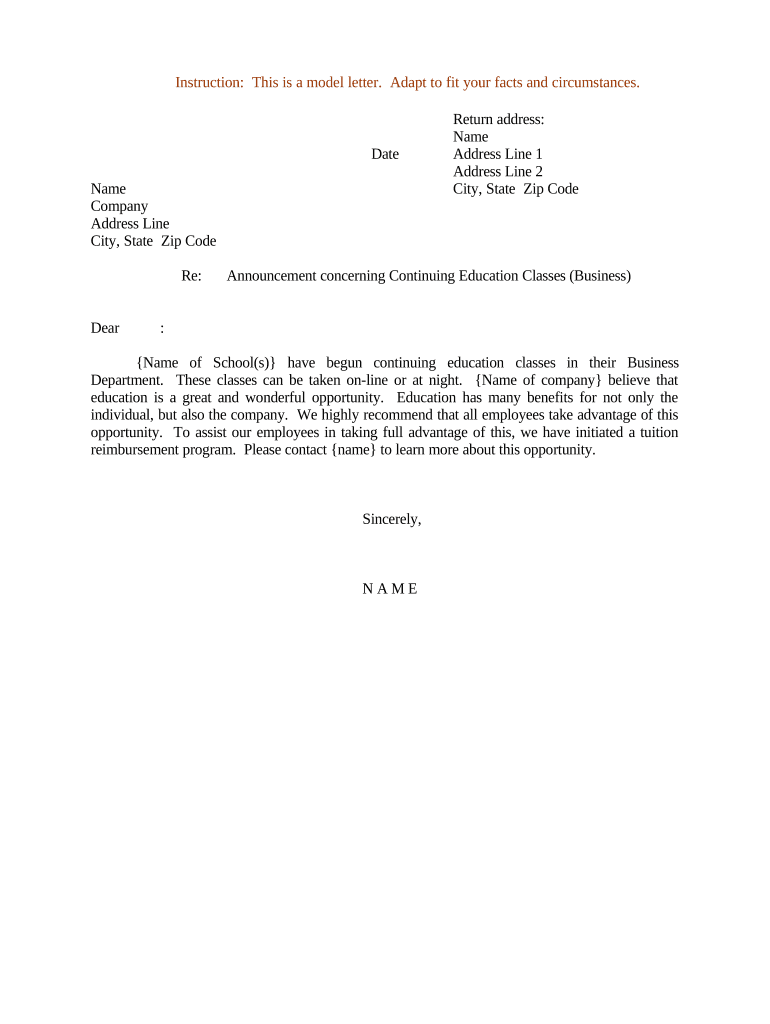
Sample letter announcement 2026

Get Form
letter of announcement Preview on Page 1

Here's how it works

01. Edit your letter of announcement online
Type text, add images, blackout confidential details, add comments, highlights and more.
02. Sign it in a few clicks
Draw your signature, type it, upload its image, or use your mobile device as a signature pad.
03. Share your form with others
Send announcement letter via email, link, or fax. You can also download it, export it or print it out.

How to use or fill out sample letter announcement with our platform

Form edit decoration
9.5
Ease of Setup
DocHub User Ratings on G2
9.0
Ease of Use
DocHub User Ratings on G2
  1. Click ‘Get Form’ to open the sample letter announcement in the editor.
  2. Begin by entering the date at the top of the letter. This sets a clear timeline for your announcement.
  3. Fill in your name, company, and address details in the designated fields. Ensure accuracy for effective communication.
  4. In the 'Re:' section, specify the subject of your announcement to provide context to the recipient.
  5. Address the recipient formally by filling in their name after 'Dear'. This personal touch enhances engagement.
  6. In the body of the letter, customize the content regarding continuing education classes. Replace placeholders with specific school names and details relevant to your organization.
  7. Conclude with a professional closing and sign off with your name. This adds a personal touch to your communication.

Start using our platform today for free to streamline your document editing and enhance your workflow!

be ready to get more

Complete this form in 5 minutes or less

Get form

Got questions?

We have answers to the most popular questions from our customers. If you can't find an answer to your question, please contact us.
Contact us
How to write an email announcement Start with an introduction. Begin your email by introducing the announcement. Explain relevance to the readers. To create an effective announcement email, add context for the readers to show why your announcement is exciting for them. Write a call to action. Provide additional details.
Digital Content: Draft an Announcement for Brief Describe the most important part of the launch, change, or retirement. Provide a call to action, if there is one. Identify who it will impact. How impactful will it be? Provide a reference for more information. Read the full submission guidelines for more details.
Examples from Collins dictionaries Sir Robert made his announcement after talks with the President. There has been no formal announcement by either government. There has been no official announcement of the arrests. An announcement in The Times listed the forthcoming marriage.
Listen up, everyone! I have an important announcement to make. I am pleased to tell you that I am happy to inform you that It gives me great pleasure to announce that We are excited/delighted to announce that Drop whatever you are doing. Weve just heard from upstairs that
How to write an announcement letter Gather all relevant information. Before writing your announcement, try gathering all relevant information first before outlining the announcement. Outline your letter. Be concise. Remain positive. Proofread the announcement.

Security and compliance

At DocHub, your data security is our priority. We follow HIPAA, SOC2, GDPR, and other standards, so you can work on your documents with confidence.

Learn more
ccpa2
pci-dss
gdpr-compliance
hipaa
soc-compliance

People also ask

Here are seven steps you can take to write an informative letter: Research your topic. Write your letter heading. Add the recipient information. Draft the body of the letter. Write a conclusion. Proofread your letter. Send your letter. Explain why the information matters.

Related links