Type text, add images, blackout confidential details, add comments, highlights and more.
02. Sign it in a few clicks
Draw your signature, type it, upload its image, or use your mobile device as a signature pad.
03. Share your form with others
Send it via email, link, or fax. You can also download it, export it or print it out.
How to use or fill out attorney dispute with our platform
Ease of Setup
DocHub User Ratings on G2
Ease of Use
DocHub User Ratings on G2
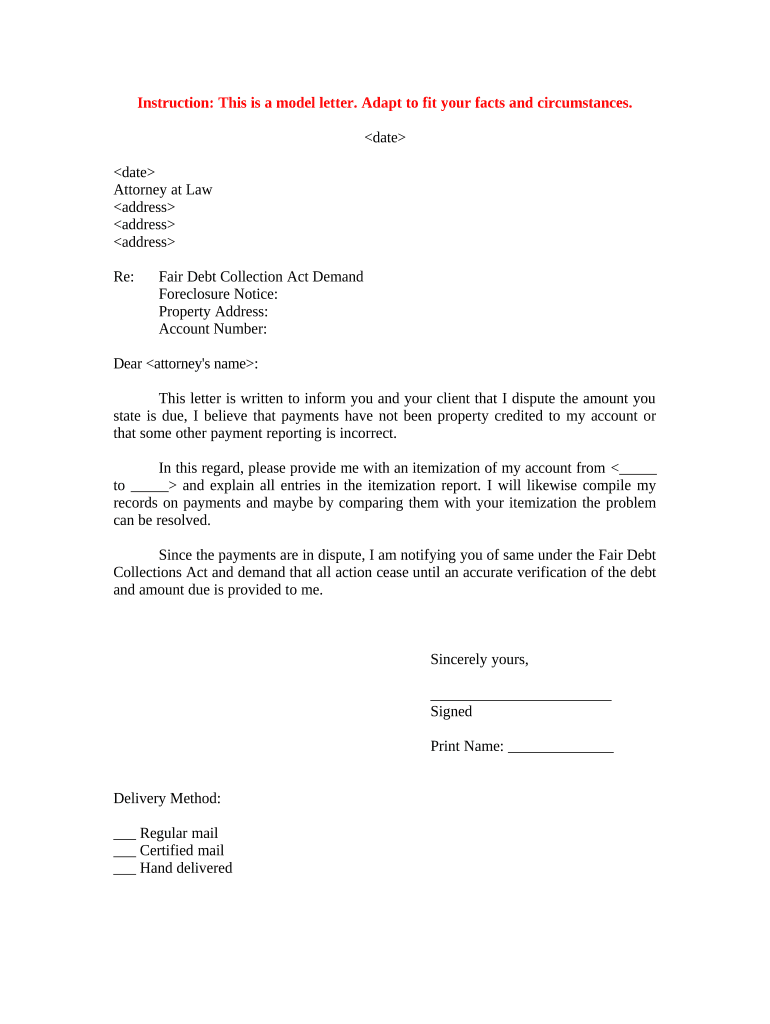
Click ‘Get Form’ to open the attorney dispute letter in the editor.
Begin by entering the date at the top of the form. This is crucial for record-keeping and establishing timelines.
Fill in your name and address, as well as the attorney's name and address. Ensure all details are accurate to avoid any miscommunication.
In the 'Re:' section, specify the nature of your dispute, such as 'Fair Debt Collection Act Demand' and include relevant details like 'Foreclosure Notice' and 'Property Address'.
Clearly state your dispute in the body of the letter. Mention any discrepancies regarding payments and request an itemization of your account for a specific date range.
Conclude with your signature, printed name, and select a delivery method (Regular mail, Certified mail, or Hand delivered) by checking the appropriate box.
Start using our platform today to streamline your document editing process for free!
Dispute resolution lawyerDispute resolution examplesDispute Resolution Program Los AngelesWhat are the five methods of dispute resolutionDispute resolutionsWhy is dispute res calling meAlternative dispute resolution examplesWhat is dispute resolution in law
Security and compliance
At DocHub, your data security is our priority. We follow HIPAA, SOC2, GDPR, and other standards, so you can work on your documents with confidence.
The OAG is committed to defending and upholding the civil rights of all Marylanders and the promoting equal justice under the law. Ensuring Good StewardshipRead more
The court must then determine whether to require the posting of a bond to secure the opposing parties damages, interest thereon, and attorneys fees and costsRead more
Dispute Resolution Program (DRP) - LA City Attorneys Office
DRP utilizes trained volunteer mediators to assist parties in resolving conflicts through the use of specific communication and negotiation techniques.Read more
Cookie consent notice
This site uses cookies to enhance site navigation and personalize your experience.
By using this site you agree to our use of cookies as described in our Privacy Notice.
You can modify your selections by visiting our Cookie and Advertising Notice.