Default judgment 2026

Get Form
default judgment Preview on Page 1

Here's how it works

01. Edit your form online
Type text, add images, blackout confidential details, add comments, highlights and more.
02. Sign it in a few clicks
Draw your signature, type it, upload its image, or use your mobile device as a signature pad.
03. Share your form with others
Send it via email, link, or fax. You can also download it, export it or print it out.

How to use or fill out default judgment with our platform

Form edit decoration
9.5
Ease of Setup
DocHub User Ratings on G2
9.0
Ease of Use
DocHub User Ratings on G2
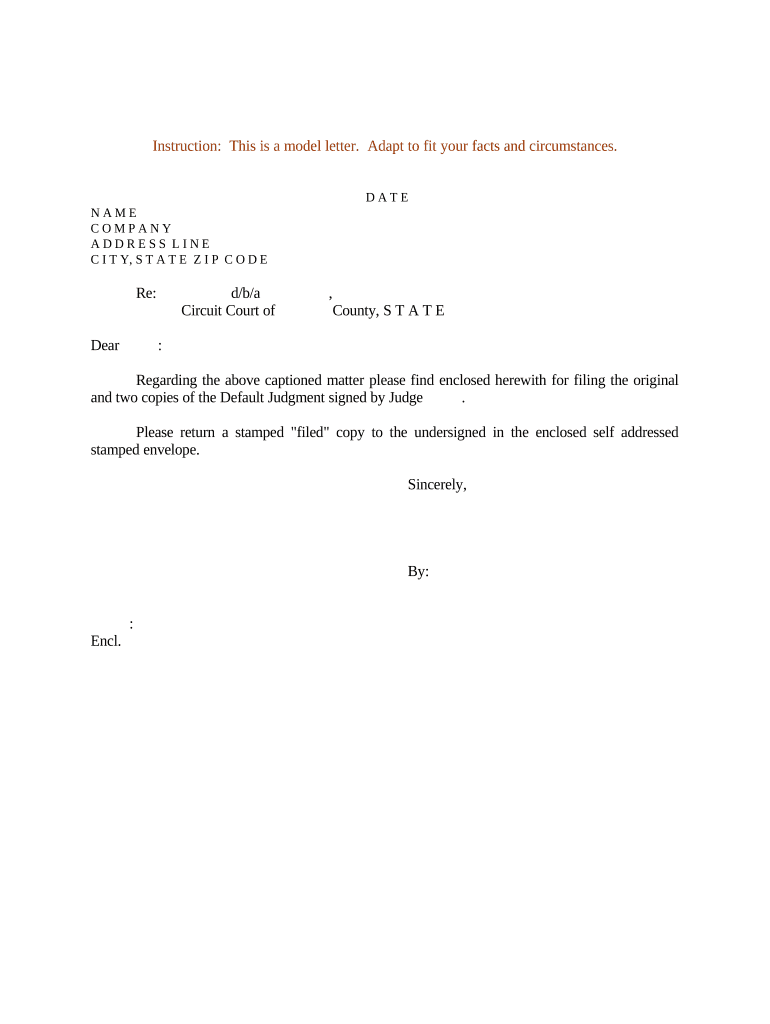
  1. Click ‘Get Form’ to open the Default Judgment document in the editor.
  2. Begin by entering the date at the top of the form. This is crucial for establishing the timeline of your case.
  3. Fill in your name, company, and address details in the designated fields. Ensure accuracy as this information identifies you as the filer.
  4. In the 'Re:' section, specify the subject matter related to your case for clarity.
  5. Address the letter appropriately by including 'Dear' followed by the recipient's name or title.
  6. Indicate the court's name and county where you are filing, ensuring it matches your jurisdiction.
  7. Mention any enclosed documents clearly, such as stating that you are submitting original and copies of the Default Judgment signed by a judge.
  8. Request a stamped 'filed' copy be returned to you using a self-addressed stamped envelope included with your submission.
  9. Sign off with your name and title at the bottom of the form before finalizing it.

Start editing your Default Judgment today for free on our platform!

be ready to get more

Complete this form in 5 minutes or less

Get form

Got questions?

We have answers to the most popular questions from our customers. If you can't find an answer to your question, please contact us.
Contact us

Many software solutions are available on the market for document modifying and signing. DocHub is one of the most in-demand online solutions that comply with all data protection and compliance standards and ensures your eSigned documentation is legally enforceable. All you need to give it a try is to create an account, add your default judgment, provide the necessary information, and click Sign. Generate your eSignature by typing, drawing it, uploading its picture to your template, or scanning a unique QR code.

You may complete and sign your default judgment on the internet, even on a tight deadline. All you need to access top-notch editing instruments on any device is a DocHub account, that you can sign up in a few moments. When you register, upload your file or find what you are looking for in our catalog, complete it using the editing instruments you need, and put your electronic signature on it at the end.

Security and compliance

At DocHub, your data security is our priority. We follow HIPAA, SOC2, GDPR, and other standards, so you can work on your documents with confidence.

Learn more
ccpa2
pci-dss
gdpr-compliance
hipaa
soc-compliance