01. Edit your thanksgiving emoji copy and paste online
Type text, add images, blackout confidential details, add comments, highlights and more.
02. Sign it in a few clicks
Draw your signature, type it, upload its image, or use your mobile device as a signature pad.
03. Share your form with others
Send thanksgiving emojis copy and paste via email, link, or fax. You can also download it, export it or print it out.
How to use or fill out Sample Letter for Happy Thanksgiving with our platform
Ease of Setup
DocHub User Ratings on G2
Ease of Use
DocHub User Ratings on G2
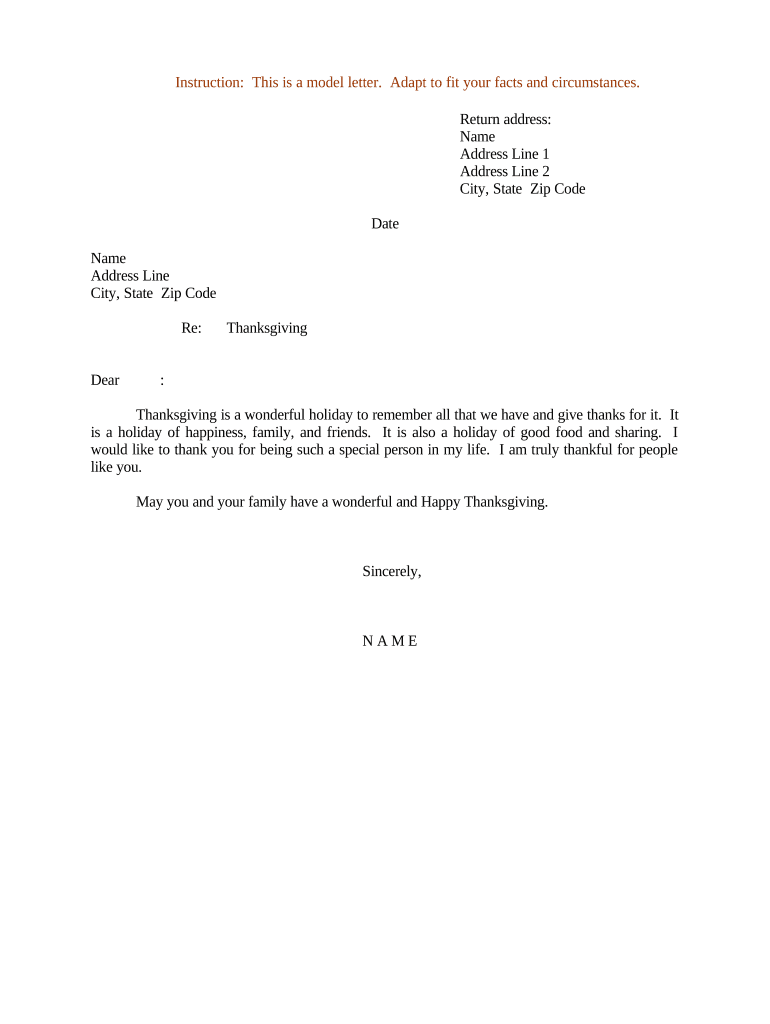
Click ‘Get Form’ to open the Sample Letter for Happy Thanksgiving in the editor.
Begin by entering your return address at the top of the letter. Fill in your name, address line 1, address line 2 (if applicable), city, state, and zip code.
Next, input the date on which you are sending the letter. This helps personalize your message.
In the recipient's section, enter their name and address details similarly to how you filled out your own information.
Proceed to the greeting section. Address the recipient with a warm 'Dear [Name]' to set a friendly tone.
In the body of the letter, express your gratitude and well wishes for Thanksgiving. Feel free to customize this section to reflect your personal sentiments.
Finally, sign off with 'Sincerely,' followed by your name at the bottom of the letter.
Start using our platform today to create personalized letters for free!
Fill out Sample Letter for Happy Thanksgiving online It's free
Sample letter for happy thanksgiving to friendsSample letter for happy thanksgiving to familyShort sample letter for happy thanksgivingSample letter for happy thanksgiving to colleaguesSample letter for happy thanksgiving to bossThanksgiving letter formatThanksgiving lettersProfessional Thanksgiving message to friends
Security and compliance
At DocHub, your data security is our priority. We follow HIPAA, SOC2, GDPR, and other standards, so you can work on your documents with confidence.
This page lists instances where logos have been spoofed or referenced in other media. All examples mentioned here should be widely recognized andRead more
Want to do a holiday letter? Let us help! Bring in your handwritten letter and well do the typing and photocopy it onto seasonal stationary for just ten cents
Cookie consent notice
This site uses cookies to enhance site navigation and personalize your experience.
By using this site you agree to our use of cookies as described in our Privacy Notice.
You can modify your selections by visiting our Cookie and Advertising Notice.