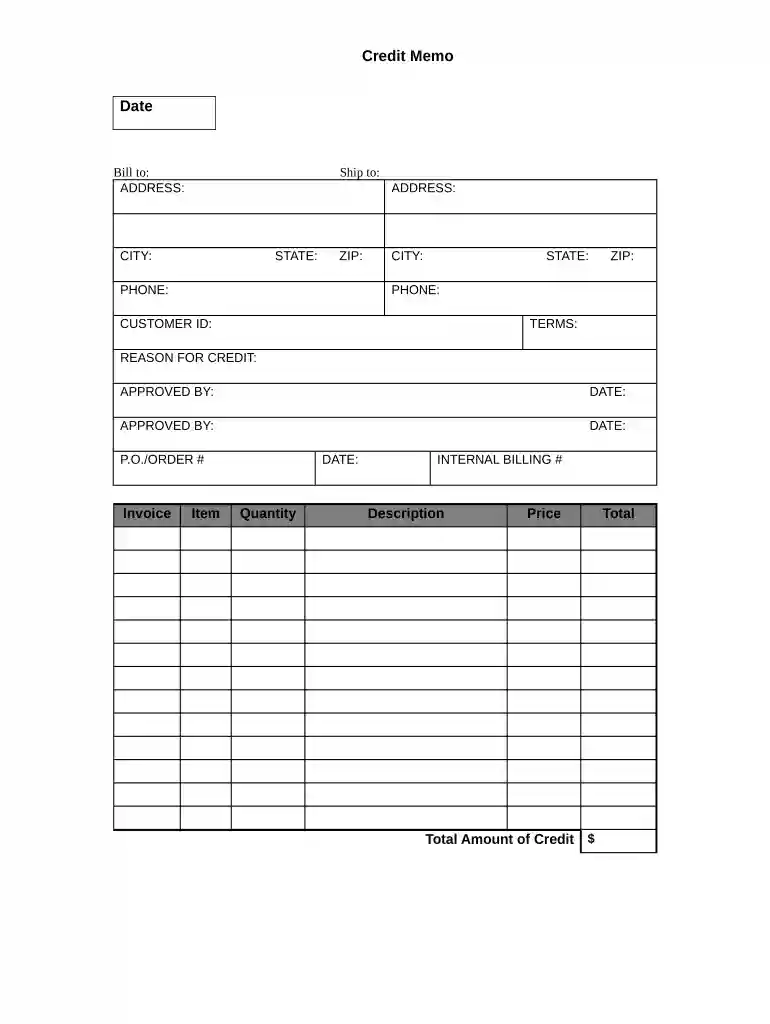
Credit Memo Preview on Page 1

Credit Memo 2026

Here's how it works

  • 01. Edit your form online

    Type text, add images, blackout confidential details, add comments, highlights and more.

  • 02. Sign it in a few clicks

    Draw your signature, type it, upload its image, or use your mobile device as a signature pad.

  • 03. Share your form with others

    Send it via email, link, or fax. You can also download it, export it or print it out.

How to use or fill out Credit Memo with our platform

Form edit decoration
9.5
Ease of Setup
DocHub User Ratings on G2
9.0
Ease of Use
DocHub User Ratings on G2
  1. Click ‘Get Form’ to open the Credit Memo in the editor.
  2. Begin by entering the 'Date' at the top of the form. This is essential for record-keeping.
  3. In the 'Bill to' section, fill in the customer's name and address details accurately, including city, state, zip code, and phone number.
  4. Next, complete the 'Ship to' section with the relevant shipping address information.
  5. Input the 'Customer ID' for easy reference and tracking of transactions.
  6. Specify the 'Terms' of credit and provide a clear 'Reason for Credit' to justify this memo.
  7. Ensure that all approvals are documented by filling in the names and dates under 'Approved By'.
  8. Fill in any relevant P.O./Order numbers and invoice details as needed.
  9. List each item being credited along with its date, quantity, internal billing number, description, price, and total amount of credit.

Start using our platform today to streamline your Credit Memo process for free!

be ready to get more

Complete this form in 5 minutes or less

Security and compliance

At DocHub, your data security is our priority. We follow HIPAA, SOC2, GDPR, and other standards, so you can work on your documents with confidence.
be ready to get more

Complete this form in 5 minutes or less

Related links

Creating a Credit Memo from a Paid Invoice

Use this feature to create a credit memo from an Invoice. To create a credit memo: Click the Invoices Paid page. Select an invoice and click CreateRead more

Learn more
Credit Memos and Write-offs: Accounts Receivable

Credit memos are issued to adjust for unpaid invoice balances due to a return, price adjustment or additional cost of doing business, such as a bank fee.Read more

Learn more
02a. GST Credit Note | IcSoft ERP and MES Wiki Site

A GST Credit Note is a document issued to adjust or reduce the taxable value or amount of a previously issued invoice. It is used to correct or reverse part of

Learn more
If you believe that this page should be taken down, please follow our DMCA take down process here