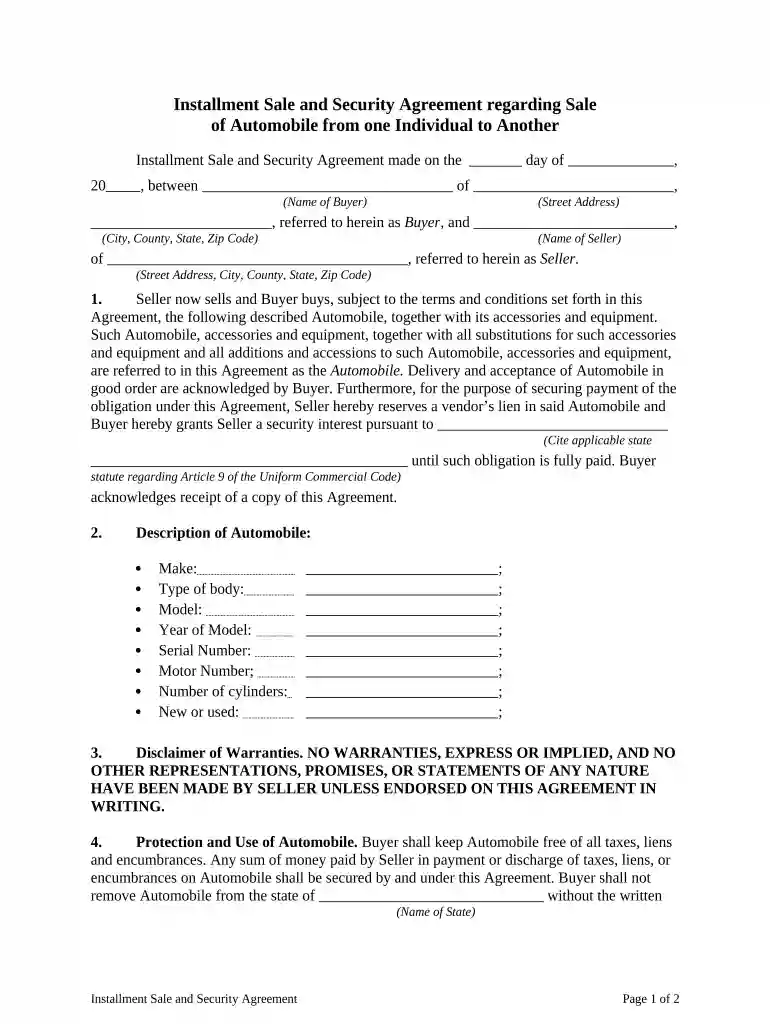
installment sale Preview on Page 1

Installment sale 2026

Here's how it works

  • 01. Edit your form online

    Type text, add images, blackout confidential details, add comments, highlights and more.

  • 02. Sign it in a few clicks

    Draw your signature, type it, upload its image, or use your mobile device as a signature pad.

  • 03. Share your form with others

    Send it via email, link, or fax. You can also download it, export it or print it out.

How to use or fill out installment sale with our platform

Form edit decoration
9.5
Ease of Setup
DocHub User Ratings on G2
9.0
Ease of Use
DocHub User Ratings on G2
  1. Click ‘Get Form’ to open the Installment Sale and Security Agreement in the editor.
  2. Begin by entering the date of the agreement at the top of the form. This is crucial for establishing the timeline of your transaction.
  3. Fill in the Buyer’s details, including their name and address. Ensure accuracy as this information is vital for legal purposes.
  4. Next, input the Seller’s information in a similar manner. This section should reflect the full name and address of the seller.
  5. In Section 2, provide a detailed description of the automobile being sold. Include make, model, year, serial number, and whether it is new or used.
  6. Review Sections 3 through 7 carefully. These sections outline warranties, insurance obligations, remedies for default, and waivers. Make sure you understand these terms before proceeding.
  7. Finally, both parties should sign and print their names at the bottom of the document to finalize the agreement.

Start using our platform today to complete your installment sale effortlessly!

be ready to get more

Complete this form in 5 minutes or less

Got questions?

We have answers to the most popular questions from our customers. If you can't find an answer to your question, please contact us.

Yes, you can use DocHub for signing any business and private documentation, including your installment sale. All eSignatures you generate with our tool are legally binding and court-admissible, as DocHub complies with criteria required by ESIGN and UETA. Save your accomplished document with a detailed Audit Trail if necessary.

When you edit your installment sale with DocHub, you simply will not need to look for other software or solutions to sign it. An electronic signature is a component of DocHub’s comprehensive editing toolset, which allows you to implement changes in your form without switching between platforms. Just complete your form, double-check the correctness of your data and put your electronic signature at the end to make it submission-ready within minutes.

Security and compliance

At DocHub, your data security is our priority. We follow HIPAA, SOC2, GDPR, and other standards, so you can work on your documents with confidence.

be ready to get more

Complete this form in 5 minutes or less

Related links

installment sale | Wex | US Law | LII / Legal Information Institute

Installment sale, as defined by Internal Revenue Code 453 and IRS Publication 537, is a sale of property in which the seller receives at least one paymentRead more

Learn more
Topic no. 705, Installment Sales | Internal Revenue Service

Jan 22, 2026 An installment sale is a sale of property where youll receive at least one payment after the tax year in which the sale occurs.Read more

Learn more
If you believe that this page should be taken down, please follow our DMCA take down process here